
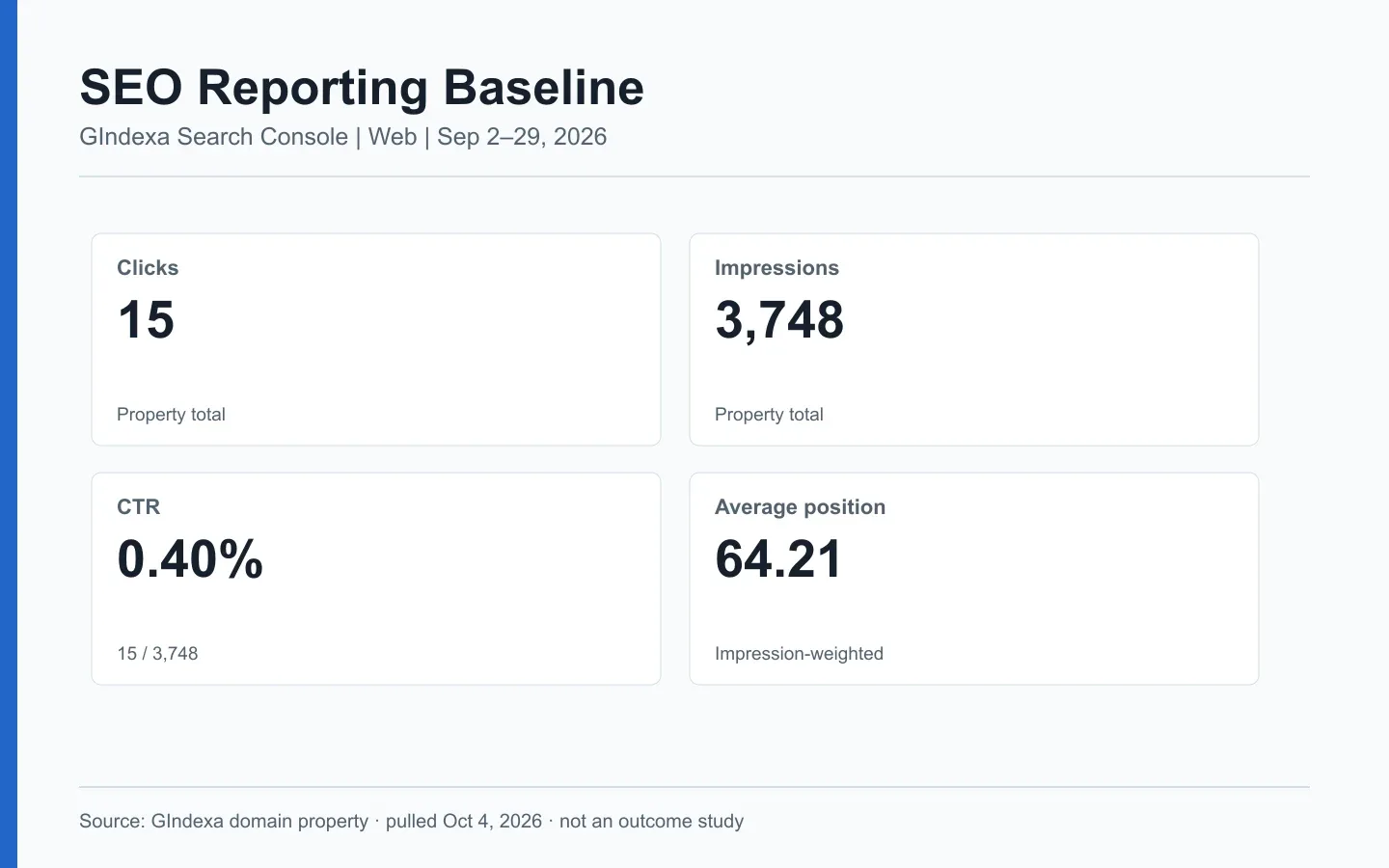
The first chart in an SEO report is often clicks. Fifteen clicks this month: good or bad? On its own, the number gives you no page to inspect and no reason for the change. A useful report connects the search query and landing page to a check someone can run.
This guide uses a real GIndexa Search Console window, September 2-29, 2026. The site is young. These numbers give us a baseline and a few leads to investigate, but they cannot tell us that an SEO edit caused growth.
What Should an SEO Report Actually Answer?
Ask what the reader can decide from the report. An editor can revise an answer. A developer can check the response for a specific URL after a release. The business owner needs to know whether search visits reached a useful outcome. Put those decisions on the same page, with the source and scope of each metric beside it.
Put four questions at the top of the brief: What moved? Which query and page were involved? What might explain it? What will we check? The third answer is often a hypothesis. Label it that way. Otherwise the report turns a plausible story into a claimed cause.
Use this source map before building charts:
| Reporting question | Primary evidence | What it cannot establish alone |
|---|---|---|
| Did Google show and send traffic to the site? | Search Console Web clicks and impressions | Visits from all search engines or a conversion outcome. |
| Which query and page were involved? | Search Console query-by-page rows | Every query, including anonymized terms. |
| Did a measured keyword move? | Fixed rank-tracking panel plus dated SERP captures | A universal rank for every user and place. |
| Did organic visits create value? | Analytics sessions and configured key events | Every Google Search click or full attribution. |
| Did the result layout change? | Dated results for the same query, market, and device | A site-owned feature unless the page is present in it. |
Google’s Performance report documentation defines clicks, impressions, CTR, and average position. GA4’s Traffic acquisition documentation defines session-source and key-event metrics. Name the source and unit in each chart. Search Console clicks and GA4 sessions are different events, so a mismatch is a diagnostic question rather than an arithmetic error.
Build a Search Console Baseline You Can Repeat
Choose the property, search type, dates, country, and device before you export. Save that selection with the report. Search Console can show preliminary data near the end of a range, so compare settled days or mark the newest ones as preliminary. Google’s filter guidance also explains why a filtered table can disagree with the chart above it.
For GIndexa, the domain property reported 15 clicks, 3,748 impressions, 0.40% CTR, and 64.21 average position for Web search from September 2 through 29, 2026. Search Console marked September 29 as the latest settled date when we pulled it on October 4. We did not mix Image search or Discover into that row.
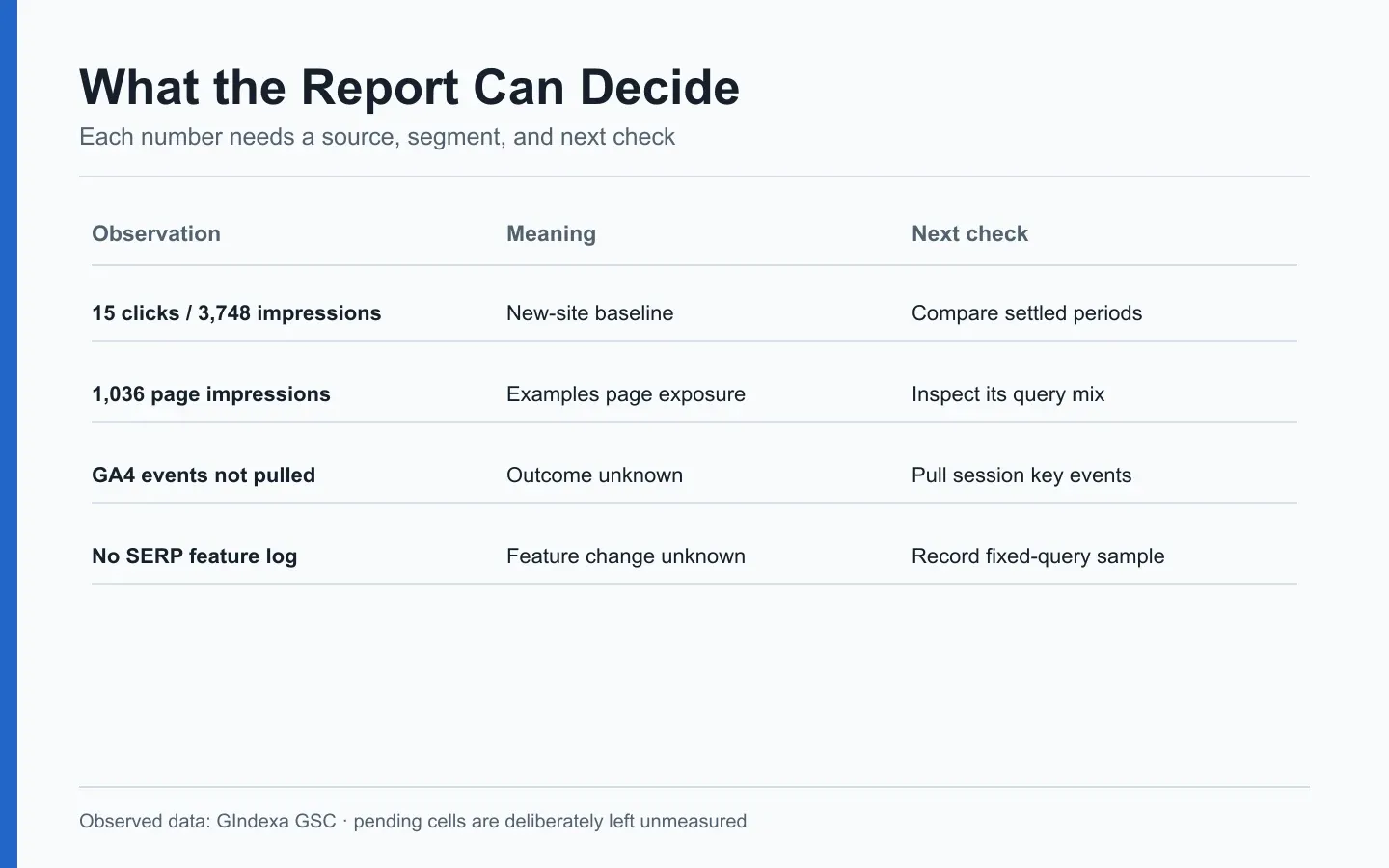
Source: GIndexa Search Console domain property, Web search, September 2-29, 2026. The visual pairs observed numbers with proposed checks. The empty GA4 and SERP-feature fields are not zeros.
Keep the property total separate from query and page tables. The GIndexa query-position extract exposed 662 query rows totaling 3,429 impressions and 8 clicks in the same window. Those visible rows do not reconcile to the property’s 3,748 impressions and 15 clicks. Search Console omits some anonymized queries, and table aggregation depends on dimensions. Do not create a phantom “lost traffic” line by subtracting the two and assigning a cause.
The visibility guide goes deeper into this denominator problem. The query-to-page workflow shows how to turn the visible rows into page decisions without treating them as the complete search market.
Measure Visibility Without Inventing Market Share
Search Console impressions tell you how often Google counted an appearance of your result. They cannot tell you how many relevant searches took place across the whole market. A rank tool’s visibility index answers another question: how its selected keywords performed under its ranking and click model. Before showing a trend, put the tracked keyword list and scoring rule beside that index.
For example, GIndexa had 2,727 desktop impressions, 1,014 mobile impressions, and 7 tablet impressions in the fixed window. Desktop and mobile behaved differently: 14 clicks versus 1. That difference identifies a segment to inspect. With only one mobile click, it does not justify a claim that a mobile redesign will lift conversions.
If the team wants one visibility slide, give it two labeled lines: observed Google impressions and modeled visibility for a fixed query panel. Split brand from nonbrand searches. Demand can grow while positions hold steady. It can also cool while positions improve. Those movements deserve separate labels, even when they fit on one chart.
A tracker may count every keyword equally. Your work queue should not. A position change for an irrelevant query is unlikely to beat a modest impression gain on a page tied to a real customer task. Save the panel version and market settings so a later comparison uses the same rules.
Read Rankings at the Query and Page Level
Search Console average position is an average of the topmost result for the selected reporting grain, weighted by impressions. Google’s counting guide explains the position rules. The property-wide 64.21 does not mean every GIndexa page sat at rank 64.
For the SEO keyword examples page, seo keywords example recorded 93 impressions and average position 25.74. seo keywords examples reached the same URL with 63 impressions and average position 19.57. A fixed query, URL, country, device, and period gives a narrower comparison. The SEO position guide shows how to build that cohort and interpret movement.
A useful monthly report can show a distribution instead of one mean: count query-page rows in positions 1-3, 4-10, 11-20, and 21+. Those bands are editorial bins, not Google’s ranking categories. In GIndexa’s visible query extract, 3,264 of 3,429 impressions were in the 21+ band. It is a reasonable signal to inspect page fit and discovery. It is not a forecast that moving those rows to page one would yield a set number of clicks.
Treat rank-tracker results as snapshots. A fixed-location desktop check may disagree with Search Console’s impression-weighted result for real users. Record both without averaging them together.
Report the Search Results People Actually Saw
A ranking line may stay flat while the page around it changes. A local pack could take the first screen, or video results could appear above your text link. For a fixed set of important queries, save the date, location, device, result types, and your URL’s placement. The SERP meaning guide shows how to read that record.
Separate three feature questions: Was the feature present? Was your page inside it? Did it bring measured traffic? Search Console’s Search appearance view covers supported appearances, but it is not a full inventory of every component on every results page. Google’s visual-elements gallery is a vocabulary for the results, not a measurement export. The SERP-feature tracking guide sets out a repeatable observation log.
Google introduced dedicated generative AI performance reports in 2026, with those impressions also included in broader Performance reporting. The announcement is a reason to label any separate AI-feature view carefully rather than add it again to the Web total. This cluster does not attempt a separate AI visibility study.
Turn the Monthly Report Into a Work Queue
Give each material finding an owner, a check, and a date. “Impressions rose” describes the chart. “The examples article gained exposure for list-style searches, and the page review found its download below the first screen” tells an editor what to inspect. Check the page before writing the ticket: a search metric cannot locate an element on the page.
A short triage table keeps observations apart from hypotheses:
| Observation | Possible explanation to test | First action |
|---|---|---|
| Impressions rise, clicks stay flat | New queries may be appearing at low positions | Compare query-page rows and result types. |
| One page loses clicks, property total holds | Another URL may have taken its queries | Inspect the pair before rewriting either page. |
| Average position improves, clicks fall | Demand, device mix, or SERP layout may have changed | Hold the query panel constant and review dated results. |
| Organic sessions move but GSC clicks do not | Attribution, consent, or reporting scope may differ | Compare GA4 session source and landing page settings. |
| A rich result disappears | Markup, eligibility, or Google’s display choice may have changed | Test the page and inspect the actual SERP. |
Use the table to choose a check, not to assign an automatic fix. With only 15 clicks, small CTR shifts can be noise. Keep this baseline, annotate releases, and revisit the same segments after another settled period. When the evidence points to a page, use the on-page audit checklist to turn the finding into a specific task.
Review a Real GIndexa Reporting Window
The September 2-29 snapshot gives the team two useful leads. The keyword examples page had 7 clicks and 1,036 impressions. Its query mix deserves an answer and link-placement review. A historical /tools/redirect-checker/ URL had 1 click and 1,330 impressions. That row calls for a URL ownership and redirect check before anyone attributes the impressions to the current tool path. Search Console preserves historical URL reporting in ways a simple site crawl may not mirror.
Neither row proves a content change worked. The preceding comparable window had little recorded activity, and we did not pull GA4 key-event data. The report therefore ends with a baseline and two checks. For a client-facing version, name the owner, due date, and exact GSC segment to revisit in the work-queue table above.
Frequently Asked Questions About SEO Reporting
Why Do the Query Rows Not Add Up to the Search Console Chart?
Check whether you are comparing the same property, search type, dates, and filters. Search Console omits some anonymized queries from tables while including them in unfiltered totals. Page and property aggregation can also differ. Save the chart total and the visible-row sum as separate fields, then annotate the reason the reconciliation is incomplete. Do not divide every page’s clicks by a query-table total to manufacture a sitewide CTR.
How Do You Reconcile Search Console Clicks With GA4 Organic Sessions?
Align the date range, time zone, hostname, and landing page first. Search Console counts clicks on Google results. GA4 counts sessions that its tag observed and classifies by session traffic source. Consent settings, redirects, tag failures, and users returning during an existing session can create differences. Compare direction and landing-page patterns, not a forced one-to-one total. Use GA4’s session-scoped source and medium for that comparison.
What if the Average Position Improves but Clicks Decline?
Hold a fixed query-page-country-device cohort and inspect its impressions. If that cohort shrank, demand or indexing may have changed. Save current SERP captures to see whether ads or other features altered the result layout. Check title links and snippets only after those observations. The property-wide average can improve simply because low-position impressions disappeared, so it is the wrong metric for a single page verdict.
How Do You Report a New Page With No Prior Period?
Label the first settled window as a baseline. Record indexability, target task, page URL, and first query-page impressions. Show no percentage change where the prior denominator is zero. An early impression is useful evidence that Google displayed the page, but a handful of clicks cannot establish an expected CTR. Revisit the same filters in the next comparable window.
Should You Sum Web, Image, Discover, and News Performance?
Keep them as separate source lines. Their impression and click rules and reader tasks differ. A page can earn an Image search click without the same exposure in Web search. If you present a combined traffic line for a business question, state exactly which sources are included and avoid comparing it to a Web-only baseline. Search Console’s separate report views remain the audit trail.
How Do You Show Search Changes After a Site Migration?
Record the old and new URL sets, migration date, redirects, canonical targets, and relevant properties. Compare a stable query group across both URL sets, since performance can shift from an old URL to its replacement. Annotate the release and inspect crawl or indexing errors before calling a dip a ranking-system effect. The redirect implementation guide provides the response checks.
When Is a Visibility Score Useful in an Executive Report?
Use it when the keyword panel, markets, devices, weighting model, and history are fixed and disclosed. It can summarize movement in a controlled panel. Put observed clicks and impressions beside it so readers do not mistake the modeled score for traffic or market share. If the panel changed, reset or backfill the series before drawing a trend line. A precise percentage without a stable denominator is decoration.