
Ask Search Console and a rank tracker for “SEO visibility” and you may get two numbers that do not resemble each other. Search Console counts appearances under Google’s impression rules. The tracker scores a keyword list that someone chose. Start with the observed impressions. Use the modeled score when you want to follow that same list over time.
The GIndexa export below shows why the distinction matters. Its property total and visible query rows differ, even though both come from the same reporting window.
Define Which Kind of SEO Visibility You Mean
Search Console counts an impression when a link to your property appears under its result-specific rules. The number does not mean that many distinct people saw your page. It also cannot tell you how often the whole market searched for a topic. Its scope is the verified property’s Google Search activity, not Bing or general brand awareness.
A third-party score usually combines selected keywords, positions, estimated search volume, and a click model. It is useful for a stable panel. Add keywords or change the weighting formula and the score moves even if Google traffic does not. Share of voice needs another definition again: which competitors and which searches count? Put that denominator on the chart.
| Measure | Denominator | Strong use | Do not infer |
|---|---|---|---|
| Search Console impressions | Google’s counted appearances for the selected property, search type, and period | Check exposure to Google’s users | Percentage of all relevant searches |
| Tracked visibility score | Chosen keywords and scoring formula | Watch a stable panel | Actual impressions or traffic |
| Search share of voice | Defined query set and competitors | Compare participation in a bounded market | Sitewide market share |
If an executive asks, “Are we more visible?” answer with the metric and scope in the same sentence: “Web impressions rose on these existing service pages for nonbrand desktop queries.” Without those qualifiers, the headline is too easy to misread.
Read a First-Party Device Split Before Averaging
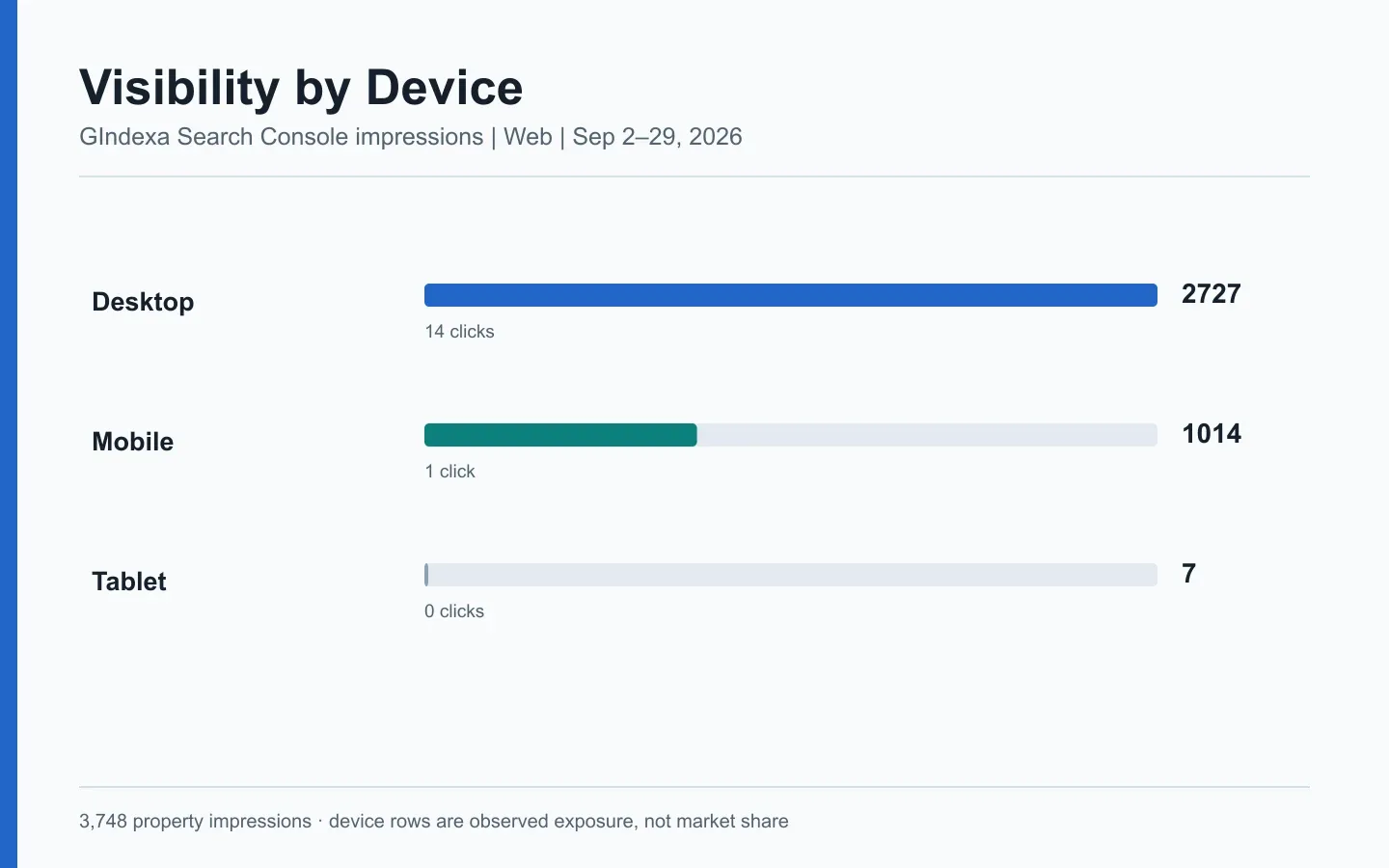
For September 2-29, 2026, GIndexa’s Search Console Web report recorded 3,748 impressions and 15 clicks. Desktop produced 2,727 impressions and 14 clicks. Mobile produced 1,014 impressions and one click. Tablet contributed seven impressions and no clicks. These are observed property totals pulled October 4, not estimated search volume or a claim about another site. The fixed window uses Search Console’s Pacific date basis.
Mobile had one click. One extra click would double that count, so a device diagnosis would be premature. First compare the same query-page pairs on desktop and mobile. If those pairs still differ, inspect the mobile result and the page. The SEO reporting guide shows how to record that check as a task.
Device totals add to the property total here: 2,727 + 1,014 + 7 = 3,748 impressions. Query rows do not necessarily do that. In our visible query export, 662 rows contained 3,429 impressions and eight clicks. The gap is not proof of broken tracking. Search Console hides some queries for privacy and aggregates data differently across chart and table views. Google’s Performance report documentation explains those limits. Preserve the property total as the headline, and mark the row table as a subset.
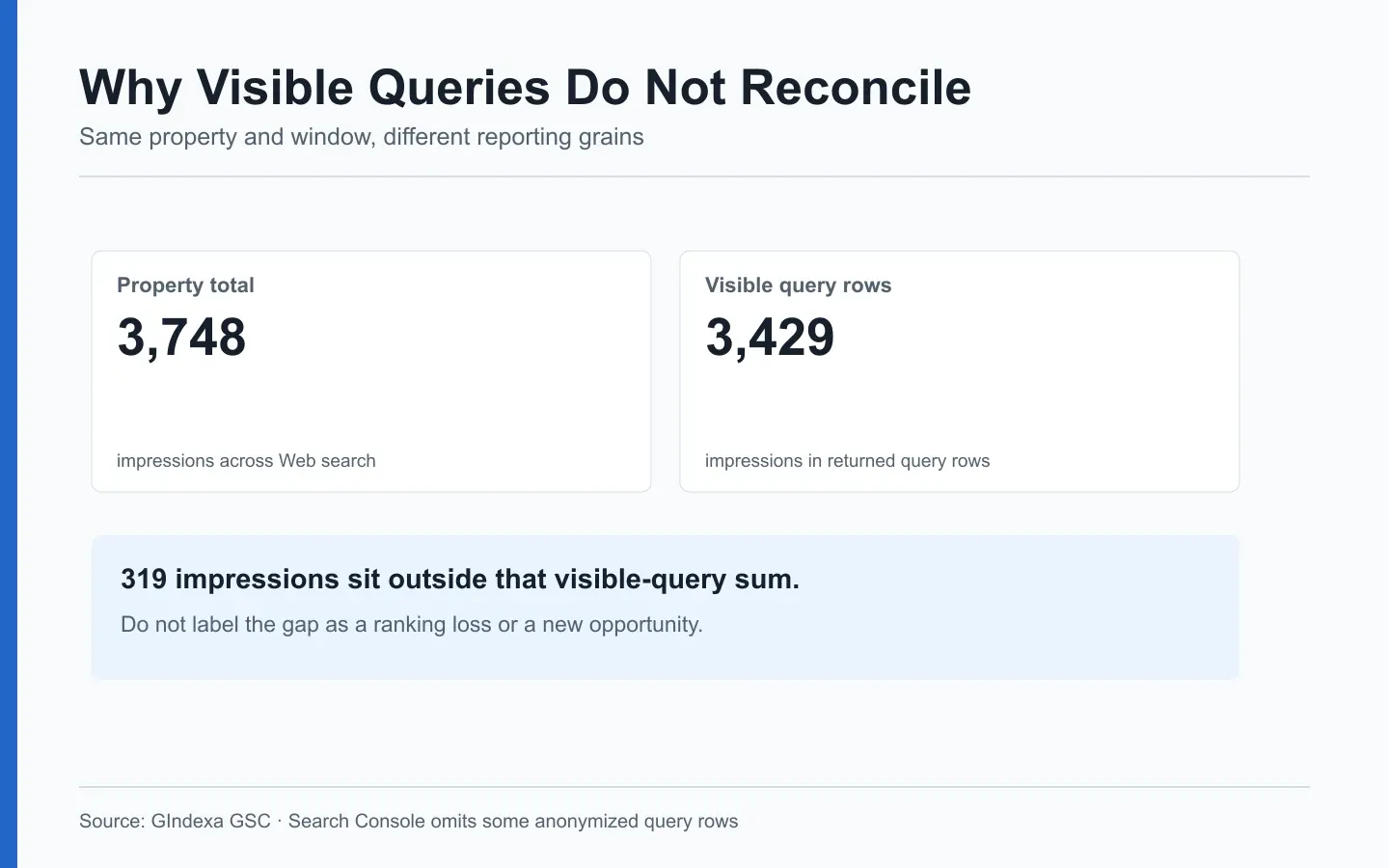
Source: GIndexa Search Console, Web, September 2-29, 2026. The 319-impression gap is a reporting-grain difference, not a measured ranking loss.
Segment Exposure by a Real Search Task
A property total can rise because one irrelevant query gained impressions. To determine whether useful demand found a useful page, filter query and landing page together. For GIndexa, the SEO keyword examples page had 1,036 impressions and seven clicks in the fixed window. That is a meaningful page-level slice of the 3,748 property impressions, but it is not a claim that every impression came from one keyword.
The query seo keywords example on that page had 93 impressions, three clicks, and an average position of 25.74. The plural seo keywords examples had 63 impressions, one click, and an average position of 19.57. Both rows belong to the same page and task. Do not add their tool-estimated search volumes to claim demand, and do not create a second article merely because the word ending changed. Inspect other query variants and the page’s answer before deciding whether a separate URL is warranted. The Search Console keyword workflow covers that decision.
For a service site, useful segments might be service type, location served, and device. For a publication, they might be topic, page age, and brand or nonbrand language. Write down the filter rules. A regex that mixes branded and generic queries can make a segment look stronger than it is. Export the exact query and page selection with the report so another analyst can reproduce it.
Compare a Stable Query Panel With New Discovery
A rising impression line can hide opposite movements. Existing target queries may have lost exposure while new, loosely related queries entered the report. Keep one panel fixed across periods: same queries, pages, country, device, search type, and window length. Put new queries in a separate discovery view. Otherwise the growing panel can make its own trend look better.
Here is a transparent model for a hypothetical fixed panel. Suppose you select 20 service queries and give each one a business weight of 1 to 3. For each date, multiply its weight by a predeclared position score, such as 1 for positions 1-3, 0.5 for 4-10, and 0 for lower positions. Divide by the sum of possible weights. That produces a normalized panel score. The thresholds are an editorial choice, not Google’s metric or a click forecast. Put the formula beside the chart and keep it unchanged between comparisons.
A panel score can fall while Search Console impressions rise. That may mean new lower-ranked queries were discovered, the tracked panel lost some positions, or the SERP layout changed. Check the underlying rows rather than forcing the numbers to agree. The SEO position guide explains why an average position is not a rank-tracker snapshot.
Diagnose Exposure Changes in the Right Order
First hold the reporting window constant. Compare equal lengths and allow for data settlement. Then separate brand from nonbrand, Web from Image, and desktop from mobile. Next identify the pages and query groups responsible for most of the movement. Only then investigate indexing, changed content, competitors, or visible search-result features. Google’s comparison filters can build matched views, but record the exact filters in your report.
| Pattern in matched data | Immediate check | Action if confirmed |
|---|---|---|
| Impressions fall for one landing page and its established queries | Inspect canonical, index status, and page availability | Fix the technical cause before editing copy |
| Impressions rise but clicks stay flat | Compare query intent, title links, and visible SERP features | Improve the result promise or page fit where a real mismatch exists |
| Nonbrand impressions rise from new questions | Group the new queries by task and page | Expand the best existing answer, or plan a distinct page if the task changes |
| Desktop grows while mobile falls for the same query-page rows | Recheck device filters and mobile rendering | Review the mobile result and page experience |
| Tool score changes but Search Console does not | Audit keyword panel, weights, and location settings | Repair the model or explain its narrower scope |
One chart does not justify five tickets. Pick the page group responsible for the movement and write down what still needs checking. “Visibility down” names a symptom. “Mobile impressions fell for these six existing queries after a canonical change. Verify the selected canonical” gives a developer a specific test. The timing suggests a lead, not a proven cause.
Keep the Denominator Visible in Every Chart
A line chart labeled “organic visibility” hides too much. Put property, search type, country, device, query rule, page rule, date range, and pull date in a note. Specify whether the chart uses property totals, page rows, or a sampled query export. The extra line of context is less costly than an incorrect conclusion.
For an impression share estimate, the denominator must be a defined set of searches or a modeled volume source. Search Console does not provide the total volume of all possible searches. If your team uses third-party volume estimates, present the result as a model and include the source and refresh date. Keep a separate column for actual GSC impressions. Do not divide GSC impressions by a vendor’s volume and call the result a measured market share.
When a property adds content, a rise in total impressions may reflect a larger inventory rather than better performance of existing pages. Show both the property total and a fixed cohort of pages that existed in both periods. A new page has no prior exposure baseline. Label it as a launch cohort and compare it with its own future periods instead of assigning a fictional before value.
Turn Visibility Into a Publishing Decision
The chart earns its place in the report when it changes a page decision. If new queries ask for the same answer, improve the existing page. If they ask for a different deliverable and the results support that distinction, plan another URL. A sharp exposure loss across stable query-page pairs calls for a technical check first. More impressions are not, by themselves, a reason to publish more pages.
For GIndexa’s keyword examples article, the singular and plural query rows point to one shared task. Check the examples and title on the existing page before proposing another URL. A query group asking for a downloadable report would be a different task and might need its own page. The distinction comes from the reader’s job, not the wording of a keyword.
Close the monthly note with the changed segment, its supporting rows, and the person who will check it next. Say when the sample is thin. Fifteen clicks across the property cannot prove that one rewrite worked, but they can tell the team which query-page pair to watch in the next settled window.
Frequently Asked Questions About SEO Visibility
Why Are Query-Row Impressions Lower Than the Chart Total?
Search Console omits some anonymized queries and uses aggregation rules that can make the chart and table differ. Keep the chart total for property-level reporting and label the visible query export as a subset. Do not create an “other queries” row by subtraction and then treat it as a real query group.
Should a New Query Count as a Visibility Gain if Its Page Already Ranked?
Count it as newly observed query coverage, not automatically as a newly won ranking. The query may have crossed a reporting threshold or appeared in the selected date window for the first time. Check prior comparable periods, query filters, and the landing page before calling it a new win.
Can I Compare Desktop and Mobile Visibility From One Average Position?
No. Apply device filters and compare the same query-page set on each device. Different result layouts and query mixes can shift the aggregate position even when the underlying pages have not changed. Report the device counts beside any position difference.
How Do I Prevent a Rank-Tracking Panel From Inflating Its Own Score?
Freeze the keyword list, location, device, weights, and position-to-score curve for a defined reporting cycle. Log any additions as a panel version change. Show an unweighted row count too, so a single highly weighted term cannot silently dominate the result.
Should I Combine Web Impressions With Discover and Image Exposure?
Keep search types and Discover in separate rows. They follow different surfaces and measurement rules. A combined total may answer a broader distribution question, but it cannot be presented as one uniform Google Web visibility measure.
What if Impressions Rise After Publishing Several New Pages?
Separate new pages from a fixed cohort of existing URLs. The total can rise because there are more eligible pages, while the old cohort remains flat or falls. Attribute the observation to the cohort first, then inspect query overlap before claiming an overall improvement.
Do AI Search Features Require a New Visibility Denominator?
Use the reporting definitions Google provides for the feature and period. Google’s 2026 Search Generative AI report note says broad Web totals include AI-related data. Do not add the specific AI report to Web totals as if it were separate exposure. State the exact view used and keep feature-level analysis separate.