
SERP means search engine results page. Its layout decides what the searcher can choose before reaching your site. A position number cannot show whether a local pack occupied the first screen, whether an ad sat above your link, or whether Google changed the displayed title. Read the result page before you explain the number.
Save the query, location, device, search surface, and date for each inspection. One screenshot is a clue about a specific search, not a record of what every user saw that month.
Read the Results Page as a Set of Competing Answers
A Google Web result can include text links, ads, image or video elements, local information, discussions, and other formats. Google’s visual elements gallery names the components. A page may show several at once. Their presence changes how much attention a text link can receive, but the mix depends on the query and context.
Start with the task in the query. Someone typing plumber near me may need a provider’s number. how to stop a leaking water heater calls for immediate instructions. Both contain plumbing terms, yet a booking page and an emergency guide serve different jobs. Check the live results for the market you care about before choosing a page type.
Scan the first screen, then the organic links below it. Note whether people see ads, a local pack, or an answer they can use without clicking. Are the links mostly tools, guides, forums, or product pages? If templates dominate a query, a definition-only article may miss the task. That is a judgment from the result you inspected, not a permanent rule for the query.
The SEO reporting guide uses this context to explain why a rank alone cannot explain clicks. The SEO position guide shows how a reported average can mix many different result pages.
Separate What You Publish From What Google Shows
Your page controls its HTML <title>, headings, structured data, and content. Google chooses the title link and result presentation. Its title-link documentation lists several possible sources, including the title element, visible headings, prominent text, and links. A preview tool displays what you supplied. It does not guarantee the exact live result.
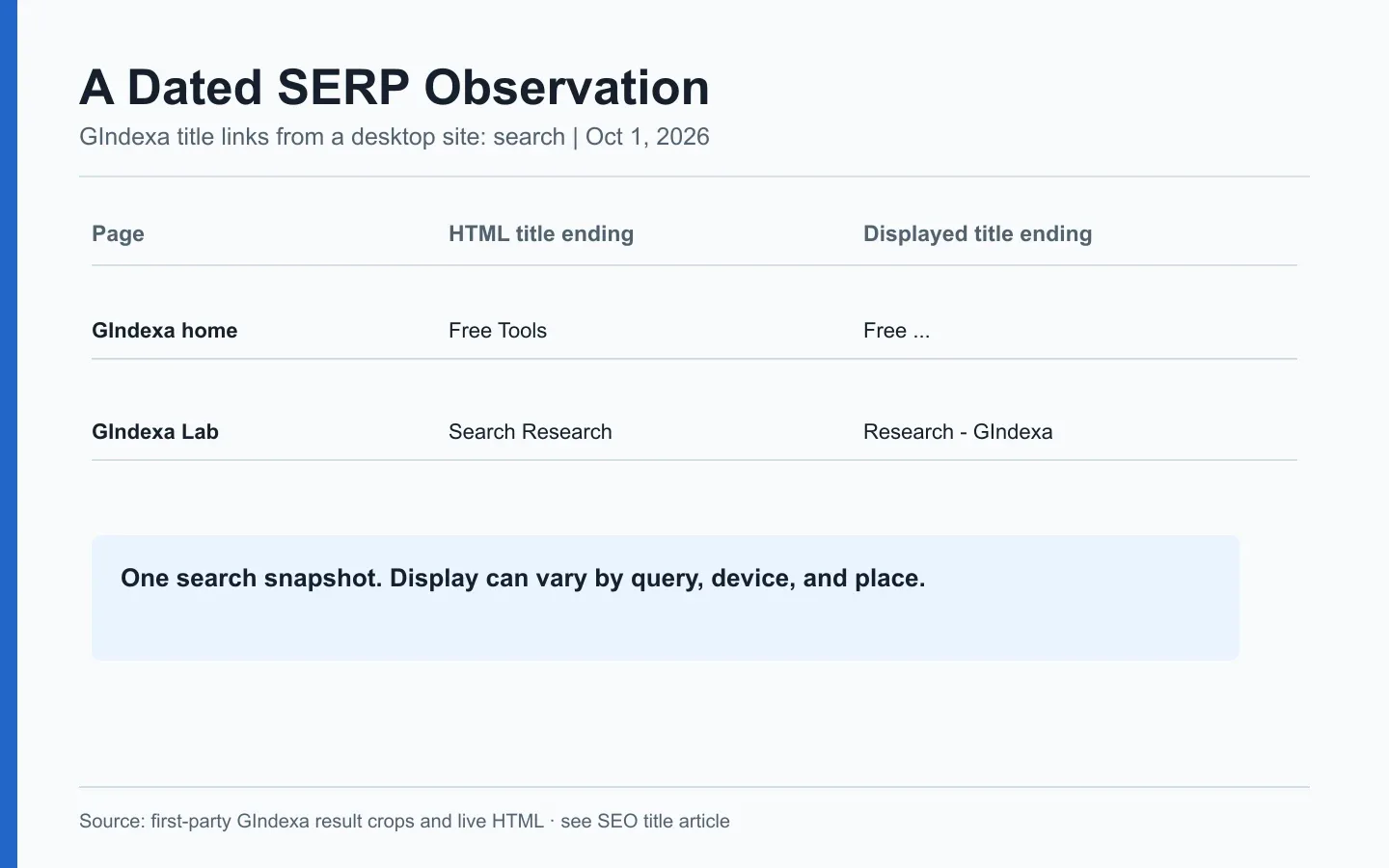
We made a narrow first-party observation on October 1, 2026 using desktop Google searches for two GIndexa pages. The homepage’s HTML title ended with “Free Tools.” One observed Google title link clipped the ending to “Free …”. The GIndexa Lab HTML title ended with “Research” while one observed result appended “- GIndexa”. These are two recorded results for particular searches, not a claim that Google always rewrites the pages or that every user sees the same text. The underlying captures and source-field comparison appear in our SEO title audit.
Those captures answer a narrow question: what appeared on that desktop search at that time? They do not show whether the displayed wording changed clicks. For a CTR investigation, we would also need the matching query-page row, a comparable period, and another result capture under the same search conditions. Keep those pieces in the same record so the screenshot does not carry more weight than it deserves.
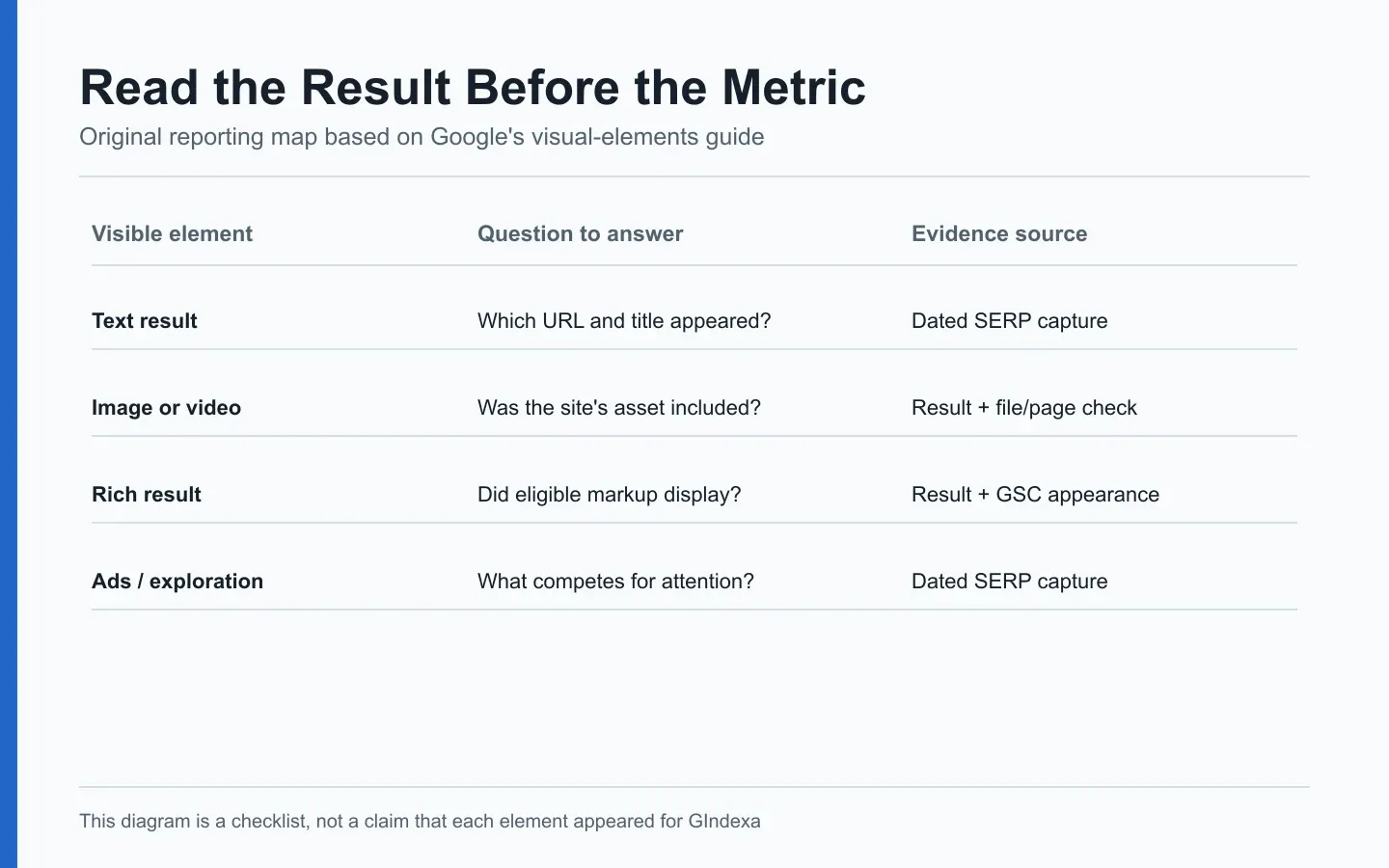
Original GIndexa reporting diagram. Keep publisher-supplied fields, observed result text, and Search Console metrics as separate evidence.
Do not file every shortened title as a rewrite. A narrow display can clip text without Google choosing a new title source. Save the observed result, URL, and initial and rendered HTML. If the result appeared only in one personalized search, say so and look for another observation before changing the page.
Use SERP Layout to Test Page Intent
The first results give you a working read on the task: buy, navigate, compare, or learn. Mixed results are common. A query with tools and guides may call for a usable tool with a short explanation. An article that spends ten paragraphs introducing the tool makes the reader wait for the thing they came to use.
Use a compact inspection record:
| Field | What to save | Why it matters |
|---|---|---|
| Exact query | Spelling, modifiers, language | Small changes can alter the task |
| Context | Date, time zone, device, location | Results can vary across these inputs |
| Surface | Web, Images, News, or another surface | Metrics and result types differ |
| First screen | Ads, local, AI, video, or text links | Shows the choices visible early |
| Top page types | Guide, product, category, tool, forum | Tests the proposed page format |
| Your result | URL, title link, snippet, result type | Connects the observation to your page |
| GSC match | Query-page metrics and period | Connects a snapshot to aggregate performance |
When results mix tasks, choose the one your page can actually serve. Leave the other tasks to pages built for them. If the first page is full of a different kind of answer, adding one paragraph to your current page probably will not change its job. The long-tail versus short-tail guide uses this task-based choice for URL planning.
Understand Which Result Features You Can Measure
Search Console’s Performance report gives clicks, impressions, CTR, and position. Some search appearances have dedicated filters, but it is not a complete log of every visual feature that existed on a SERP. The Search appearance documentation and Performance report help should guide how you name and filter those views.
A feature can be present on the results page without belonging to you. Your page can be eligible for a rich result without Google choosing to display it. A rich result can appear without producing a click. These are three separate observations. Google explicitly says valid structured data does not guarantee display. A report that merges all three into “feature wins” inflates the finding.
For a query panel, keep a feature ledger with one dated row per query, device, and location. Record presence, ownership, and observed result URL separately. Pair it with Search Console’s aggregate query-page data, but do not claim the screenshot caused the clicks. The SERP feature tracking guide supplies the exact ledger and review cadence.
Newer results can also include AI-generated interfaces. Google’s 2026 note on Search Generative AI reports explains that the broader Web report already includes related data. Keep a feature-specific view separate from the Web total so you do not add overlapping impressions. The relevant reporting question is what the documented metric covers, not whether the interface looks new.
Diagnose a CTR Shift With a Dated SERP Record
Suppose the query-page average position holds steady while CTR falls. The title might be fine. Check the impression count and query mix, then inspect whether ads or a new result feature changed the first screen. Save the displayed title link too. One current screenshot can suggest an explanation. It cannot prove what happened throughout the month.
Work backward from the metric. Export the query and URL for the same country and device across equal periods. Note impression and click counts. Capture the current SERP with its context. Fetch the page to compare the HTML title, visible H1, and actual content. If the title link promises a different answer than the page provides, fix the page or title. If a local pack now dominates a local service query, consider whether the page and business profile address the actual task. If the data are sparse, log the observation and wait for another comparable period.
This sequence also prevents a misleading “we lost rank” conclusion. A result can keep the same average position while attention shifts to a feature. A page can move down numerically because new broad queries added low-position impressions, even while its core query still performs. The SERP inspection gives context, and the matched data tell you whether it applies to enough searches to matter.
Choose a Page Action From the Result Pattern
Use the result pattern to make a page decision. If tools dominate and your article offers no tool, ask whether you can build the utility. If the results are current product listings, an evergreen guide may belong at an earlier stage. If your page addresses the same task but gives a weaker answer, improve it. A page built for a different task needs a different target query.
Record the decision and its limit: “For this US desktop query on October 1, top results favored templates. Our guide lacks a copyable template. Add one and recheck the query-page row after the next settled period.” That statement is actionable. “The SERP wants freshness” needs evidence of dated content, visible update signals, and the actual user task before it becomes a ticket.
A result set can change. Keep the capture date and do not present one screenshot as a permanent Google layout. The SEO reporting guide shows how to put a SERP note beside metrics without claiming the screenshot explains a month’s clicks.
Frequently Asked Questions About SERP Meaning
Why Does My Title Link Differ Between Two Searches for the Same Page?
Google can select and display title text in context, and screen width can clip it differently. Save both queries, devices, dates, and full observed links. Compare them with the HTML title and headings before filing a rewrite issue.
Can a Manual SERP Screenshot Prove a Month-Long Feature Change?
No. It documents one query in one context at one time. Sample the same query, location, and device repeatedly, then compare with the appropriate Search Console period. Keep the observation log so a later reader can judge its coverage.
How Should I Read a SERP With Mixed Informational and Commercial Results?
List the distinct tasks represented by the result types and identify the one your page can satisfy. Check whether the same mix appears across relevant locations and devices. Do not force a single page to answer every task just because the SERP contains them.
Do Search Ads Change My Organic Average Position?
Organic position in Search Console follows Google’s position rules for the reported results. Ads can change screen visibility and clicks without necessarily changing that organic number. Record ads in the dated SERP note when interpreting CTR.
Why Is a Rich Result Present Even Though Search Console Shows No Appearance Row?
The Performance interface does not expose every visible element as a dedicated appearance filter. Check the exact result type, property, date, and report support. Keep a manual presence record, but do not turn missing filter rows into zero observed SERPs.
What if Search Results Differ Across Two Cities I Serve?
Make separate location records and keep the query and device fixed. Local intent and proximity can alter providers and page types. Choose your page’s service-area claim from real operations, then measure each relevant market rather than averaging incompatible local screenshots.
Can I Infer Search Intent From the Top Three Results Alone?
Use them as a starting signal. Inspect the rest of the first page, visible features, and a few close query variants. A mixed or volatile result set can expose several legitimate tasks. Write down which task your page addresses and test that choice against later performance.