
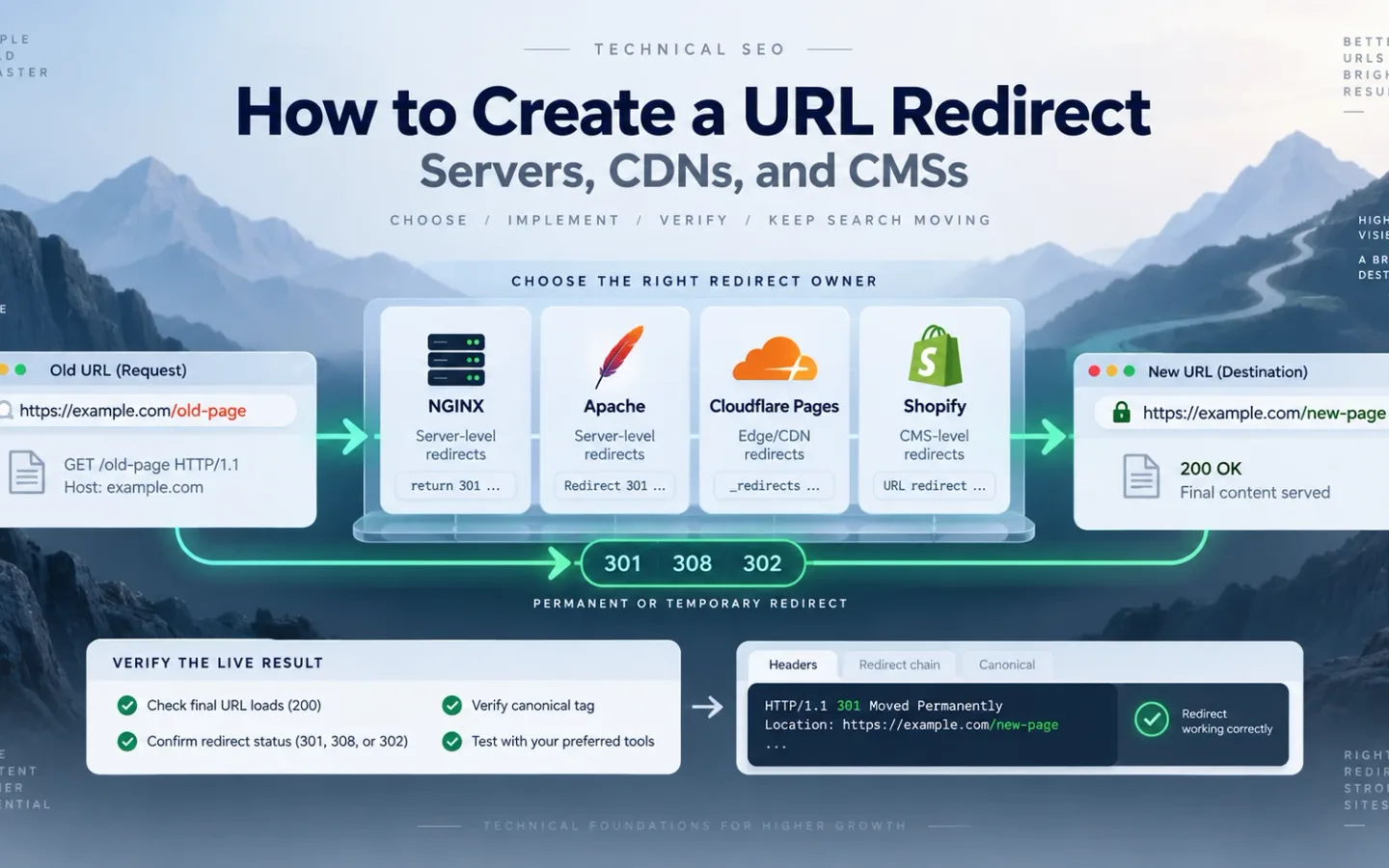
To create a URL redirect, decide whether the source should disappear, map it to a relevant final URL, choose a status that matches the duration, and implement the rule in one authoritative layer. Then request the public URL and verify the actual response. A saved rule in a dashboard is not evidence that the redirect works.
Use 301 or 308 for a permanent move. Use 302 or 307 when the old URL remains the long-term address. Prefer an HTTP redirect at the edge or server. HTML and JavaScript are fallback methods because the client must load or render a document before moving. Use the HTTP redirect code guide to choose the status before copying platform syntax.
How to Build a Source-to-Final Redirect Map
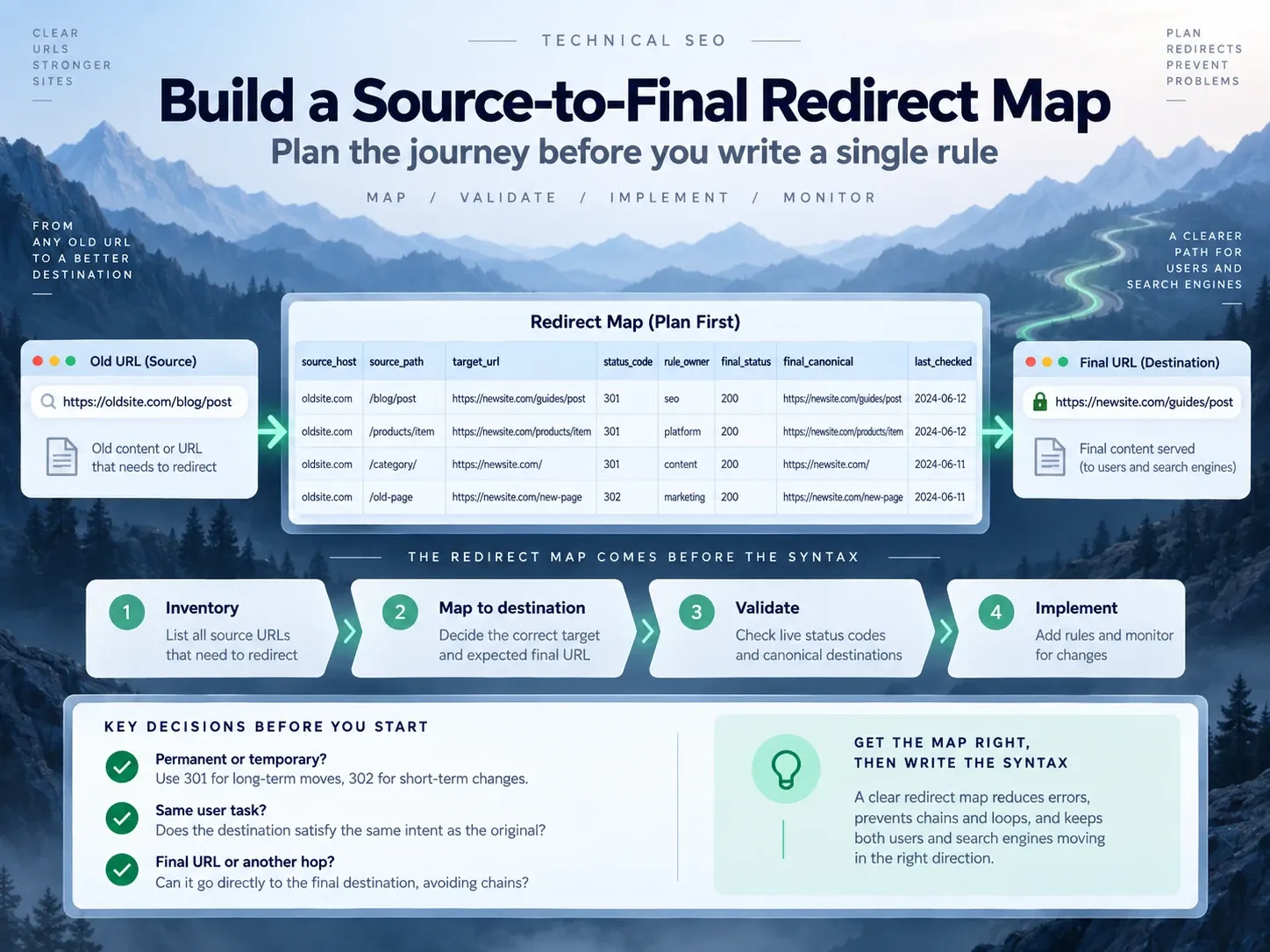
People searching how to set up a URL redirect often start with syntax. The map comes first.
Use these fields:
source_scheme
source_host
source_path
source_query_pattern
target_url
status_code
reason
rule_owner
cache_policy
rollback_action
prelaunch_result
production_result
final_status
final_canonical
last_checked
For each source, answer:
- Does the source need to remain accessible as a distinct page?
- Is the route permanent or temporary?
- Does the target complete the same user task?
- Is the target already final, or does it redirect again?
- Which layer sees the request first?
- Which parameters change content or state?
- Could the request use POST, PUT, PATCH or DELETE?
- How will the team reverse the change if the target fails?
Do not map an old page to a URL that already redirects. Do not use a homepage redirect when a deep page has a better successor or no successor at all. Use the 404, 410, or redirect decision policy when no relevant replacement exists.
Redirect vs. Link: When the Source URL Should Remain Accessible
A link offers navigation inside a document:
<a href="https://example.com/new-page/">Read the replacement page</a>An HTTP redirect answers the source request with a new location:
HTTP/1.1 301 Moved Permanently
Location: https://example.com/new-page/
The query make a redirect link can mean either. Use a normal anchor when the current page still has a purpose and the visitor should choose whether to leave. Use a redirect when the source address has been replaced or traffic needs a temporary route.
That also answers how to make a redirect link: an <a href> is a link; a 3xx status is an automatic protocol-level redirect. They are not interchangeable.
How to Choose the Layer That Owns the Redirect
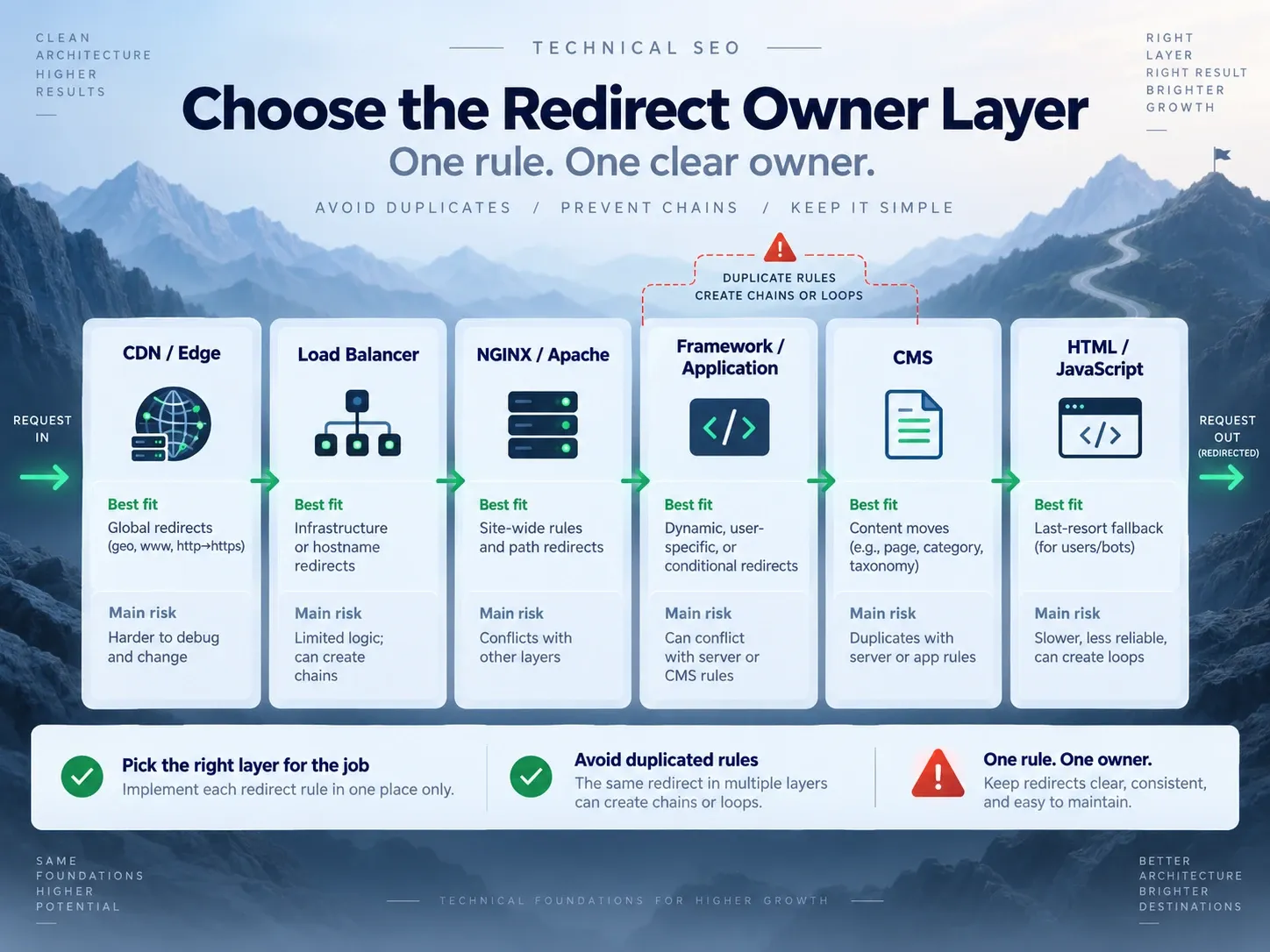
Modern sites can redirect at several layers. More layers do not make the rule safer.
| Layer | Best fit | Main risk | Rollback location |
|---|---|---|---|
| CDN or edge | Host, protocol and large migration rules | Hidden priority, caching, origin never reached | Edge ruleset |
| Load balancer | Infrastructure routing | Application team may not see it | Load-balancer config |
| NGINX or Apache | Stable path and host rules | Pattern scope or server context | Versioned server config |
| Framework or application | Stateful and route-aware logic | Code path, middleware order, runtime failure | Application release |
| CMS | Editor-managed page moves | Plugin overlap and limited matching | CMS redirect store |
| HTML or JavaScript | Last resort on restricted hosting | Initial 200, render and accessibility failures |
Source document |
Use one owner for each policy. For example, force HTTPS at the edge or at the origin. Do not implement both independently unless the origin understands the forwarded scheme and the two rules have been tested together. If the route repeats, use the redirect-loop diagnosis procedure to identify the layer that issued each response.
How to Create a Redirect in NGINX
For one exact permanent move:
location = /old-page/ {
    return 301 https://example.com/new-page/;
}
For a temporary move:
location = /maintenance/ {
    return 302 https://example.com/status/;
}
For a whole old host whose paths match the new host:
server {
    listen 80;
    server_name old.example.com;
    return 301 https://new.example.com$request_uri;
}
The old HTTPS host needs its own certificate and redirecting server block. TLS completes before the client can receive Location.
NGINX documents return in its rewrite module. Prefer return for direct rules. Use rewrite only when pattern transformation is required.
Before reload:
nginx -tThe exact executable path and privileges depend on the installation. Keep the configuration in version control, test broad host rules outside production and know the reload and rollback commands for that server.
NGINX Failure Modes
- A prefix
locationcatches pages outside the migration. - Separate HTTP, host and slash rules create a chain.
$request_uripreserves parameters that should be removed.- A case-normalization rule changes a case-sensitive resource.
- An edge redirect runs before NGINX, so the edited rule never executes.
- A cached permanent response hides the corrected result.
How to Create a Redirect in Apache
Apache’s mod_alias provides Redirect for straightforward mappings:
Redirect permanent "/old-page/" "https://example.com/new-page/"A temporary route:
Redirect temp "/maintenance/" "https://example.com/status/"Apache recommends Redirect or RedirectMatch for simple URL moves. Its canonical URL guide notes that mod_rewrite is not required for every redirect.
Scope matters. A prefix rule can append the remainder of a path. Test /old-page/child, query strings and near matches instead of assuming the example affects one document only.
If shared hosting requires .htaccess, confirm:
mod_aliasormod_rewriteis available;AllowOverridepermits the directive;- a parent directory does not add another rule;
- the CMS does not redirect the same source;
- the file is read for the public virtual host.
Do not mix Redirect and RewriteRule for the same source without a documented reason and execution order.
How to Create a Redirect on Cloudflare Pages
Cloudflare Pages reads redirects from a _redirects file in the static asset directory, often public/ or static/.
/old-page/ /new-page/ 301
/temporary-offer/ /current-offer/ 302
/docs/* /guides/:splat 301
The format is:
[source] [destination] [status]Cloudflare’s Pages redirect documentation states:
- the default status is
302, so write301explicitly for a permanent move; - rule order matters;
- static rules should precede dynamic rules;
- the file supports 2,000 static and 100 dynamic redirects;
_redirectsrules do not apply to routes served by Pages Functions;- fragments are handled by the browser and cannot be matched as request fragments;
- query-parameter matching is not supported by the file syntax.
A Pages Function that owns the route must issue the response itself, or its route must exclude the redirect path. If Bulk Redirects and a Pages _redirects file both match successive hosts, the combined result can form a chain. Trace the public request across both products.
How to Create a Redirect in Shopify
Shopify exposes URL redirects under Content > Menus > View URL Redirects. Enter the source path in “Redirect from” and the target in “Redirect to.”
Shopify’s URL redirect documentation lists several production limits:
- the source must be broken; a live page at the source prevents the redirect from applying;
- reserved paths such as
/cart,/orders,/appsand fixed product or collection paths cannot be redirected through this feature; - query strings may not behave as expected;
- collection tag-filter paths remain valid and cannot be redirected normally;
- cached
301responses can continue in browsers after a rule is removed; - market subfolders require testing, especially when locales need different targets;
- standard stores and Plus stores have different redirect limits.
Use a relative target for the same primary domain. Use a full URL for an external target. Export the redirect list before a large catalog change, keep the source handles and test actual storefront URLs after import.
A discontinued product should reach a close successor or useful collection only when that destination continues the shopping task. A deleted product with no equivalent should remain a genuine missing page rather than landing on the home page.
When to Create a Redirect in Application Code
Applications can set a status and Location header. They must stop further output after doing so.
PHP example:
<?php
header("Location: https://example.com/new-page/", true, 301);
exit;
The header must be sent before body output.
Node or framework example:
return new Response(null, {
  status: 301,
  headers: {
    Location: "https://example.com/new-page/",
  },
});
Framework APIs differ. Verify the generated public response instead of assuming a helper named redirect uses the intended status. Some helpers default to 302, 303 or 307.
Application logic is appropriate when the target depends on trusted route data or authenticated state. It is a poor place to duplicate a simple host policy already enforced at the edge.
How to Redirect a Domain While Preserving Paths and Exceptions
The question how to redirect a site to another site needs two separate rulesets.
Use a host-wide path-preserving rule only when the new site has the same paths:
old.example.com/products/widget
  -> new.example.com/products/widget
Create explicit mappings when the structure changed:
old.example.com/support/widget
  -> new.example.com/help/widget
Assign 404 or 410 when no replacement exists. Exclude subdomains that host different products, documentation, APIs or account systems.
A domain redirect also requires:
- valid TLS on old HTTPS hosts;
- updated canonicals;
- new-domain XML sitemaps;
- direct internal links;
- updated hreflang and structured data;
- analytics and consent configuration;
- payment and OAuth callback allowlists;
- monitoring of both old and new properties.
Google’s site-move guide recommends page-level mappings and direct permanent redirects. It warns against sending many irrelevant old URLs to one homepage. The domain-forwarding migration guide covers certificates, old-host monitoring, canonical alignment, and launch sequencing.
Why You Should Update Internal Links and Keep Redirects
The query how to redirect a link to another link often describes two jobs:
- issue a redirect when the old URL is requested;
- replace links you control so new clicks go directly to the final URL.
The redirect protects external links, bookmarks and historical references. Updating internal links avoids an extra request and stops normal navigation from depending on the old route.
If you do not control the source URL, you cannot make its server redirect. You can update properties you own, ask the publisher to change the link, or use a managed short URL that you control.
When to Use HTML or JavaScript Redirects
An instant meta refresh can create a URL redirect in HTML:
<meta http-equiv="refresh" content="0; url=https://example.com/new-page/">Add a visible anchor to the same destination.
JavaScript can use:
<script>
  window.location.replace("https://example.com/new-page/");
</script>
Neither method changes an initial 200 into an HTTP 301. Google recommends server-side redirects and treats JavaScript as a fallback because rendering can fail. The detailed HTML redirect guide covers raw responses, rendering, Content Security Policy and accessibility.
URL Redirect Acceptance Criteria
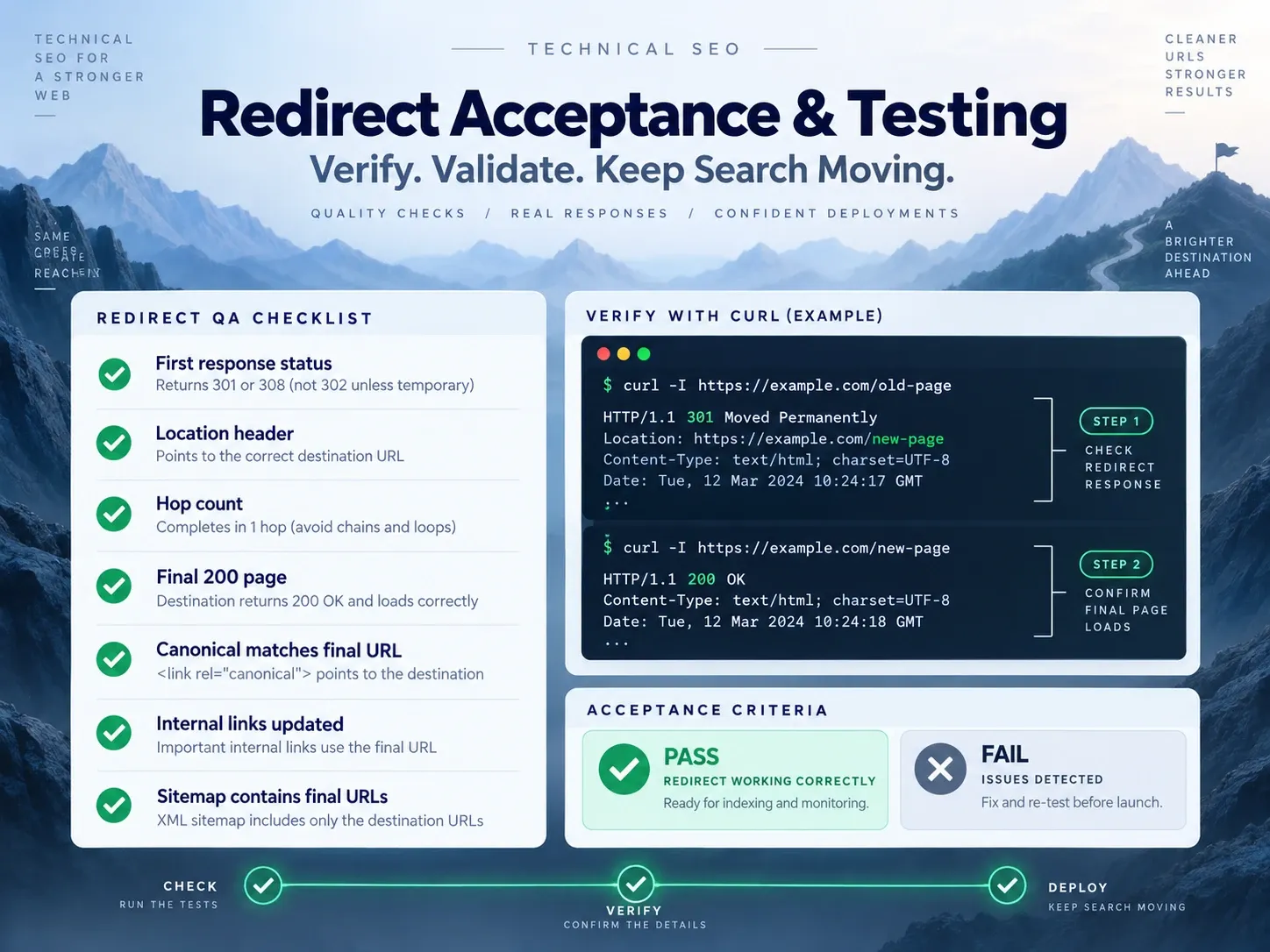
An SEO friendly redirect passes observable tests:
| Check | Passing result |
|---|---|
| Source intent | Source should move or route temporarily |
| Status | Matches real duration and method requirements |
| Relevance | Target replaces the source’s task |
| Hop count | Direct to the final URL |
| Final response | 200 and available to intended users |
| Indexability | Matches the destination’s search role |
| Canonical | Names the final landing URL |
| Internal links | Point directly to final URL |
| Sitemap | Contains final indexable URLs, not sources |
| Variant handling | Protocol, host, slash, case and parameters are deliberate |
| Ownership | One documented layer issues the rule |
| Rollback | Team knows how to remove or replace the rule |
A 301 that lands on a 404, login page, noindex page or another redirect fails this gate.
How to Test a Public Redirect With GET Requests
Use the redirect checker and preserve a terminal record.
# First response
curl -sS -D - -o /dev/null "https://example.com/old-page/"

# Full response chain
curl -sS -L -D - -o /dev/null "https://example.com/old-page/"

# Final HTML metadata
curl -sS -L "https://example.com/old-page/" | grep -i 'canonical'
curl -I sends HEAD. Some applications handle HEAD differently from GET, so do not use it as the only migration test.
For batch QA, use a CSV with:
source,expected_code,expected_target,actual_code,actual_target,hops,final_code,canonical,resultFail a row when:
- the first code differs;
Locationdiffers after safe URL normalization;- hops exceed the approved map;
- final status is not
200; - the final canonical differs;
- the target crosses an unintended host or locale;
- a source that should stay live redirects.
Test HTTP and HTTPS, both host forms, slash variants, known case variants, parameters, encoded paths, files and application routes.
What Indexora’s Redirect Study Proves and Does Not Prove
Indexora’s 22-day root-to-www study used a direct permanent host redirect, two Search Console properties, crawl statistics and about 5,200 referring links. The destination’s rolling 28-day view recorded 8.23K clicks and 70.2K impressions during monitoring, while the old host declined.
That case supports the workflow of mapping, deploying one hop and monitoring both sides. It does not test each NGINX, Apache, Cloudflare Pages, Shopify, HTML or JavaScript example in this article. Treat every code block as a configuration template that must pass your environment’s syntax and production tests.
How to Create a URL Redirect That Survives Deployment
Define the source, final target, duration, request semantics and owner before choosing syntax. Configure one layer, update links you control, and request the public URL with a complete variant matrix. The redirect is finished when the live response matches the approved map and the destination completes the original task.
Frequently Asked Questions About URL Redirects
Why Does a Removed Permanent Redirect Still Work in the Browser?
The browser or CDN may have cached it. Test a clean client, inspect cache headers and purge the responsible shared cache. Do not add another redirect merely to fight a cached one.
Why Does a Permanent Redirect Setting Return 302?
Trust the response. Check platform defaults, publish state and whether another layer answered first.
Why Does the Homepage Redirect Work While Deep Pages Fail?
The root rule does not prove a site migration. Test a sample from every path class and every mapped exception.
Why Does a Redirect Work on Static Pages Routes but Not a Function Route?
Pages _redirects does not apply to routes served by Pages Functions. Move the logic into the Function or change the route ownership.
Why Will a Shopify Redirect Not Activate?
Confirm that the source returns a broken page and is not a reserved platform path. Clear cached responses and test the storefront URL, not only the admin record.
Should Old Redirects Remain Forever?
Google recommends at least one year for site moves. Keep useful stable redirects longer when old links and bookmarks still send traffic and the maintenance cost is low.