
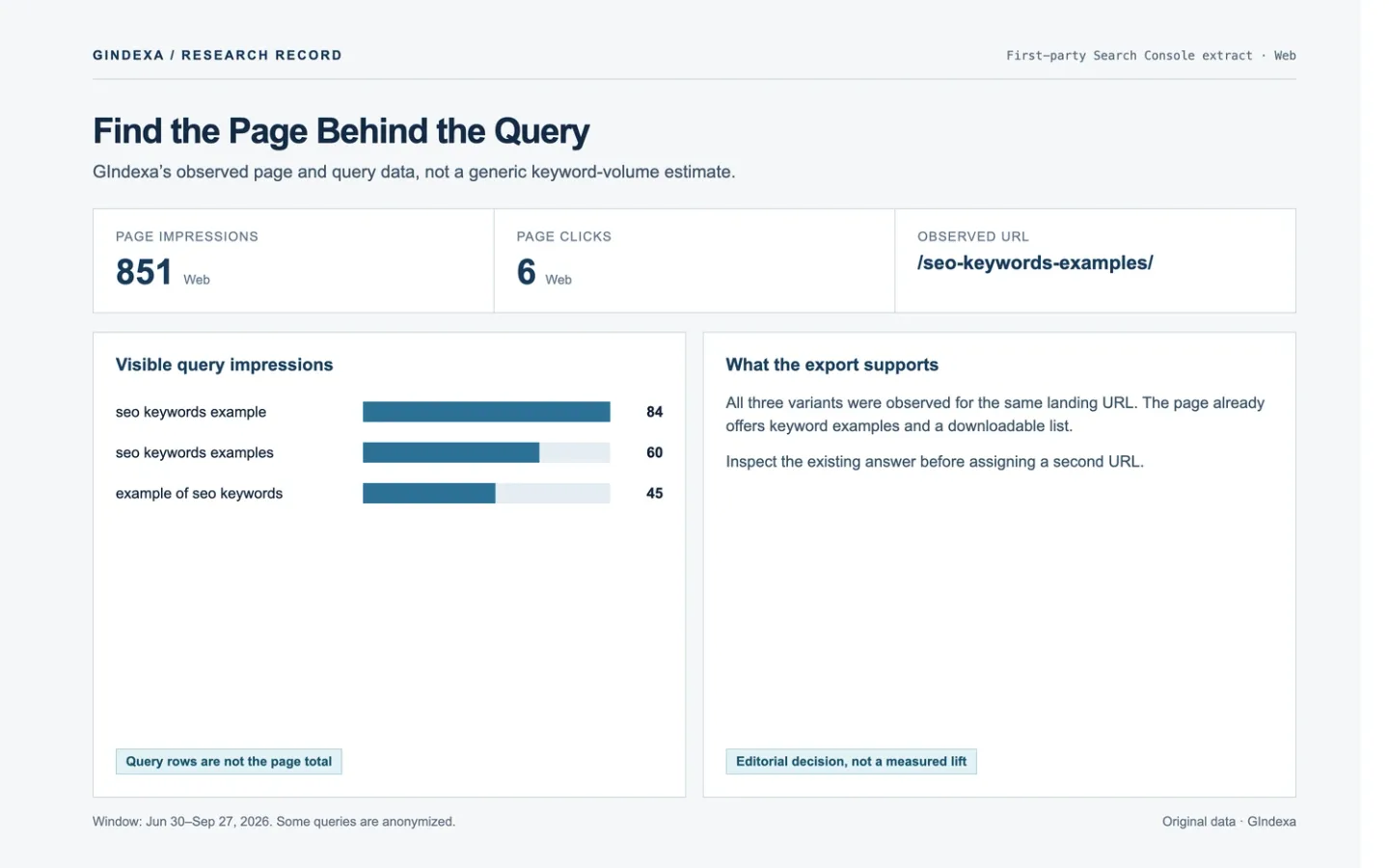
The Queries tab can tempt you into drafting an article for every promising phrase. Open the Pages tab first. The useful unit is the query paired with the URL Google showed for it. Hold the date, country, device, and search type steady, then read that page. Sometimes the answer needs a clearer section or a link from a related article. Sometimes the query points to a task the page cannot handle.
This workflow assumes you have access to the Performance report. If you still need seed terms, start with the website keyword research workflow. Here, the goal is to leave each candidate with a documented page decision, not to apply a generic ranking cutoff.
Set a Search Console Baseline You Can Compare
Open Performance → Search results and choose Web unless another search type fits the question. For a before-and-after comparison, use equal-length date ranges. Leave out the newest incomplete days: Google says Performance data typically arrives two to three days late and uses Pacific Time. Record the property, filters, dates, and export date. Otherwise, the next person cannot reproduce your numbers.
Check country and device before combining rows. A term gaining mobile impressions in one country can look flat at property level. Compare those segments separately when they change the diagnosis. On a new site, inspect the daily trend too; a 90-day total can conceal that almost all impressions arrived in the last two weeks.
The report gives clicks, impressions, CTR, and average position. Google defines the metrics and dimensions. Average position is calculated across impressions; it is not a fixed rank seen by every searcher.
Pair Every Promising Query With Its Landing Page
The Queries tab shows which searches appeared, but you still need to identify the landing page. Select a query and inspect Pages, or select a page and inspect Queries. For a larger audit, export both dimensions together. Keep query, page, clicks, impressions, CTR, average position, country, device, and period in the working file.
The visible query rows may not add up to the chart. Google omits some anonymized terms from the query table even though they contribute to unfiltered totals. The interface also limits the rows it shows; Google explains the limits. An absent row tells you little about demand by itself.
Add two fields to every query–page row: the searcher’s task and what the page currently answers. Suppose someone searches for a downloadable keyword list and lands on an examples article. If the list is already there but hard to find, move the download link. There is no reason to brief another examples article yet.
Sort Opportunities by the Action They Require
Read the landing page and a current results page before assigning an action. These patterns are prompts for judgment, not CTR or position thresholds.
| Pattern in the query-page pair | Check | Likely next action |
|---|---|---|
| Relevant query, suitable page, important answer hard to find | Compare heading, opening answer, table, and download or tool placement | Improve the existing page. |
| Relevant query, suitable page, answer present but isolated | Trace links from related articles and the topic hub | Add descriptive contextual links. |
| Query implies a distinct task the page cannot finish | Compare search results and the site’s current page inventory | Create a focused supporting page and link both ways. |
| Several pages appear for one task | Check which page has the best answer and which query variants each attracts | Consolidate ownership or clarify the pages’ roles. |
| High impressions but very low average position | Inspect the results page and content fit before blaming the snippet | Improve relevance or authority; do not treat CTR alone as the defect. |
Rules such as “refresh every query at position 8–20” and “rewrite the title below 2% CTR” erase the context. Result features, intent, and page type all affect clicks. Position 40 also offers a very different click opportunity from position 4.
A GIndexa Query-to-Page Example
GIndexa’s own Search Console Web export gives a small example. From June 30 through September 27, 2026, the SEO keyword examples page received 851 impressions and 6 clicks. The visible query seo keywords example brought 84 impressions, 3 clicks, and an average position of 24.68. seo keyword list example brought 21 impressions, 0 clicks, and an average position of 20.19 to the same URL. Most activity in the 90-day window arrived in September, so this is an early signal, not a performance trend.
Both queries lead to examples. The current page already has those and a downloadable 100-keyword list. The first check is whether readers can see the list near the opening, whether the examples answer the query, and whether related articles link to it clearly. The second query gives us a reason to inspect the page. It does not establish that another URL would rank.
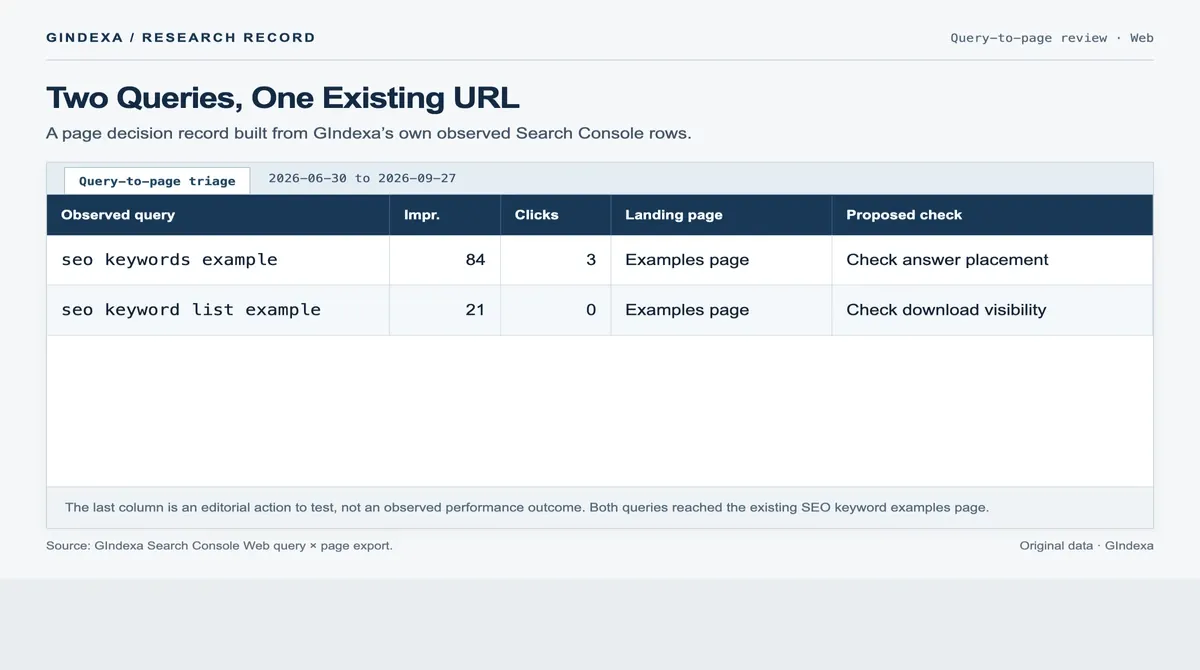
Source: GIndexa Search Console Web query-by-page export, June 30–September 27, 2026. The proposed checks are editorial next steps, not measured outcomes.
local seo keyword research asks for a different deliverable: a service-and-location research process and page map. That can support a separate worked example. The keyword examples hub can link to it after publication.
Turn the Evidence Into a Brief or an Update Ticket
Give each candidate a short decision record:
- Record the observed query and page: exact URL, filters, dates, and four Performance metrics.
- State what the searcher needs to accomplish.
- Point to the gap on the current page: a missing answer, buried section, weak link path, or wrong page type.
- Choose an action: update, add a section, link, consolidate, or create a distinct page.
- Set a review date and name the query–page segment you will check after release.
If the proposed page differs only in adjective or word order, put the answer on the existing URL. If it offers a distinct worksheet, procedure, comparison, or audience-specific decision, explain that difference in the brief. Use the content-refresh workflow when changing a page that already receives traffic.
Measure the Result Against the Same Query and Page
After an edit, compare equal-length settled periods with the same Web, country, device, query, and page filters. Log the change date. Total page impressions might rise because Google shows the URL for new queries while the term you targeted stays flat.
Watch for query migration. If a different URL starts appearing for the same search, inspect both pages before calling the edit a success or failure. Track a new supporting article and its core page separately. Search Console shows visibility and clicks, but those measures alone cannot attribute a change to your edit.
Use Search Console Keyword Opportunities to Make Page Decisions
“Investigate” is a valid outcome. If you have impressions but have not read the landing page or current results, you have not yet chosen an action. Once you have, record the owner URL, the edit or new page you propose, and the query–page segment you will revisit.
Frequently Asked Questions About Search Console Opportunities
How Do You Stop a Page Regex From Mixing One Directory With Deeper Paths?
In Pages → Custom (regex), anchor the full URL. For a single article level, ^https://www\.example\.com/insights/keyword-research/[^/?]+/?$ matches one slug after the folder but excludes /insights/keyword-research/topic/child/. Replace the host and adjust the trailing-slash rule for your site. Then check several URLs you expect to include and exclude. Search Console uses RE2 and partial matching by default, so the anchors and [^/] matter. RE2 has no lookaround; explicit path boundaries are the safer choice.
How Can BigQuery Expose Long-Tail Rows Beyond the 1,000-Row Interface Export?
The interface download contains at most 1,000 representative table rows. The Search Analytics API accepts up to 25,000 rows per call through rowLimit and startRow, but it still exposes at most 50,000 rows per property, day, and search type. For ongoing analysis at larger scale, configure Search Console bulk export to BigQuery. It requires a billed Cloud project, starts after setup, and does not fill in historical dates. Query the URL-level table, summing repeated keys:
SELECT query, url,
       SUM(impressions) AS impressions,
       SUM(clicks) AS clicks
FROM `your-project.searchconsole.searchdata_url_impression`
WHERE data_date BETWEEN DATE '2026-09-01' AND DATE '2026-09-27'
  AND search_type = 'web'
  AND NOT is_anonymized_query
GROUP BY query, url
ORDER BY impressions DESC;
Replace the project, dataset, and dates, then group the returned query–URL pairs by task. The table reference defines each field. Bulk export bypasses Search Console’s daily row cap. It cannot recover anonymized query text, and BigQuery storage and queries can cost money.
Why Do Query Rows Still Fail to Reconcile With the Chart or BigQuery Total?
Start with the aggregation level. The chart usually counts at property level; a Pages or URL-level table can count several site URLs separately. A query filter can also remove anonymized contributions. Match the property, search type, dates, country, device, and aggregation level before comparing totals. BigQuery can contain anonymized rows with blank query text, but the terms stay hidden. See Google’s explanation of Performance data limits.
What if One Query Starts Appearing for a Different URL After an Update?
Group the query by page and date in the API or bulk export. In the interface, use its Pages table and daily trend. Mark the edit date, then inspect both URLs with URL Inspection. Compare Google’s selected canonical in the indexed record, crawl state, redirects, and internal links. The live test cannot predict Google’s eventual canonical choice. Read both pages: did the new URL answer the task better, or did the edit make ownership ambiguous? A query moving between URLs is not automatically a ranking loss.
What if Mobile CTR Falls While Desktop CTR Looks Healthy?
Compare devices for the same query, landing page, country, and settled dates. First check impressions and average position. Mobile may show the URL lower, or push it down with ads and local modules, without anything being wrong with its title. Open a current mobile results page in the target market and check whether the page itself answers the question clearly on a phone. Rewrite the title only if the wording misrepresents the page or the query. Log the edit and revisit the same segment.
What if a Content Change Appears to Have No Effect After Two Days?
Check the publication date and whether Google has recrawled the page. Search Console reports days in Pacific Time, and data normally arrives after two to three days. The latest values may still move. Once you have finalized data after the crawl, compare equal-length periods with the same query–page filters. Check for new queries too. Two incomplete days cannot tell you whether the edit worked.
What if a High-Impression Query Has No Clicks and Average Position Near 20?
Open the results page and the landing URL before calculating a “CTR gap.” An average around 20 blends impressions from different ranks and result layouts, so it does not guarantee a page-two opportunity. If the URL answers the task, bring that answer forward and improve relevant internal links. If the results favor another page type, check the site inventory and brief the missing task. Review the same query–page segment later. The position number alone does not warrant another article.