
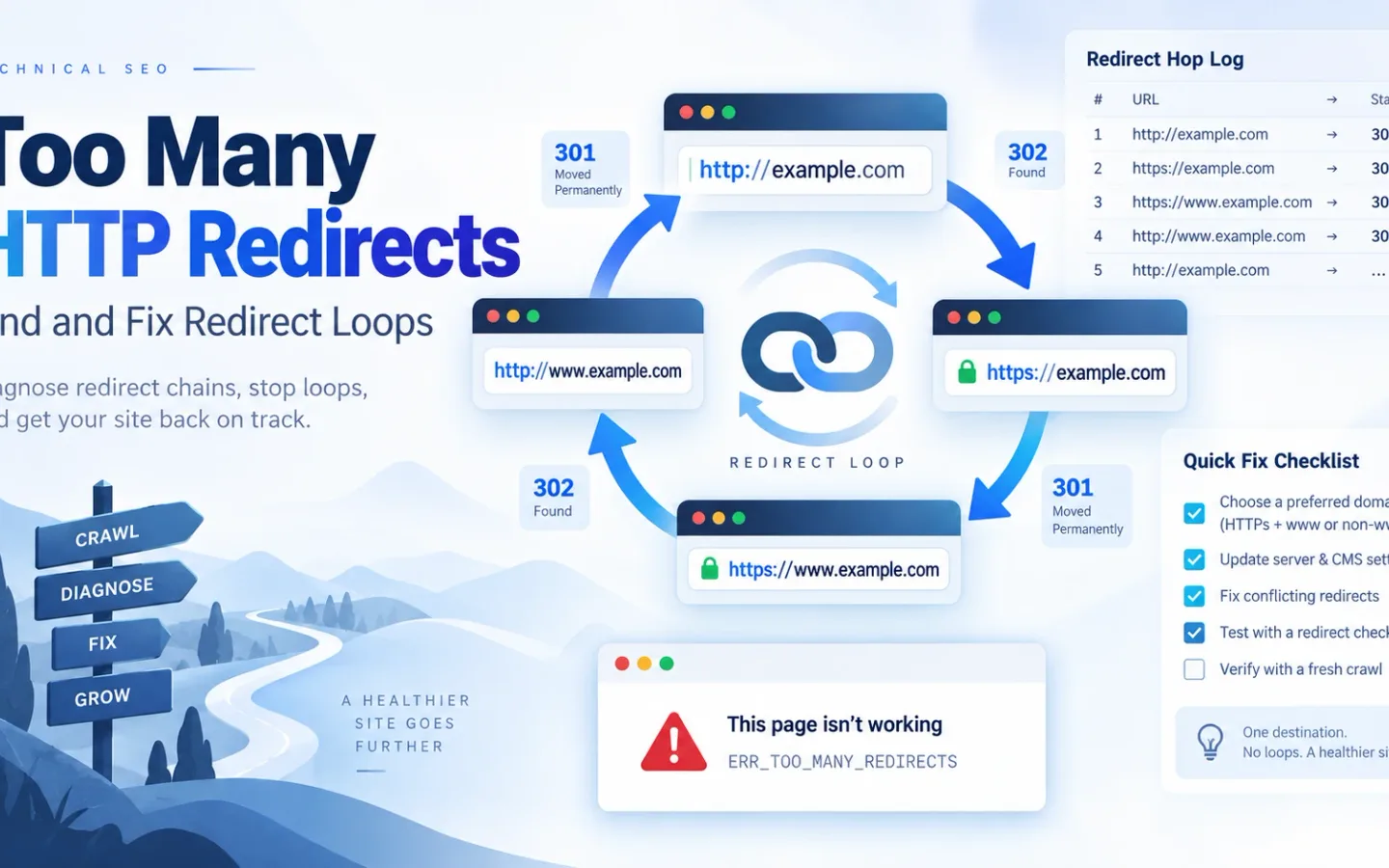
“Too many HTTP redirects” means the client could not reach a final response before it detected a cycle or hit its redirect limit. Capture the exact sequence, find the first repeated request state, identify which layer issued each Location, remove the conflicting rule, and retest from a clean session.
Clearing cookies can remove a stale session symptom. It cannot repair an edge, server or application loop.
What the “Too Many Redirects” Browser Error Proves
The error proves that automatic navigation failed to reach a usable final response. It does not prove:
- that a
301caused the problem; - that the web server owns every hop;
- that all users receive the same sequence;
- that cookies are the cause;
- that clearing cache repaired the configuration;
- that the browser sent the same request as a command-line client;
- that the loop is visible in HTML.
A healthy route ends:
GET http://example.com/page
  -> 301 Location: https://example.com/page
GET https://example.com/page
  -> 200
A two-state loop repeats:
GET https://example.com/account
  -> 302 Location: https://www.example.com/account
GET https://www.example.com/account
  -> 302 Location: https://example.com/account
GET https://example.com/account
  -> repeats
A client stops following to prevent an endless request sequence. The browser error page rarely identifies the rule owner.
Redirect Loops vs. Long Redirect Chains
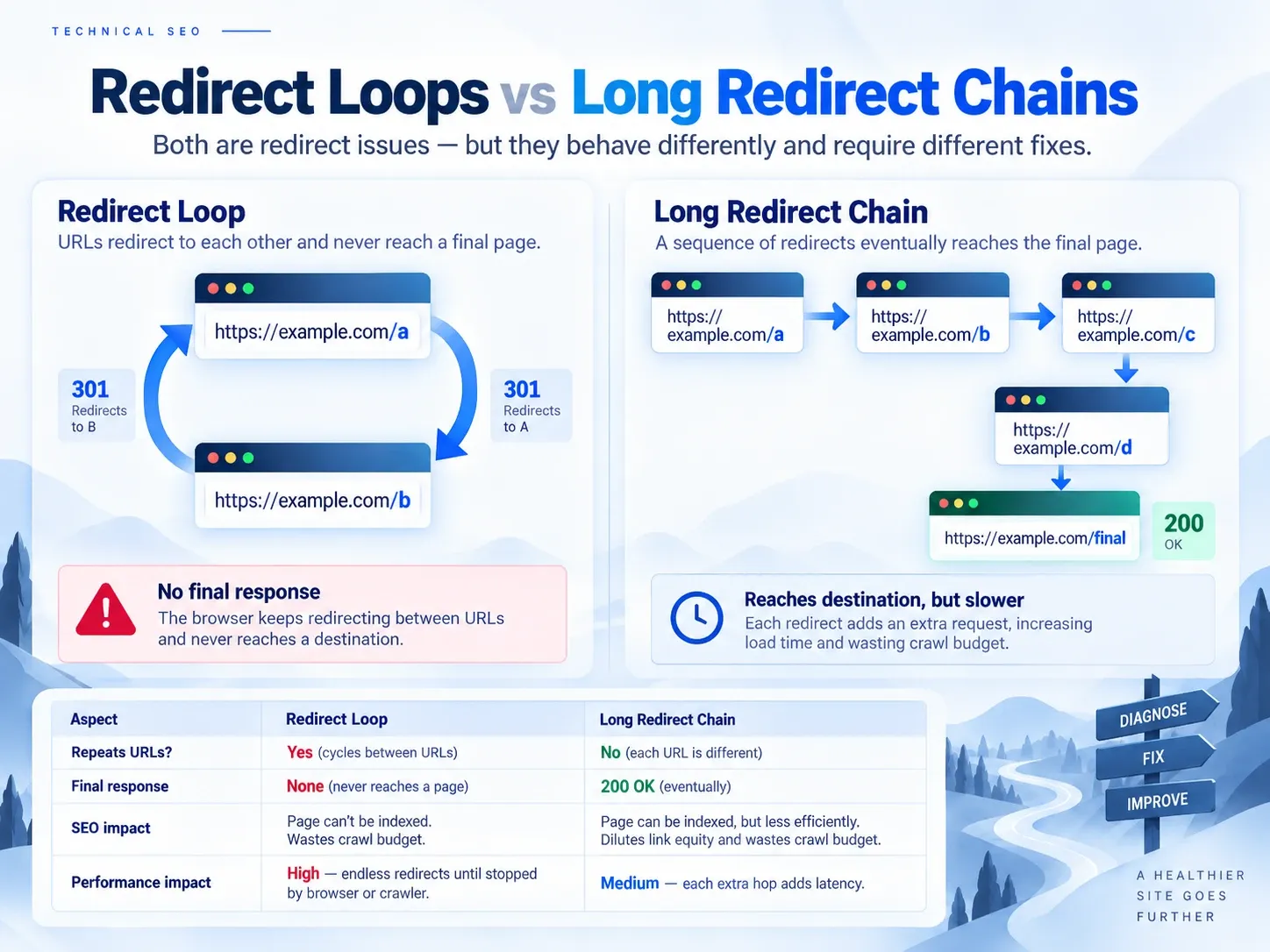
A loop revisits an earlier request state and cannot finish. A long chain may finish but adds requests, latency and more places to fail. The HTTP redirect code guide explains what each status promises before you diagnose route ownership.
| Pattern | State sequence | Final response | Diagnostic condition |
|---|---|---|---|
| Two-URL loop | A -> B -> A | None | Exact URL repeats |
| Protocol loop | HTTP -> HTTPS -> HTTP | None | Scheme repeats |
| Host loop | bare -> www -> bare | None | Host policy conflicts |
| Conditional loop | protected -> login -> protected | None for one session state | URL and cookie state repeat |
| Long chain | A -> B -> C -> D | 200 |
No repeat, excessive hops |
| Client loop | A 200 -> JavaScript B -> JavaScript A |
May not contain HTTP 3xx |
Browser navigation repeats |
| Internal rewrite cycle | Application remaps path internally | Often 5xx |
No public Location required |
Track a request state as more than a URL when behavior is conditional:
scheme + host + port + path + query
method
relevant cookie state
authentication state
selected headers
region or edge rule
Two visits to the same URL can differ when a cookie, method or trusted proxy header changes.
How to Capture a Redirect Chain Before Changing Settings
Start with a precise URL that includes scheme, host, path and query.
Record the First GET Response
curl -sS -D - -o /dev/null \
  "https://example.com/path"
Follow the Chain With a Fixed Limit
curl -sS -L --max-redirs 10 \
  -D redirect-headers.txt \
  -o /dev/null \
  "https://example.com/path"
Curl returns an error when it exceeds the limit. Preserve the headers that appeared before failure.
Do not rely only on:
curl -I "https://example.com/path"-I sends HEAD. Some applications and middleware handle HEAD differently from GET. The first GET response and browser Network log are stronger evidence for a page request.
Use the redirect chain checker to inspect a normal public chain. Use authorized local tools for cookies, authentication or nonpublic origins.
Build a Redirect-Hop Ledger
| Hop | Requested URL | Method | Status | Location | Set-Cookie | Cache clues | Owner hypothesis |
|---|---|---|---|---|---|---|---|
| 0 | Initial URL | GET | 301 |
Next URL | None | CDN header | Edge |
| 1 | Next URL | GET | 302 |
Initial URL | Session cookie | App header | Application |
Replace these template rows with the captured values. Record exact strings before normalizing them. A trailing slash, port, encoded character or query value may be the difference that closes the loop.
Useful fields:
timestamp
request_id
client
requested_url
method
status
location
server
via
cf-ray_or_edge_id
x-cache
age
set-cookie
forwarded
x-forwarded-proto
x-forwarded-host
application_trace_id
suspected_owner
Do not publish secrets, session identifiers or personal data. Redact values while preserving the attributes needed for diagnosis.
How to Identify the Layer That Issued Each Redirect
A request can pass through:
browser state and HSTS
DNS
CDN or edge
load balancer
reverse proxy
web server
application middleware
CMS or redirect plugin
authentication provider
HTML or JavaScript
DNS selects infrastructure but does not issue an HTTP redirect. HSTS can upgrade a browser’s request locally before the first network response. HTML and JavaScript can navigate after an initial 200. Use the HTML redirect guide when the move begins only after document parsing or script execution.
Assign ownership with evidence:
| Clue | Likely source |
|---|---|
| Edge request ID, CDN server header or rule trace | CDN |
| Redirect appears when origin is bypassed | Origin or application |
Set-Cookie changes before redirect |
Authentication or app |
| Response changes by login state | Session middleware |
Source returns 200, browser still moves |
HTML or JavaScript |
| Browser differs from clean curl | HSTS, cache, cookie, extension or client script |
| Only one path family fails | CMS, route or scoped server rule |
| All hosts and paths fail | Global edge, proxy or host policy |
Compare the origin only when you are authorized and can preserve the intended Host, TLS and access controls. Do not expose an origin as a troubleshooting shortcut.
Use one owner for each policy. HTTPS, preferred host, slash normalization and legacy mappings should not be reimplemented independently across every layer. The URL redirect implementation guide compares the layers that can own each rule.
How to Prevent HTTP, HTTPS, and Host Redirect Loops
Write the intended final state:
scheme: https
host: www.example.com
port: 443
path policy: trailing slash
Every alternate should move toward it.
Test:
http://example.com/path
https://example.com/path
http://www.example.com/path
https://www.example.com/path
A common host loop:
edge:  example.com -> www.example.com
origin: www.example.com -> example.com
Remove one competing policy. Do not add a third redirect that attempts to counter the first two.
A good global rule calculates the final scheme and host once. Legacy page mappings should also point directly to that final form rather than an intermediate old-host URL.
How to Diagnose Cloudflare Flexible SSL and Origin HTTPS Loops
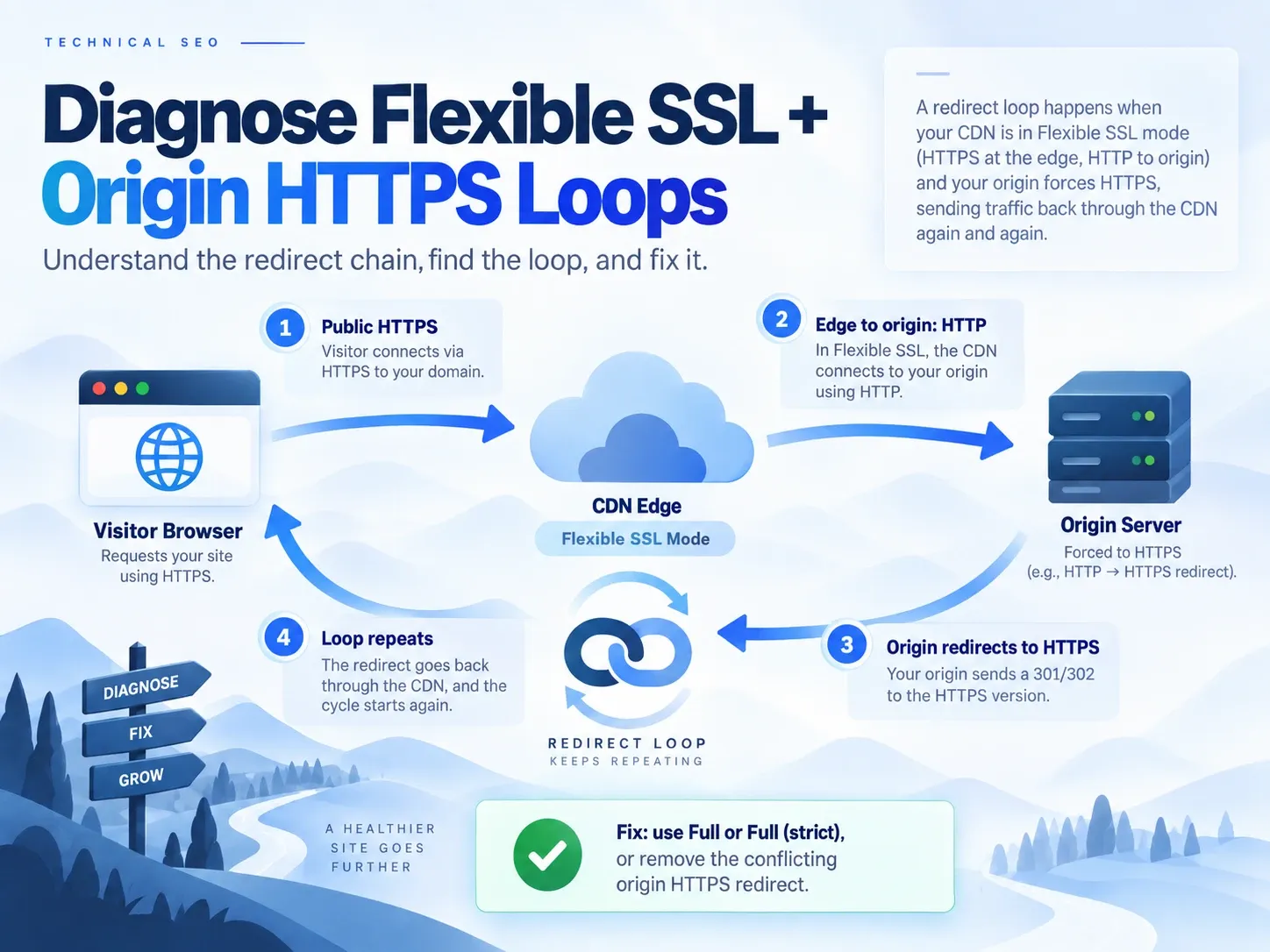
Cloudflare’s ERR_TOO_MANY_REDIRECTS guide documents a specific loop:
visitor -> HTTPS request to Cloudflare
Cloudflare Flexible -> HTTP request to origin
origin -> redirects HTTP to HTTPS
Cloudflare -> again connects to origin with HTTP
origin -> redirects again
Cloudflare’s Flexible mode documentation says not to use Flexible when the origin forces HTTPS. The documented remedies are to use Full or Full (strict) with a valid origin certificate, or remove the conflicting origin behavior and enforce HTTPS at the edge according to the intended architecture.
Inspect:
- public scheme;
- edge encryption mode;
- edge-to-origin scheme;
- origin certificate;
- Always Use HTTPS or Redirect Rules;
- origin HTTPS rule;
- application proxy trust;
ForwardedandX-Forwarded-Proto.
Do not disable transport security merely to make the error disappear. Fix the disagreement between layers.
How to Verify Reverse-Proxy Trust Settings
An application behind a proxy may see the proxy’s internal HTTP connection and believe the original visitor used HTTP. It redirects to HTTPS even though the visitor already did.
A trusted proxy should pass the public scheme and host through standardized or documented headers. The application must trust only known proxy addresses and interpret the header once.
Failure patterns:
- proxy sends
X-Forwarded-Proto: https, but the app ignores it; - app trusts client-supplied forwarded headers from the public internet;
- two proxies append values in an order the app parses incorrectly;
- load balancer and framework both rewrite the host;
- application base URL is set to the alternate hostname.
Log the public request, proxy headers and application view of scheme and host. Do not blindly enable “trust all proxies.”
How to Normalize URL Slashes and Case Without Creating a Loop
One layer can add a slash while another removes it:
/docs -> /docs/ -> /docs -> repeatsCase can produce a similar cycle:
/Product -> /product -> /ProductChoose one rule owner. Apply normalization before or together with legacy mappings so the source reaches the final URL directly.
Do not force lowercase paths unless the application treats path case as equivalent. On case-sensitive systems, /Product and /product can identify different resources.
Test near matches:
/docs
/docs/
/Docs
/docs?view=all
/docs%2F
Encoded separators and application-decoded paths need special care. A proxy and framework can normalize them differently.
How to Diagnose Authentication and Cookie Redirect Loops
An authentication loop often alternates between a protected route and a login or callback URL.
/account
  -> 302 /login?return=/account
/login callback
  -> 302 /account
/account
  -> 302 /login?return=/account
Check:
DomainandPathonSet-Cookie;SecureandSameSite;- cookie expiry;
- public and internal schemes;
- callback allowlist;
- state and nonce validation;
- load-balancer session affinity;
- authorization roles after login;
- caches storing user-specific redirects;
- whether the return URL is encoded once or repeatedly.
Run two authorized tests:
- a clean session with no stored cookie;
- a session that completes login.
If clearing cookies helps only an existing browser, stale state was involved. If every new session loops, the application or identity-provider configuration remains broken.
A user who is authenticated but lacks permission should normally receive an explicit authorization outcome, not bounce indefinitely between login and the protected page.
How to Find Duplicate Redirect Rules Across the CDN, Server, and CMS
Export or inspect every active rule source:
registrar forwarding
CDN Single or Bulk Redirects
legacy Page Rules
load-balancer listeners
NGINX or Apache configuration
framework middleware
CMS redirect records
SEO or redirect plugins
application route guards
Search for both the source and every observed target. A rule may not name the original source but can match it through a wildcard.
Prefer removing duplicate ownership. Adding exclusions on top of unknown rules makes future incidents harder to reproduce.
For WordPress and similar CMS stacks, check the server configuration, site-address settings, redirect plugins, cache plugins and CDN. For Shopify, remember that platform redirects generally act on broken storefront paths, while apps, market domains and edge products can add other routing behavior. Always trace the public request. For a host-wide cutover, use the domain-forwarding migration guide to keep protocol, host, and page mappings in one release plan.
How to Distinguish Cached Redirects, HSTS, and Live Rules
A corrected server can still look broken.
Browser Redirect Cache
A previously cached 301 or 308 can keep sending the old target. Test a clean profile or a client with no stored cache.
CDN Cache
Inspect Age, cache status and rule deployment version. Purge the affected response or route according to the provider’s controls.
HSTS
HSTS upgrades HTTP to HTTPS in the browser. It is not a server 301. A browser with stored HSTS can skip the HTTP request that curl sends.
Service Worker
A service worker can return cached HTML or script that navigates again. Test with registrations cleared in an isolated profile.
Application Cache
A route or authentication cache can store conditional redirects. Confirm the cache key includes the state that changes the response.
Do not “fix” stale state by adding another redirect. Identify and invalidate the layer that retains it.
A Step-by-Step Redirect-Loop Incident Procedure
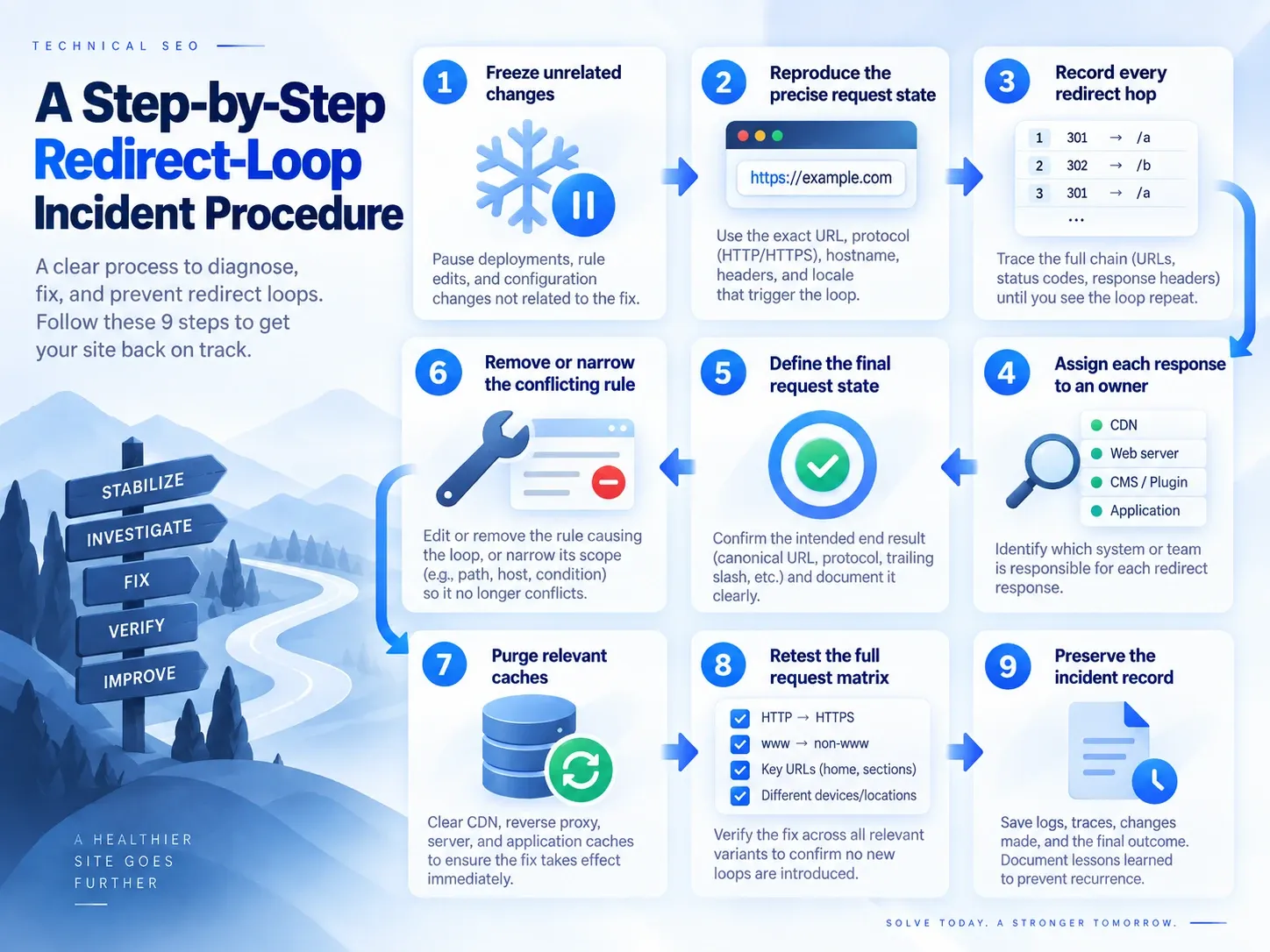
1. Freeze Unrelated Changes
Record the current rule versions, application release and incident time. Avoid changing several settings at once.
2. Reproduce the Precise Request State
Capture scheme, host, path, query, method, session state, user role, device or region conditions and the affected client.
3. Record Every Redirect Hop
Save the GET response headers and browser Network log. Mark the first repeated state.
4. Assign Each Response to an Owner
Use edge traces, server access logs, application trace IDs and configuration history. Replace guesses with evidence.
5. Define the Final Request State
Write the one intended scheme, host, path, query policy and authentication outcome.
6. Remove or Narrow the Conflicting Rule
Prefer deleting duplicate ownership. When an exception is required, scope it to the exact host, path or request state.
7. Purge Only Relevant Caches
Purge edge responses, test a clean browser and unregister a test service worker only when evidence points to those layers.
8. Retest the Full Request Matrix
Cover host, protocol, slash, case, query, authentication and affected regional conditions.
9. Preserve the Incident Record
Store the before trace, rule change, after trace, owner, rollback and follow-up action. That record turns a generic checklist into evidence for the next migration.
How to Add Redirect-Loop Checks to CI and Monitoring
For each critical route, define:
source
expected_first_status
expected_location
max_hops
expected_final_url
expected_final_status
expected_auth_state
Fail the check when:
- a URL repeats;
- hop count exceeds the approved route;
- final status differs;
- a target crosses an unintended host;
- a logged-out route exposes logged-in content;
- a canonical URL redirects;
- a sitemap URL returns
3xx; - a protected route alternates between login and content.
Use safe GET and HEAD checks in CI. Test non-GET routes only against controlled staging endpoints. Do not put production credentials in a monitor.
How to Clean Up SEO Signals After Fixing a Redirect Loop
Restoring 200 removes the outage. It does not remove stale discovery paths.
Update:
- internal links;
- XML sitemaps;
- canonical tags;
- hreflang;
- structured-data URLs;
- redirect maps;
- feeds and campaign links.
Then inspect:
- server logs for repeated requests to former loop URLs;
- Search Console indexing for priority destinations;
- Google-selected canonical on important pages;
- long chains uncovered during the incident;
- old rules that no longer receive valid traffic.
Do not claim a fixed ranking gain from removing one hop. The measurable outcomes are successful requests, fewer failures, shorter routes and clearer canonical signals. After the route works, use the canonical-versus-redirect audit to align the final page, sitemap, and internal links.
What Indexora’s 22-Day Study Shows About Loop Prevention
Indexora’s root-to-www study did not contain an ERR_TOO_MANY_REDIRECTS incident. It documented the opposite: a planned permanent host consolidation with a one-hop map, two Search Console properties and crawl-stat monitoring.
The case is useful as a prevention model. The old host recorded 19.2K crawl requests during the observation window and the destination 20.6K. The destination’s rolling 28-day Search Console view showed 8.23K clicks and 70.2K impressions while the old host declined. Those numbers do not measure a loop fix or predict recovery from an outage.
How to Validate the Final URL After Fixing a Redirect Loop
A repair is complete when the same authorized request state reaches one intended final URL, returns the expected response and does not depend on stale client data. Preserve the before and after traces. Remove duplicate rule ownership. Retest alternate hosts, schemes, paths and authentication states.
That evidence fixes the system. A cleared browser message only proves that one client stopped showing the symptom.
Frequently Asked Questions About Redirect Loops
Will Clearing Cookies Fix Too Many Redirects?
It can remove a stale session or expose a cookie-scope problem. It does not fix conflicting host, protocol, CDN or origin rules.
How Many Redirects Are Too Many?
A loop is broken at any length. For routes you control, point directly to the final destination. Do not design toward a browser’s maximum.
Can Two 301 Rules Create a Loop?
Yes. Permanence does not prevent A from pointing to B and B from pointing to A. Caching can make the result persist after a change.
Why Does the Browser Loop When curl Does Not?
Compare HSTS, cache, cookies, service workers, JavaScript, user agent and authentication. Also verify that curl tested GET rather than only HEAD.
Why Does Only One Country or Device Fail?
An edge rule, locale router, experiment or conditional application branch may apply to that request class. Reproduce the exact condition and record its owner.
Can a Canonical Tag Create ERR_TOO_MANY_REDIRECTS?
No. A canonical tag does not navigate the browser. It can create conflicting SEO signals, but the browser loop comes from HTTP, HTML, JavaScript or browser state.