
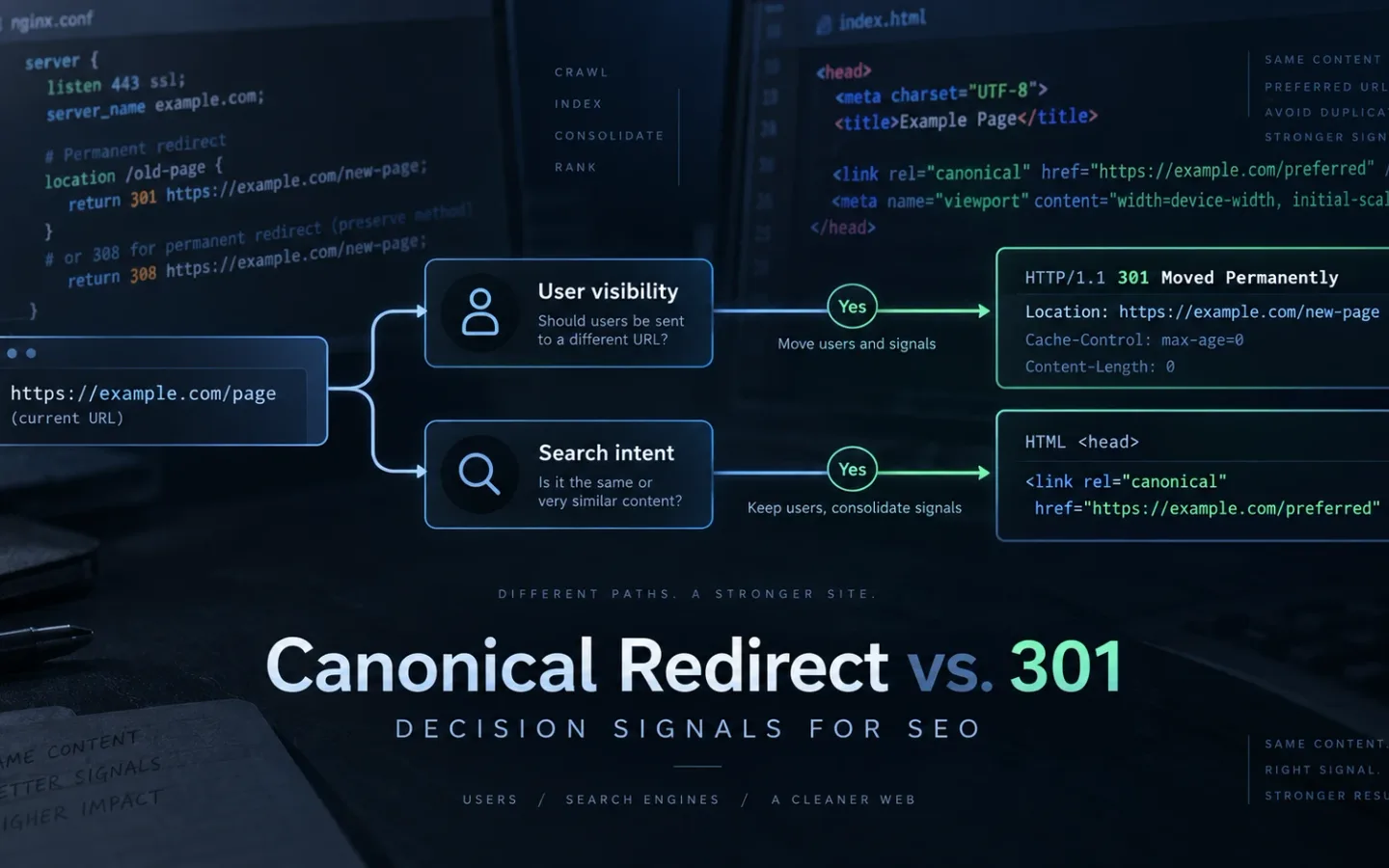
Use a 301 redirect when the source URL should disappear for both users and search engines. Use rel="canonical" when the source must remain accessible but its main content duplicates another URL. A redirect changes navigation. A canonical tag states an indexing preference without moving the visitor.
That distinction answers most cases. The difficult work starts when templates, JavaScript, a CDN, sitemaps and internal links publish different answers.
What “Canonical Redirect” Means
There is no HTTP status named canonical redirect. The phrase usually mixes two separate mechanisms:
- A
301 Moved Permanentlyor308 Permanent Redirectresponse sends the client to a new URL through theLocationheader. - A
rel="canonical"link identifies the preferred URL while the current resource remains available.
Google classifies redirects and rel="canonical" as strong canonicalization signals, while sitemap inclusion is weaker. Signals can reinforce one another, but Google can still select a different canonical. Its systems cluster duplicate pages and choose a representative URL based on the evidence they can crawl and process. See Google’s canonicalization methods and canonical selection overview.
A useful rule is: decide the user-visible behavior first, then select the technical signal. After making that decision, use the URL redirect implementation guide for server, CDN, and CMS syntax.
How to Choose Between a 301 Redirect and a Canonical Tag
Use this flow before writing a redirect rule or a canonical tag:
Does the source URL still need to work as a distinct user-facing page?
|
+-- No
|   |
|   +-- Is there a close, permanent replacement?
|   |   +-- Yes: return 301 or 308 directly to that replacement.
|   |   +-- No: return 404 or 410. Do not redirect to an unrelated page.
|   |
|   +-- Update internal links, sitemaps, hreflang and structured data.
|
+-- Yes
    |
    +-- Does it satisfy a distinct search intent with distinct main content?
    |   +-- Yes: keep it indexable and self-canonical.
    |   +-- No: continue.
    |
    +-- Is it a duplicate or near-duplicate of a preferred URL?
        +-- Yes: return 200 and canonicalize to the preferred URL.
        +-- No: self-canonical, noindex or redesign based on its real purpose.
Run four checks on the proposed target:
- Equivalence: Would a visitor who requested the source accept the target as the same resource or its direct successor?
- Final state: Does the target return
200, remain indexable and declare itself canonical? - Durability: Is the relationship permanent? If not, a temporary redirect or no redirect may be correct.
- Signal agreement: Do internal links, sitemaps, hreflang, structured data and rendered HTML name the same preferred URL?
If any answer is no, the implementation is not ready. When several source pages become one complete resource, apply the SEO page-consolidation workflow. When no relevant replacement exists, follow the 404, 410, or redirect decision policy.
301 Redirect vs. Canonical Tag: Key Differences
| Test | rel="canonical" |
301 or 308 |
|---|---|---|
| Source response | Usually 200 |
301 or 308 |
| Visitor remains on source | Yes | No |
| Source can serve a useful view | Yes | No normal page body is needed |
| Best use | Accessible duplicate or near-duplicate | Permanent URL replacement |
| Search role | Strong hint | Strong move signal |
| Target requirement | Final, indexable, equivalent URL | Final, relevant destination |
| Internal links | Prefer target | Replace source with target |
| Sitemap entry | Usually target only | Final target only |
| Failure mode | Google selects another canonical | Chain, loop, soft 404 or irrelevant target |
Do not choose canonical merely because changing redirects is operationally difficult. Do not choose a redirect merely because it feels stronger. The source URL’s product and user requirements determine the method.
What Indexora’s Redirect Data Proves and Does Not Prove
Indexora has first-party evidence for one side of this decision. It is a domain consolidation, not a randomized canonical-versus-redirect experiment.
In a 22-day host consolidation study, the bare root host duplicated the preferred www host and had no reason to remain independently accessible. That made a permanent redirect the correct treatment. The test covered two Search Console properties, Google crawl statistics and about 5,200 referring links.
The old host recorded 19.2K crawl requests at a 313 ms average response time during the observation window. The destination recorded 20.6K requests at 259 ms. Its rolling 28-day Search Console view showed 8.23K clicks, 70.2K impressions, an average position of 5 and an 11.7% click-through rate. Crawl demand on the retiring host fell toward zero while the destination stayed stable and absorbed demand.
This result supports a narrow conclusion: when a duplicate host should cease to exist, a direct server-side permanent redirect can consolidate navigation and crawl demand without requiring the old host to keep serving canonicalized HTML. It does not prove that every 301 is lossless, nor does it measure how a canonical-only implementation would have performed. URL mapping, response speed, backlink coverage and signal consistency were part of the result.
A separate small trailing-slash canonical test produced a qualitative finding across three recrawl windows: consolidation was cleanest when redirects, canonicals, sitemaps and internal links agreed. The sample is too small for a universal timing claim, so use the result as a configuration lesson, not a forecast.
How Conflicting Redirect and Canonical Signals Break Consolidation
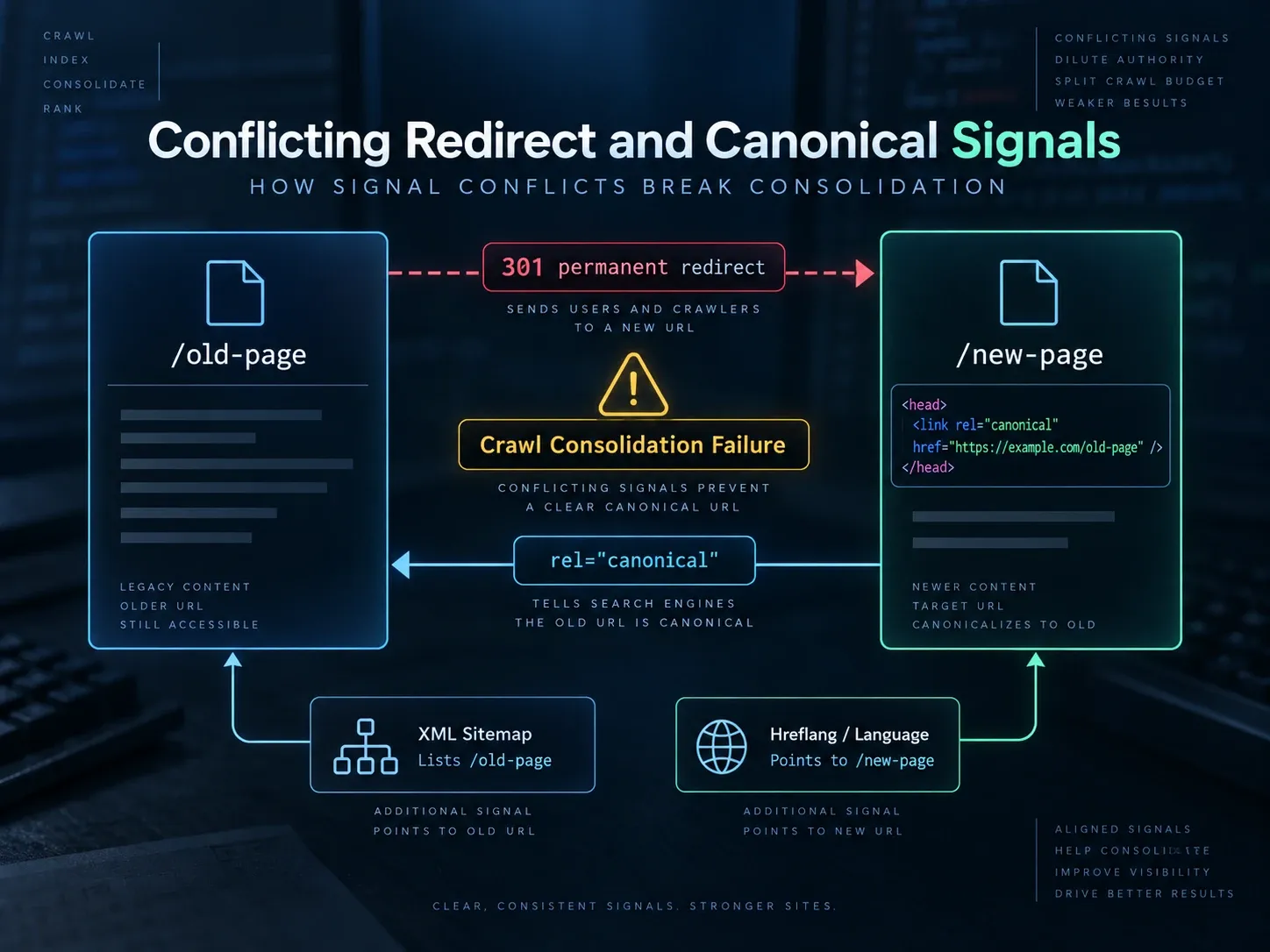
Consider this configuration:
GET /old-page
301 Location: /new-page

GET /new-page
200
<link rel="canonical" href="https://example.com/old-page">

sitemap.xml: contains both URLs
navigation: links to /old-page
hreflang: points to /new-page
The redirect says /old-page was replaced. The canonical on /new-page nominates the replaced URL. The sitemap and navigation disagree with each other. A crawler must resolve the loop of intent before it can consolidate anything.
The fix is deterministic:
/old-page -> one 301 hop -> /new-page
/new-page -> 200 and self-canonical
sitemap.xml -> /new-page only
navigation -> /new-page
hreflang and structured data -> /new-page
The important unit is not the tag. It is the URL state across every system that emits or references it.
| Layer | Question to test | Passing condition |
|---|---|---|
| Edge or web server | What is the first response? | Intended status and exact Location |
| Application | What is the final response? | 200, indexable and stable |
| Raw HTML | What canonical ships before JavaScript? | One absolute preferred URL |
| Rendered DOM | Did hydration change the tag? | Same URL as raw HTML |
| HTTP headers | Is there a Link canonical? |
Absent or identical to HTML |
| Internal links | Which URL receives crawl paths? | Preferred URL |
| Sitemap | Which URL is submitted? | Preferred indexable URL |
| Hreflang | Which version is referenced? | Canonical URL for that locale |
| Structured data | What page URL is declared? | Preferred URL |
How to Configure Canonicals, Indexing, and Crawl Rules for Faceted Navigation
Faceted navigation can generate a practical catalog for users and an unbounded URL space for crawlers. A canonical tag is not an immediate crawl-control mechanism. Google says faceted parameters can create near-infinite spaces and that canonical consolidation may reduce crawl volume only over time. Its current faceted navigation guidance recommends either preventing crawl when filtered URLs have no search value or making indexable combinations stable and useful.
Classify combinations before configuring them:
| Facet class | Example | HTTP and index rule | Canonical | Discovery |
|---|---|---|---|---|
| Search landing page | /shoes/womens/red/ with demand and tailored content |
200, indexable |
Self | Internal links and sitemap |
| Duplicate ordering | ?sort=price-asc with same products |
200; usually not an index target |
Clean collection | Avoid routine internal links |
| Useful single filter | ?color=red with stable inventory and demand |
200, indexable if intentionally supported |
Self | Crawlable <a href> links |
| Combinatorial noise | ?size=8&heel=3&sort=rating&view=grid |
Prevent crawl or indexing according to architecture | Do not rely on canonical alone | Keep out of sitemap |
| Empty result | Any combination with no products | 404, or noindex if the page must remain useful |
None or self, never a populated category | Remove crawl paths |
Three implementation rules prevent most failures:
- Use one parameter order.
/shoes?color=red&size=8and/shoes?size=8&color=redmust not become separate crawl paths. - Return
404for impossible or permanently empty combinations instead of a200page with an empty grid. - Do not block a URL in
robots.txtand expect Google to read its page-level canonical ornoindex. A blocked crawler cannot retrieve those signals.
For a catalog that does not want any faceted URL indexed, blocking crawl patterns can be appropriate. For selected indexable facets, create a whitelist with stable URLs, self-canonicals, useful headings, accurate counts and direct internal links. This is an information architecture decision, not a tag-generation task.
How to Configure Pagination, Infinite Scroll, and View-All Pages
Every page in a paginated sequence is a separate URL. Google’s pagination guidance says not to canonicalize pages 2, 3 and later to page 1. Give each useful page a unique URL and a self-referencing canonical.
A reliable paginated category looks like this:
<!-- https://example.com/category/?page=2 -->
<link rel="canonical" href="https://example.com/category/?page=2">

<a href="https://example.com/category/?page=1">Previous</a>
<a href="https://example.com/category/?page=3">Next</a>
Use real <a href> links. Google generally does not click buttons or trigger user actions to discover more results. rel="next" and rel="prev" can still help other consumers, but Google no longer uses them for sequence detection.
For infinite scroll, preserve the scrolling interface for users but expose persistent component URLs such as ?page=2. Each URL must load the same chunk when opened directly, work without previous session state and link sequentially. When a new chunk becomes primary in the viewport, update the visible URL with the History API. Google’s lazy-loading guidance also warns that Search does not scroll or click to reveal content.
A view-all page is not automatically canonical. Use it as the canonical only when it includes the complete equivalent set, loads reliably, remains stable and is genuinely the best landing page. If the view-all version times out, truncates inventory or changes item order unpredictably, keep the component pages self-canonical.
How to Configure Canonicals for Shopify and Adobe Commerce Product Variants
The phrase “product variant” covers two different SEO cases.
A size selector that changes only SKU, price and stock usually belongs to one product entity. A colorway with unique imagery, copy, reviews, availability and its own query demand may deserve a separate landing page. Apply this test:
| Variant condition | Recommended treatment |
|---|---|
| Same main content; selection changes size or SKU | Canonical to stable parent product |
| Unique search demand and substantial variant content | Dedicated URL with self-canonical |
| Variant is permanently replaced | 301 to exact successor |
| Variant is temporarily unavailable | Keep 200 if it will return and offer useful availability information |
| Variant is permanently gone with no equivalent | 404 or 410 |
| Multiple category paths expose the same product | Canonical to one product URL, or redirect redundant paths if users do not need them |
Google’s ecommerce URL guidance recommends a canonical product URL on unique variant URLs and self-canonicals on indexable pages.
For Shopify themes, inspect layout/theme.liquid. Shopify exposes the global canonical_url object and documents this output:
<link rel="canonical" href="{{ canonical_url }}">That is the platform baseline, not proof that every app behaves correctly. A variant, filter or SEO app can add a second tag or replace the head after load. Compare raw HTML with the rendered DOM and search for every occurrence of rel="canonical". Shopify’s theme metadata documentation confirms that the tag belongs in <head> and should use canonical_url.
Adobe Commerce can expose the same product through category paths. Adobe documents settings for canonical product and category tags, plus an option to create permanent redirects when URL keys change. If category paths produce URLs such as /gear/bags/product.html and /product.html, select one product URL in Stores > Configuration > Catalog > Search Engine Optimization. Do not enable canonicals and then add a theme extension that emits another target. See Adobe’s catalog URL settings and canonical metadata examples.
How SSR and CSR Applications Generate Canonical URLs
Canonical bugs in Next.js, Nuxt and custom single-page applications often come from having two owners for <head>.
Google can process a JavaScript-injected canonical after rendering, but its JavaScript SEO guidance recommends setting the canonical in the initial HTML when possible and not changing it with JavaScript. Multiple tags or different raw and rendered values create ambiguity.
Use this release matrix:
| Rendering model | Initial HTML | Hydrated DOM | Required test |
|---|---|---|---|
| SSR or SSG | One correct canonical | Same canonical | Verify hydration does not replace it |
| CSR with URL known only after data load | No conflicting placeholder | Exactly one final canonical | Test rendered HTML in URL Inspection |
| Hybrid route transition | Route-specific canonical | Updated once after navigation | Reload every route and inspect history navigation |
| Error or fallback route | No false product canonical | Correct error behavior | Test direct request and client transition |
A common failure looks like this:
<!-- Server output -->
<link rel="canonical" href="https://example.com/products/">
<!-- Client head manager adds a second tag after hydration -->
<link rel="canonical" href="https://example.com/products/red-shoe/">The repair is ownership, not timing. Put canonical generation in one route-aware metadata layer. On server-rendered pages, calculate it from trusted route data and the configured production origin. Do not derive the public host from an unvalidated request header. On a client-only page where the final URL cannot be known during initial rendering, omit the placeholder instead of publishing a known-wrong value.
Use URL Inspection to compare rendered HTML, but also test raw responses locally. Rendering tools reveal what executed; raw requests reveal what every crawler receives before execution.
How CDN Redirects Can Conflict With Origin Canonicals
A redirect can occur before the origin application runs. This matters on Cloudflare and other reverse proxies.
Cloudflare documents Single Redirects as an early rule phase and describes redirect actions as terminating: when a matching redirect executes, evaluation stops and the response is returned. The origin’s HTML canonical is therefore irrelevant to that request because the HTML was never served. Cloudflare’s rules execution order is the source of truth for the current phase order.
Use this exact diagnostic sequence:
- Request the public URL without following redirects.
- Record the status,
Location, cache headers and proxy-specific headers. - Follow the chain and record every hop.
- Inspect canonical tags and
Linkheaders only on responses that serve content. - Review matching edge rules before changing application templates.
- If authorized, compare the origin response with the public response using a controlled host override. Do not expose an origin or bypass access controls merely for testing.
# First public response. GET is used because some stacks handle HEAD differently.
curl -sS -D - -o /dev/null "https://example.com/old"

# Full chain with one header block per response.
curl -sS -L -D - -o /dev/null "https://example.com/old"

# Final HTML after redirects.
curl -sS -L "https://example.com/old" | grep -i 'canonical'

# HTTP Link canonical, useful for PDFs and other non-HTML resources.
curl -sSI "https://example.com/file.pdf" | grep -i '^link:'
Suppose Cloudflare redirects http://example.com/a to https://www.example.com/a, while the final origin HTML declares https://example.com/a. The edge and origin name different hosts. Fix the origin’s production base URL, then update sitemaps and links to the www destination. Adding another redirect at the application layer only creates a chain. For host-wide migrations, use the domain-forwarding migration guide. If two rules bounce between states, switch to the redirect-loop troubleshooting workflow.
Also check caches after a rule change. A corrected origin tag does not repair a cached edge redirect, and a corrected edge rule does not update stale HTML already stored by a separate cache layer.
NGINX and Apache Configurations for Redirects and Canonical Headers
The following examples are deliberately narrow. Back up the active configuration, run the server’s syntax test and deploy through your normal rollback process.
NGINX: One Exact Permanent Redirect
location = /old-page {
    return 301 https://example.com/new-page;
}
Use return for a known mapping. NGINX documents return in its rewrite module. For a large migration, generate explicit mappings or a reviewed map instead of a broad expression that sends every path to the homepage.
Apache: One Exact Permanent Redirect
Redirect permanent "/old-page" "https://example.com/new-page"Apache recommends Redirect for straightforward canonical URL moves rather than reaching for mod_rewrite. Its redirect and remapping guide explains the distinction.
NGINX: A Canonical Link Header for a PDF
location = /downloads/spec-sheet.pdf {
    add_header Link '<https://example.com/spec-sheet/>; rel="canonical"' always;
}
NGINX permits arbitrary response fields through add_header; always applies the field regardless of response code. Confirm that the location block does not accidentally attach the header to a redirect or an error. See the NGINX headers module.
Apache: Canonical Link Headers for PDFs
<FilesMatch "\.pdf$">
    Header set Link "<https://example.com/spec-sheet/>; rel=\"canonical\""
</FilesMatch>
This requires mod_headers. In a real library, do not point every PDF to one HTML page. Generate or scope one equivalent canonical per document. Apache’s mod_headers documentation covers response header replacement and configuration contexts.
Google supports the HTTP Link header for non-HTML documents such as PDFs. Do not send one canonical in HTML and a different canonical in the response header. The official canonical methods guide covers both methods.
How to Audit Redirect and Canonical Signals
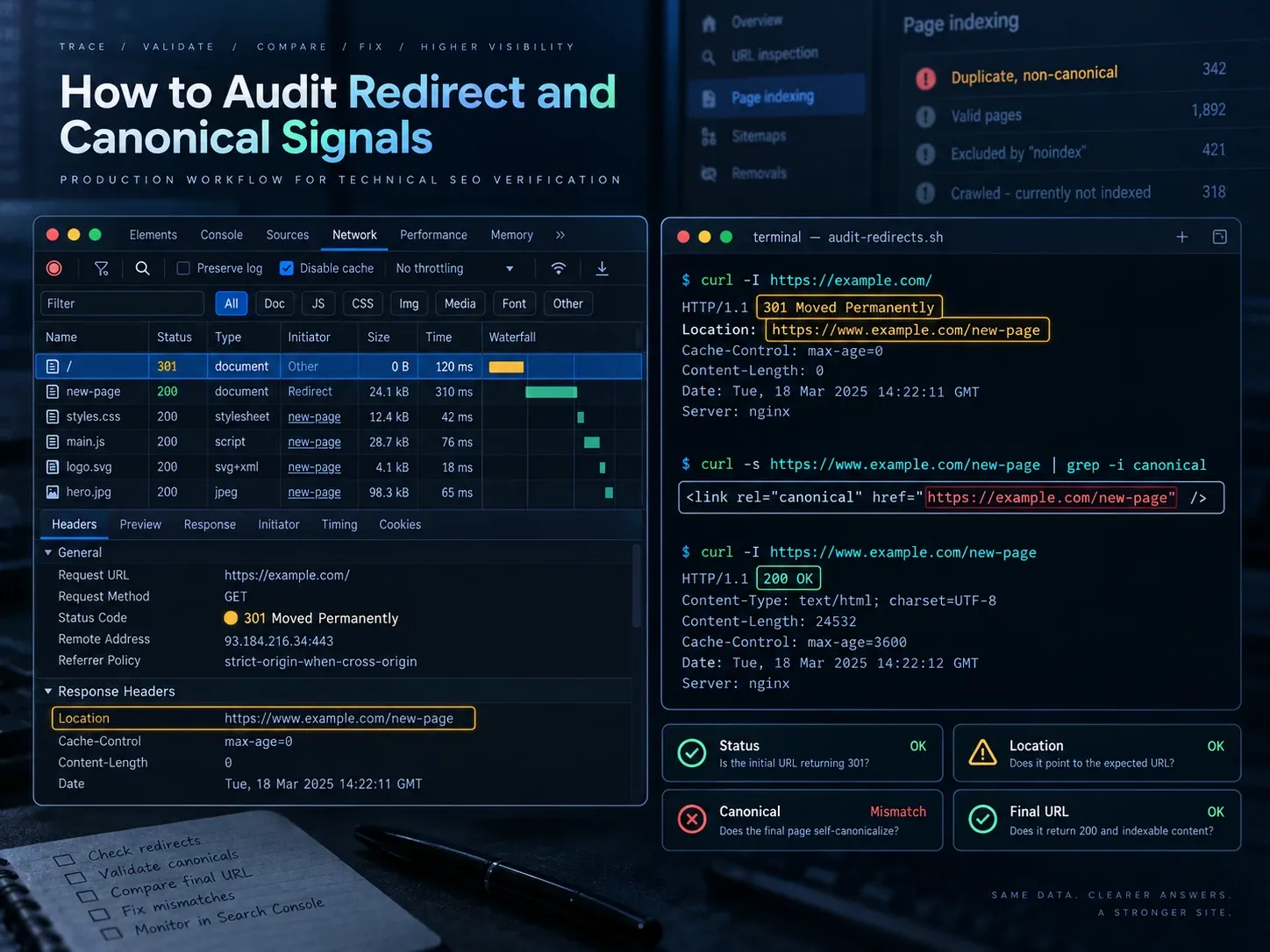
Do not start with Search Console counts. Start with a sample that represents every URL-generating system.
1. Build the URL Sample
Include at least:
- top organic landing pages;
- high-link source URLs;
- newly changed slugs;
- HTTP, HTTPS,
wwwand non-wwwvariants; - trailing-slash and case variants;
- page 1, page 2 and a deep pagination URL;
- one indexable and one non-indexable facet;
- product parent and variant URLs;
- one SSR route and one client-rendered route;
- a PDF if the site uses
Linkcanonicals.
2. Capture the First Response and Final Destination
The url checker bulk exposes status codes and hops. For an exportable terminal record, use curl:
curl -sS -o /dev/null -w \
'status=%{http_code}\nredirects=%{num_redirects}\nfinal=%{url_effective}\ntime=%{time_total}\n' \
-L "https://example.com/old-page"
The output should show one final 200 URL and the expected hop count. A canonical target that redirects is not final. A redirect target that returns 404, noindex or a login page is not valid.
3. Compare the Raw HTML, Response Headers, and Rendered DOM
curl -sS "https://example.com/page" |
  grep -ioE '<link[^>]*canonical[^>]*>'

curl -sSI "https://example.com/page" |
  grep -iE '^(HTTP/|location:|link:|x-robots-tag:)'
Then load the same URL in a browser with JavaScript enabled and inspect the final <head>. The raw and rendered canonical should match. If they do not, identify whether the server template, framework metadata API, tag manager or third-party app owns the second value.
4. Normalize Only Proven URL Equivalents
Compare scheme, hostname, port, path, trailing slash and approved parameters. Do not lowercase paths automatically. Google’s URL structure guidance notes that path casing can be significant, and case-sensitive servers may treat /Product and /product as different resources.
5. Trace Every Supporting URL Signal
For each sampled URL, record:
requested URL
first status
redirect hops
final URL and status
HTML canonical
HTTP Link canonical
robots meta and X-Robots-Tag
sitemap membership
internal-link count
hreflang target
structured-data URL
Google-selected canonical
Use the Canonical Checker for page-level comparison, then export sitemap and crawl data for scale. URL Inspection can show the user-declared and Google-selected canonical for properties you control. A mismatch is a diagnostic clue, not proof that Google ignored a valid tag without reason. Google’s canonical troubleshooting guide notes that re-evaluation can take time.
6. Set a Release Gate
Fail the release if any critical URL has:
- more than one redirect hop under your control;
- a non-
200final destination; - multiple canonical tags;
- a canonical target that redirects;
- raw and rendered canonical disagreement;
- a non-indexable canonical target;
- internal links or sitemap entries pointing at redirected URLs;
- a paginated page canonicalized to page 1;
- a blocked URL whose page-level canonical is expected to be read.
This gate is more useful than trying to make every Search Console report immediately reach zero.
Common Redirect and Canonical Mistakes
Canonicalizing Every Page to the Homepage
Distinct pages are not duplicates of the homepage. Give unique pages self-canonicals. Redirect a removed page only to a close replacement; otherwise return 404 or 410.
Canonicalizing to a Redirect
Point directly to the final 200 URL. Fix the template or database value, not just the first redirect in the chain.
Publishing Staging or Preview Hosts
Generate canonical URLs from an explicit production origin. Add an automated check that fails a build when localhost, a preview domain or a staging host appears in rendered metadata.
Blocking Canonicalized Duplicates in robots.txt
If Google cannot crawl the source, it cannot read the canonical on that source. Choose deliberate crawl prevention or crawlable canonical consolidation based on the URL class. Do not assume both mechanisms work together.
Using a Canonical Instead of Access Control
Canonical tags do not protect private, paid or sensitive content. Use authentication and authorization. Search metadata is not a security boundary.
Expecting an Immediate Google-Selected Canonical Change
After a configuration fix, resubmit clean sitemaps, request indexing for a small set of important URLs and monitor representative pages. Do not submit thousands of manual requests. Google recommends sitemaps for larger sets in its recrawl guidance.
A Production Policy for Canonicals and Redirects
A durable policy is short enough to enforce:
- Redirect when the source should disappear.
- Use
rel="canonical"when an accessible duplicate must remain. - Keep every indexable page self-canonical unless there is a documented equivalent.
- Point redirects and canonicals directly to a final
200URL. - Make links, sitemaps, hreflang, structured data, raw HTML and rendered HTML agree.
- Test URL classes, not just a few hand-picked pages.
- Record evidence and limitations instead of turning one migration into a universal promise.
Indexora’s 22-day host study shows why a permanent redirect was correct when a duplicate host had no independent purpose. The platform and edge cases show why the same answer does not fit pagination, facets, variants or client-rendered routes. Treat each URL as a product decision first. The right protocol signal then becomes much easier to choose.
Frequently Asked Questions About Canonicals and Redirects
Can I Use a 301 and rel=canonical Together?
Yes, but on different responses. The source returns 301 to the replacement. The final page returns 200 and normally self-canonicalizes. There is no useful HTML canonical on a source that serves only a redirect response.
Should a Canonical Point to a Redirecting URL?
No. Point it to the final indexable 200 URL. Otherwise the crawler must resolve an avoidable intermediate signal.
Does a Canonical Redirect Users?
No. rel="canonical" is metadata. It does not change the browser address or move the visitor.
Is a 308 Better Than a 301?
Both are permanent redirects. A 308 preserves the request method and body, which matters for non-GET requests. For normal page migrations, a 301 is widely understood and sufficient. Test forms and APIs separately from indexable page URLs.
Can robots.txt Replace a Canonical?
No. robots.txt controls crawling, not canonical selection. If a URL is blocked, page-level tags on it cannot be fetched.
Should Tracking Parameters Be Redirected?
Only when removing them will not break attribution, personalization or application state. A safer default is to use clean internal links and canonicalize duplicate tracked URLs to the clean page. Strip parameters at the edge only after testing every consumer.