
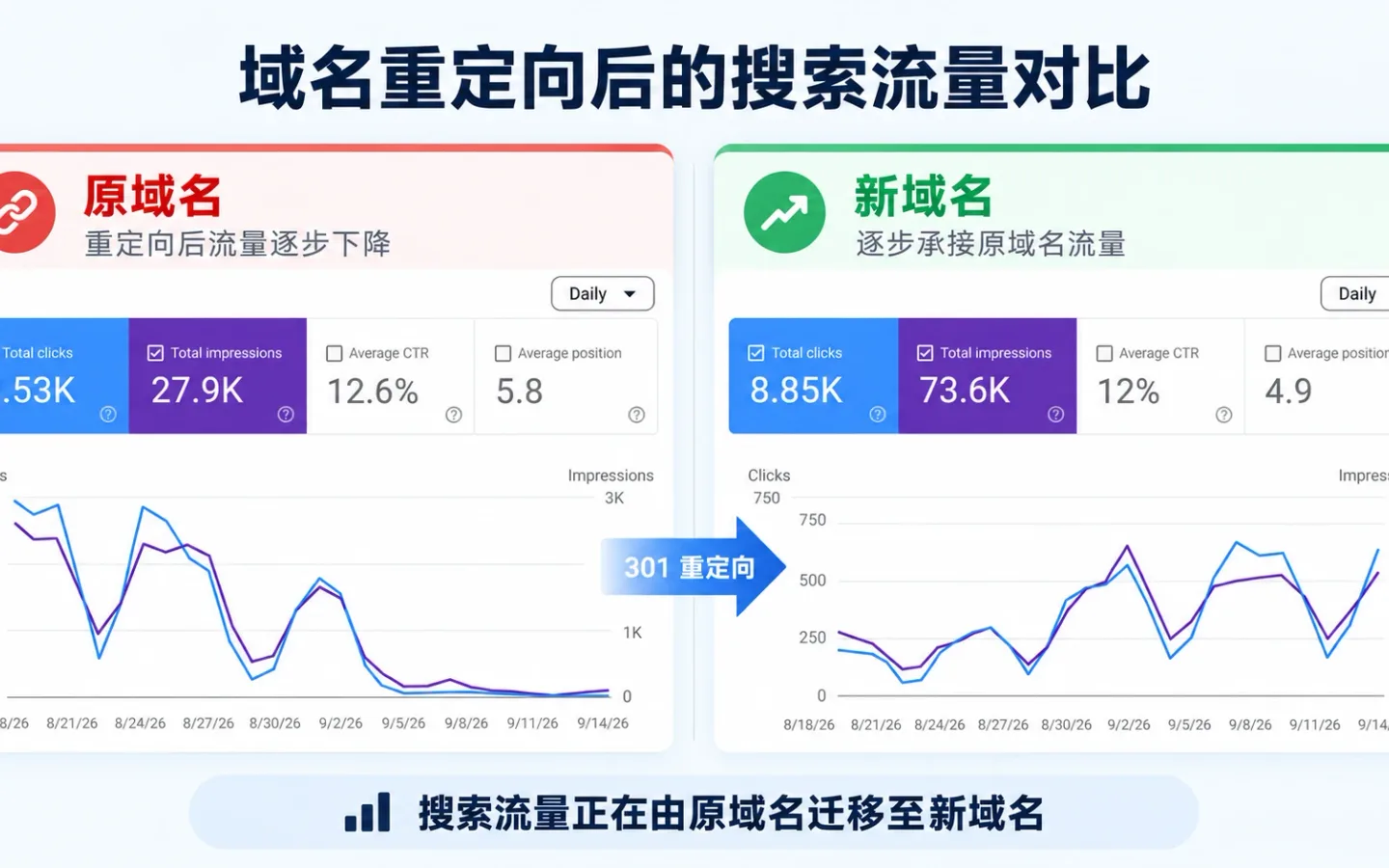
Current finding: The old root host declined toward zero in both clicks and crawl demand while the canonical www host stayed stable and absorbed the crawl budget, indicating that traffic transferred rather than disappearing.
Short answer: a clean redirect usually costs you far less than the horror stories suggest. In our own domain consolidation the traffic did not disappear, it moved. We redirected our bare root domain to the canonical www host on the evening of August 24, and left two unrelated subdomains untouched because they serve different content. By the September 15 publication date, 22 days had elapsed since the cutover. In the rolling 28-day Search Console view captured during monitoring, the destination host recorded 8.23K clicks, 70.2K impressions, an average position of 5, and an 11.7% click-through rate. The old root-domain property drained toward zero, exactly as planned, while the www host picked up the demand and overall visibility stayed intact.
That result was not luck. It came from the work before and after the switch: comparing traffic across both Search Console properties, mapping where our backlink equity lived, building a clean 1:1 URL map, and watching both GA4 and Google’s crawl logs through the cutover. Here is the process, with the numbers we could verify.
What a Redirect Really Does to Your Traffic
A web redirect is a simple instruction, not magic. It tells search engines and browsers that an address moved and that everyone should be sent somewhere else instead. Done with a permanent 301, it also passes most of the ranking signals from the old URL to the new one. The redirect itself is rarely the problem. The damage comes from the gaps: a page you forgot to map, a redirect chain that loops, or a slow response that times out.
So the useful question is not whether you will lose traffic, but how much control you have over the move. Control is what kept our numbers flat, so that is where the work started.
When Would It Be Necessary to 301 Redirect in the First Place
Before planning anything, we pressure-tested the reason. If you are asking when would it be necessary to 301 redirect, the honest triggers are narrow: a full domain change, a merge of two properties, an HTTPS or root-to-www consolidation, or retiring old URLs that still earn links and clicks. Ours was a consolidation. The bare root domain served the same pages as www and split our signals in two, so we pointed the root at the canonical host and kept everything on one address.
The two other subdomains were a deliberate exception. They host genuinely different content, so a subdomain redirect into www would have merged unrelated pages and destroyed their relevance. We did not redirect for cosmetic reasons. Every redirect adds a hop, and hops add risk. Whether you are running a 301 redirect to a new domain or folding a root domain onto its www host, the discipline is the same: only move what genuinely needs moving.
Step One: Comparing Traffic Across Both Search Console Properties
We ran both properties side by side in Google Search Console before and through the switch. The root-domain property was still pulling real demand right up to the cutover: on August 24 it recorded 354 clicks and 2,233 impressions in a single day, at an average position of 5.9. The www property was already the stronger host and stayed that way.
Vanity URL counts got ignored. Instead we exported the top landing pages by clicks and impressions, so we could compare the same queries and pages after the switch rather than guess at them. That baseline is what let us show, with evidence, that demand transferred instead of vanishing. Watching the root-domain line fall toward zero while the www line held was the clearest sign the redirect fired correctly.
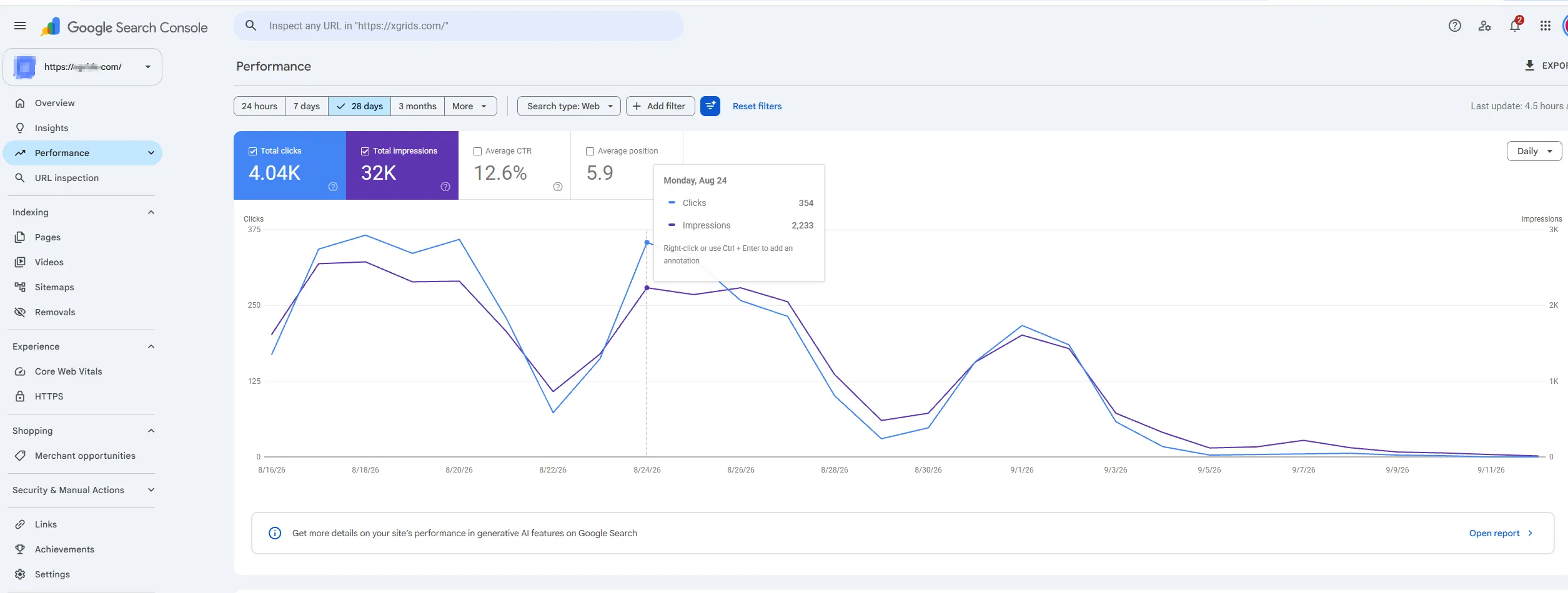
The old root-domain property recorded 354 clicks and 2,233 impressions on August 24, then declined toward zero as the redirect took effect.
Step Two: Mapping Where the Backlink Equity Lived
The standard domain forwarding impact on SEO recommendations you read online all say the same thing: protect your strongest links. So we pulled the full backlink profile across the root domain and every subdomain, then sorted by host and by target URL.
The finding was blunt. Across the whole domain and its subdomains we counted roughly 5.2K referring links, and the www host alone held more than half of them. That reshaped our priorities. The homepage redirect from the root to the www host had to be flawless, because most of our link equity already resolved there. Every high-value link target got mapped to its exact new address, never to a generic catch-all. Redirecting a deep linked page to the homepage would have thrown away the topical relevance those links carried.
The two content-different subdomains held their own links, and those stayed exactly where they were. Because we were not moving that content, there was no equity to transfer and no reason to touch those hosts.
Step Three: Building a 1:1 URL Map and Cleaning Non-Standard URLs
A domain redirect is only as clean as its URL map. The root host had accumulated the usual mess: tracking query parameters, mixed-case paths, inconsistent trailing slashes, and a few legacy directories that no longer matched the www architecture. Redirecting those as-is would have produced soft 404s and diluted signals. So before writing a single rule, we normalized every source URL and mapped it 1:1 to its canonical www destination.
Every source URL ran through the same decision tree:
For each source URL on the old root host:
├─ Does it belong to a content-different subdomain?
│   └─ Yes → exclude from the map, leave live, no redirect
├─ Strip non-content query params (utm_*, gclid, fbclid, session ids)
│   └─ Keep only parameters that change the rendered page
├─ Normalize case and trailing slash to the www convention
└─ Does an exact 1:1 equivalent exist on www?
    ├─ Yes → map source → exact www URL (single 301)
    └─ No →
        ├─ Content moved to a new path?  → closest equivalent page (single 301)
        ├─ Merged into a broader page?   → that parent page (single 301)
        └─ Dead with no equivalent?      → return 410 Gone, never the homepage
Two rules did the heavy lifting. Parameters that did not change the rendered page were stripped, so a dozen tracked variants of one article collapsed into a single canonical target instead of a dozen separate redirects. And any URL without a real equivalent returned 410 Gone rather than a lazy homepage redirect, which keeps crawl budget honest and avoids the soft-404 trap. The map that reached production was small, explicit and fully single-hop.
Step Four: Configuring the 301 at the Edge
With the URL map locked, the redirect itself was the least dramatic part. We configured every rule as a server-side 301 at the edge, before any request reached the origin application. For a consolidation aimed at a technical audience, that choice matters for three concrete reasons.
First, the edge answers with a “301 Moved Permanently” header on the first hop, so Googlebot and browsers never wait on origin logic or a database call. Second, one rule set at the edge is a single source of truth, instead of redirect logic scattered across app routes, server config files and CMS plugins. Third, it keeps responses fast, which showed up later in the crawl logs as a lower average response time on the new host.
We deliberately skipped the client-side options. A 301 redirect html snippet or a meta-refresh tag only runs after the browser has already loaded the old page, and an html redirect like that passes ranking signals inconsistently. The reference table at the end of this article compares those methods; for a domain move, none of them belong in the critical path.
Step Five: Killing Redirect Chains Before Launch
The most common self-inflicted wound in a migration is the redirect chain. Root domain to intermediate URL to HTTPS to final www URL is four hops when it should be one. Chains cause too many HTTP redirects, waste crawl budget, and can trigger a literal too many redirects error that hands the visitor a blank failure page instead of your content.
We crawled the full redirect map in staging before going live and ran the source URLs through a Redirect Checker to confirm each one resolved cleanly. Every source URL had to reach its destination on the www host in a single hop. We paid special attention to old HTTP rules fighting new HTTPS rules, the classic source of loops. Fixing those before launch, not after, is the difference between a flat traffic curve and a week of firefighting.
Step Six: Watching GA4 Through the Cutover
We did not switch and walk away. GA4 stayed open in real time during the cutover on the evening of August 24 and for the weeks that followed.
The real-time report showed the www host receiving sessions within minutes of the change. From there we tracked landing pages, engaged sessions, and the key events tied to transactions, comparing behavior against the pre-switch pattern. GA4 also confirmed that referral traffic from our strongest backlinks was landing on the correct www URLs, which meant the important redirects fired as intended rather than dumping visitors on a fallback page.
The moment the redirect went live, we submitted a fresh XML sitemap for the www host to Google Search Console so Google could recrawl the new canonical URLs quickly instead of waiting to rediscover them. Before uploading it we ran the file through a Sitemap Checker to make sure every listed URL returned a 200 on the new host and none still pointed at a redirecting root-domain address. Submitting the sitemap early is what shortens the window between the cutover and Google reindexing the destination.
Search Console told the same story from the other side. In the rolling 28-day view, the destination host logged 8.23K clicks and 70.2K impressions at an average position of 5, while the root-domain property tailed off to near zero. The demand did not evaporate; it moved to the new address.
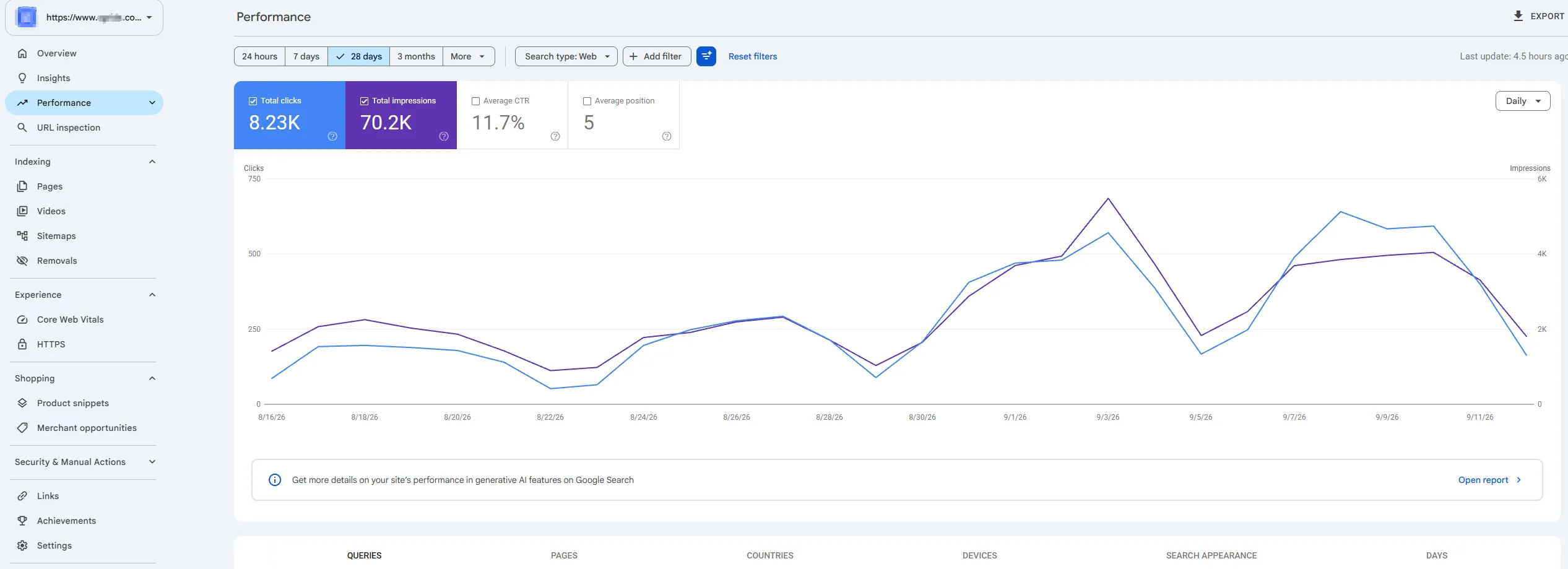
The rolling 28-day Search Console view for the canonical www host recorded 8.23K clicks and 70.2K impressions while the old property declined.
Step Seven: Reading Crawl Logs to Confirm the Transfer
Clicks confirm what users saw. Crawl logs confirm what Googlebot saw, which is the earlier and more technical signal. We watched Google’s crawl-stats for both hosts through the switch, because a healthy consolidation shows up in crawl demand before it settles in rankings.
On the old root host, crawl demand decayed exactly the way a correct 301 should force it to. Total crawl requests over the window came to 19.2K at an average response time of 313 ms. The daily curve, steady around 250 to 500 requests through July and early August, fell sharply toward zero after August 22 to 24 as Googlebot learned that every URL now returned a permanent redirect and stopped re-requesting the old addresses.
The canonical www host showed the mirror image. Crawl requests climbed after the cutover, peaking near 2.3K per day around August 30 to September 4 before settling into a steady 500 to 750 band. Over the window the host logged 20.6K crawl requests and 2.34 GB downloaded at a faster 259 ms average response time. Googlebot was reallocating its budget from the retiring host to the destination, which is the crawl-level proof that the consolidation transferred demand rather than leaking it.
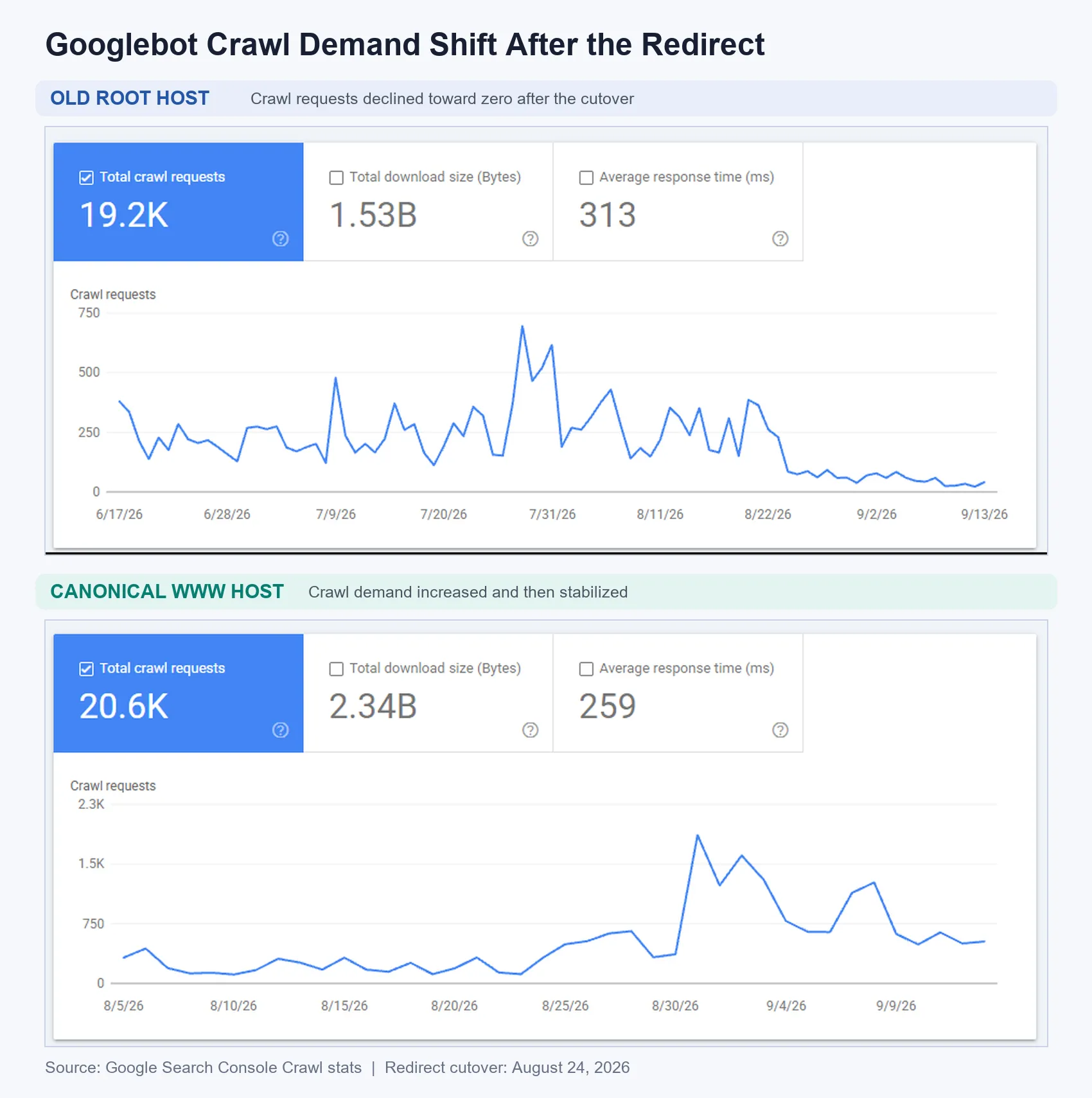
Googlebot shifted its crawl demand from the retiring root host to the canonical www host after the August 24 cutover. The old host recorded 19.2K crawl requests at a 313 ms average response time, while the destination recorded 20.6K requests at 259 ms.
Does a 301 Redirect Carry an SEO Penalty?
This is the fear that drives most of the hesitation, so let it go: there is no inherent 301 redirect SEO penalty. A correctly implemented permanent redirect passes ranking signals, and Google has said repeatedly that 301s do not cause a ranking loss on their own.
The traffic drops people blame on redirects almost always come from something else: broken mapping, chains, mixed signals from a meta refresh, or redirecting everything to the homepage and destroying page-level relevance. People blame the redirect, but the implementation is usually the real cause.
What the Data Proved About Domain Redirect SEO
Our consolidation backed up one point about domain redirect SEO: the outcome is decided before you flip the switch, not after. We compared traffic across both Search Console properties, protected the www host that already held most of our 5.2K backlinks, built a normalized 1:1 URL map, ran every rule as a server-side 301 at the edge, cleared every redirect chain, and verified the move in GA4, Search Console and the crawl logs against a real baseline.
The result was a canonical host whose rolling 28-day Search Console view held 8.23K clicks and 70.2K impressions during the cutover, while the old root domain drained on schedule in both clicks and crawl demand. A redirect will only cost you traffic and revenue if you let it. Map carefully, protect your links, keep it to one hop, and measure against a baseline, and a domain redirect stays boring in the best possible way.
Frequently Asked Questions
Does Traffic Disappear When You Redirect a Domain?
Not if it is mapped correctly. In our case the demand transferred from the root domain to the www host rather than vanishing. The rolling 28-day Search Console view captured during monitoring recorded 8.23K clicks for the destination host.
Should I Redirect Old Pages to the Homepage?
No. Redirect each URL to its closest matching new page, and return 410 Gone for pages with no equivalent. A homepage redirect for deep pages throws away the topical relevance and link equity those pages earned.
Is a Meta Refresh a Safe Web Redirect?
For migrations, no. Prefer a server-side 301. A meta refresh html redirection is slower and passes ranking signals less reliably.
What Causes a “Too Many Redirects” Error?
Usually a loop or a conflict between old HTTP and new HTTPS rules. Crawl your redirect map before launch so no URL needs more than one hop.
Redirect Types: A Quick Reference
We only used one method above, a server-side 301. For readers newer to migrations, here is how the common redirect types compare and what each one does to a site.
| Redirect type | How it works | Passes ranking signals? | Impact on your site |
|---|---|---|---|
| 301 permanent | Server returns a “301 Moved Permanently” header | Yes, passes almost all equity | Best choice for a domain redirect or consolidation; the old URL drops from the index and the new one inherits its authority |
| 302 / 307 temporary | Server signals a temporary move | No, the original URL keeps the equity | Use only for short-term detours; using it for a permanent move strands rankings on the old address |
| 308 permanent | Like 301 but preserves the request method | Yes, treated as permanent | Safe for permanent moves on forms and APIs where the POST or PUT method must survive |
| Meta refresh (html redirect) | An html redirection tag in the page head reloads to a new URL | Inconsistent and slow | Hurts speed and user experience; crawlers may read intent wrong, so avoid it for migrations |
| JavaScript redirect | A url redirect in html fires client-side after render | Only if the crawler renders JS | Adds crawl delay and risk; signals transfer late or not at all |
| Canonical tag | A hint, not a redirect; both URLs stay live | Consolidates, does not move | Useful for duplicate content, but it does not send visitors anywhere and can be ignored |
The short version: a server-side 301, or a 308 where the request method matters, is the only reliable way to move a live audience and their link equity. The client-side methods trade control for convenience.