
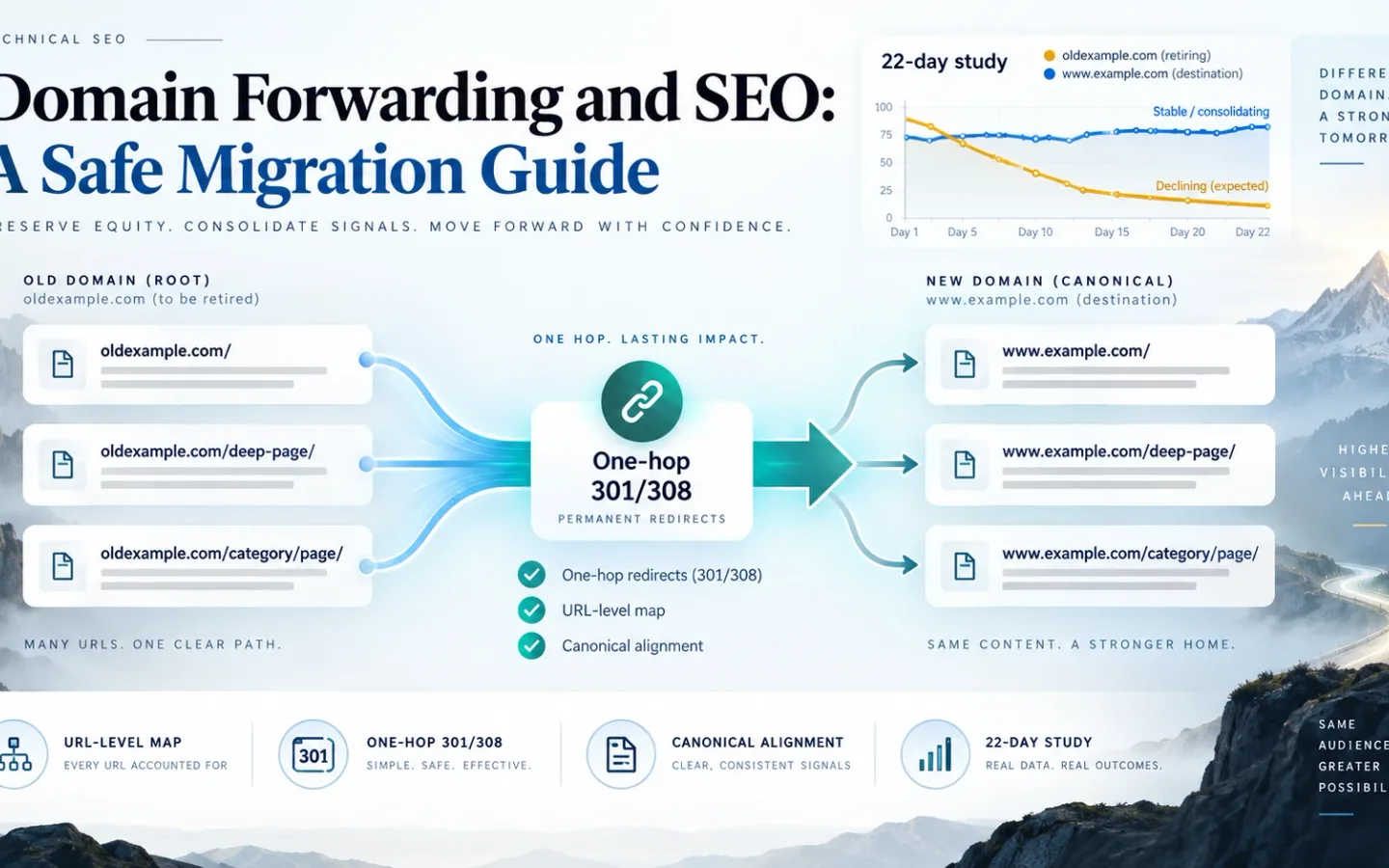
Domain forwarding can preserve access and search signals when every old URL reaches a relevant final URL through one permanent server-side hop. It creates migration risk when a registrar forwards only the homepage, every path lands on an unrelated homepage, or the new site still publishes old-domain canonicals and links.
Indexora has one measured case: a 22-day root-to-www consolidation. The observed traffic and crawl pattern was consistent with a clean transfer, but the study had no counterfactual control. It does not prove that every domain move is lossless.
What Domain Forwarding Changes at the DNS, HTTP, and HTML Layers
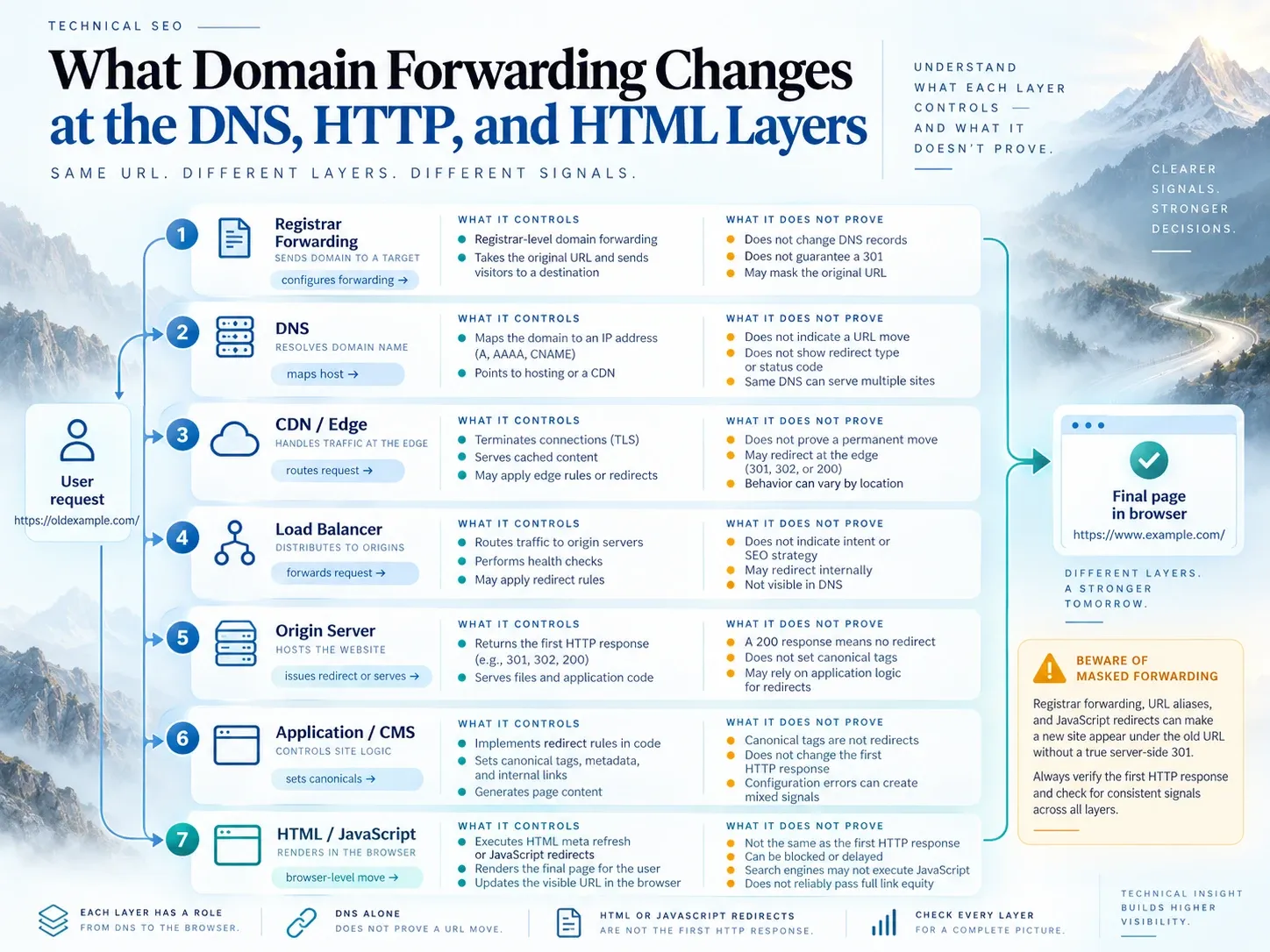
“Forward domain” is a control-panel label, not an HTTP specification. Identify which layer handles the request.
| Layer | What it controls | What it does not prove |
|---|---|---|
| Registrar forwarding | Often issues an HTTP redirect through the registrar’s service | That deep paths, HTTPS and query strings are preserved |
| DNS | Maps a hostname to an IP address or service | That a URL moved or which page is canonical |
| CDN or edge | Can issue redirects before the origin runs | That the application and cached HTML use the new host |
| Load balancer | Routes requests among origins | That content paths have equivalent destinations |
| Origin server | Can redirect by host and path | That CMS links and sitemaps were updated |
| Application or CMS | Knows page-level content relationships | That an upstream edge rule will not override it |
| HTML or JavaScript | Moves a browser after a document loads | That the first response is an HTTP redirect |
Masked forwarding, where the old address stays visible while another page loads in a frame, is not a migration strategy. A domain alias that serves the same content on both hosts also leaves two crawlable versions unless redirects or consistent canonical signals resolve them.
Test the public HTTP response. Do not infer behavior from a dashboard label.
What Indexora’s 22-Day Domain Move Shows About SEO
The numbers below come from Indexora’s root-to-www consolidation study. This article explains the implementation and the limits of the evidence.
Study Scope
Cutover: evening of August 24, 2026
Observation end: September 15, 2026
Elapsed time: 22 days
Properties: old root host and canonical www host
Redirected scope: duplicate root host
Excluded scope: two content-distinct subdomains
Evidence: Search Console performance, crawl statistics and backlink data
Link inventory: about 5,200 referring links across the domain and subdomains
Control group: none
The rolling 28-day Search Console view captured during monitoring showed 8.23K clicks and 70.2K impressions on the destination, with an average position of 5 and an 11.7% CTR. The retiring host declined toward zero.
Crawl statistics showed 19.2K requests to the old host at a 313 ms average response time. The destination recorded 20.6K requests at 259 ms and 2.34 GB downloaded. Crawl demand on the old host decayed while demand on the destination increased and then settled.
These observations answer a narrow question. A duplicate root host with no independent content purpose was a good candidate for a permanent redirect to the canonical www host. They do not isolate the effect of the redirect from every other migration input, predict recovery time for another site, or compare 301 with canonical, 302, HTML refresh or JavaScript.
How Domain Forwarding Affects SEO
Yes. The effect depends on the map, status, destination and supporting signals.
A permanent redirect tells Google that the destination should become canonical. Google’s site-move guidance says permanent redirects do not cause a loss in PageRank. That statement does not guarantee stable rankings when content, internal architecture, rendering or relevance also changes. The canonical-versus-redirect guide explains how the final domain’s preferred-URL signals should align.
The useful way to answer does domain forwarding affect SEO is to separate four outcomes:
| Outcome | Evidence to inspect |
|---|---|
| Users reach the correct page | Redirect map and final landing page |
| Crawlers receive a permanent move | Initial status and Location header |
| The new URL is indexable | Final 200, robots state and canonical |
| Demand transfers rather than disappears | Both Search Console properties, query groups and logs |
The phrase domain forwarding impact on SEO recommendations calls for a documented migration, not a generic yes. Each recommendation should name the source class, destination rule, evidence and failure response.
When a Domain Move Requires Permanent URL-Level Redirects
Use 301 or 308 when the old URL should be replaced for the long term.
Common cases:
- one domain moves to another;
- a bare host consolidates into
www, or the reverse; - HTTP consolidates into HTTPS;
- two sites merge;
- a stable URL structure changes;
- a page on the old host has a close successor on the new site.
The question when would it be necessary to 301 redirect must be answered per URL. A discontinued item with a direct successor can move permanently. A campaign with no relevant replacement should return 404 or 410, not a homepage redirect.
Use 308 when a permanent non-GET route must preserve its method and body. Test APIs, checkout routes and uploads separately. Ordinary public pages normally use GET, where 301 is the familiar permanent choice.
How to Inventory the Old Domain Before Writing Redirect Rules
Build the source inventory from:
- current and historical XML sitemaps;
- Search Console landing pages;
- analytics landing pages;
- backlink targets;
- server logs;
- CMS exports;
- image, PDF and feed URLs;
- subdomains and alternate ports;
- paid, email and profile links.
Recommended fields:
source_url
source_class
clicks
impressions
referring_domains
last_log_request
current_status
content_owner
target_url
target_class
status_code
query_policy
redirect_owner
prelaunch_result
production_result
last_checked
Keep content-distinct subdomains out of a blanket rule. In Indexora’s move, two subdomains remained live because they served different content. Redirecting them into www would have erased that distinction.
How to Choose an Outcome for Every Old URL
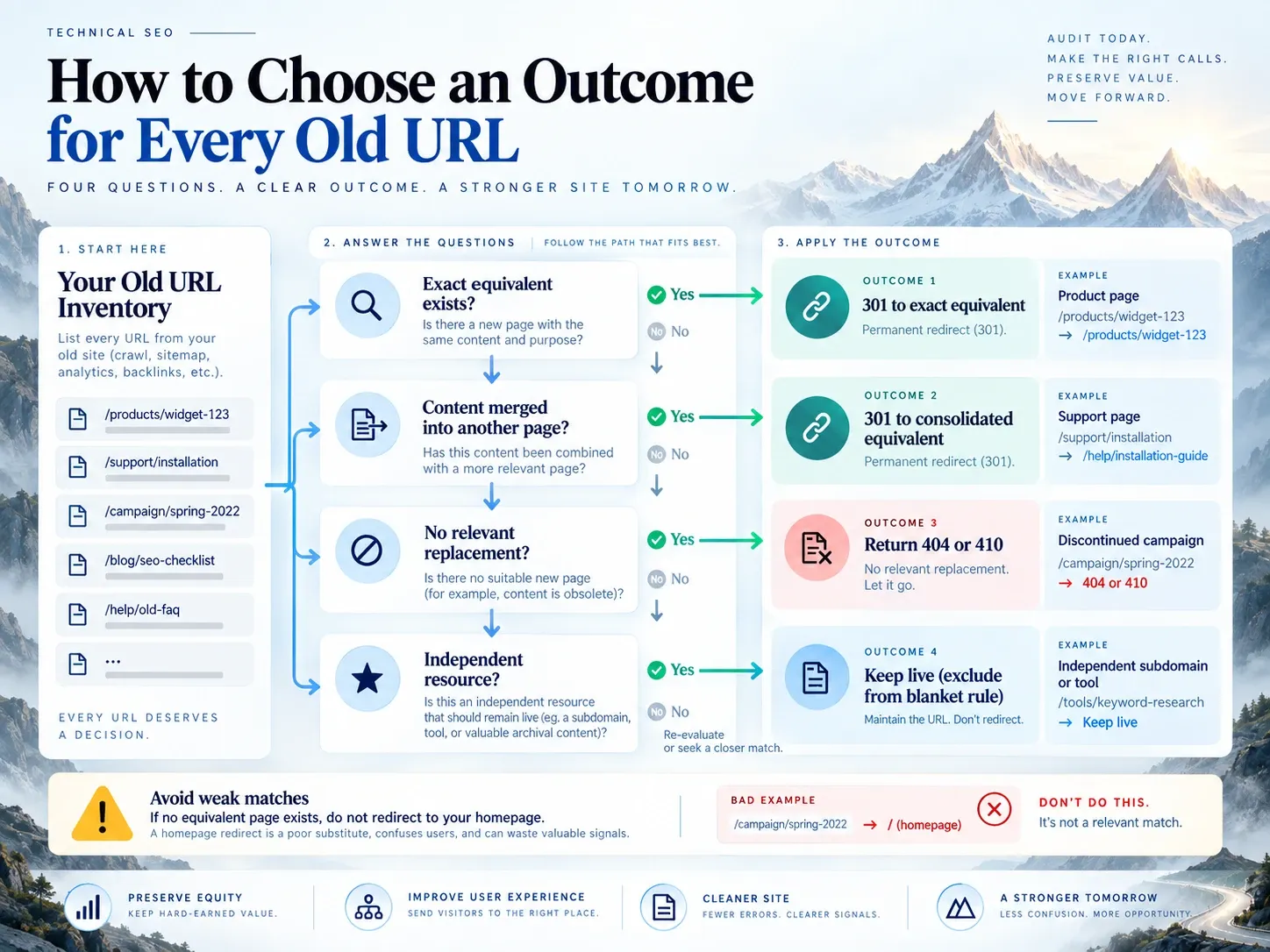
Assign one of four outcomes:
- Exact equivalent: permanent redirect to the same page on the new host.
- Consolidated equivalent: permanent redirect to the page that now contains the source’s useful content.
- No equivalent: return
404or410. - Independent resource: keep live and exclude it from the domain rule.
A broad path-preserving rule works only when the old and new structures match. If /support/widget-a/ moved to /help/widget-a/, blindly preserving the path creates a bad destination. If no equivalent remains, use the 404, 410, or redirect decision policy instead of forcing a weak match.
Use explicit exceptions before a general host rule. Review:
- legacy directories;
- mixed-case paths;
- slash variants;
- old file extensions;
- translated paths;
- media and documents;
- application routes;
- parameters that change content;
- tracking parameters that should not survive.
How to Normalize Source URLs Without Removing Meaning
Indexora’s source inventory contained tracking parameters, mixed-case paths, inconsistent slashes and legacy directories. The map removed parameters such as utm_*, gclid, fbclid and session identifiers only when they did not change the rendered page.
Use this decision order:
1. Is this host in migration scope?
2. Does the parameter change content or state?
3. Does path case change the resource?
4. What is the final slash convention?
5. Does an exact equivalent exist?
6. If not, did the content merge into another page?
7. If not, return 404 or 410.
Do not lowercase all paths unless the application treats them as equivalent. Do not copy authentication tokens, signed parameters or session identifiers into public redirect destinations. Query preservation is an application decision.
How to Deploy One Redirect Hop to the Final HTTPS URL
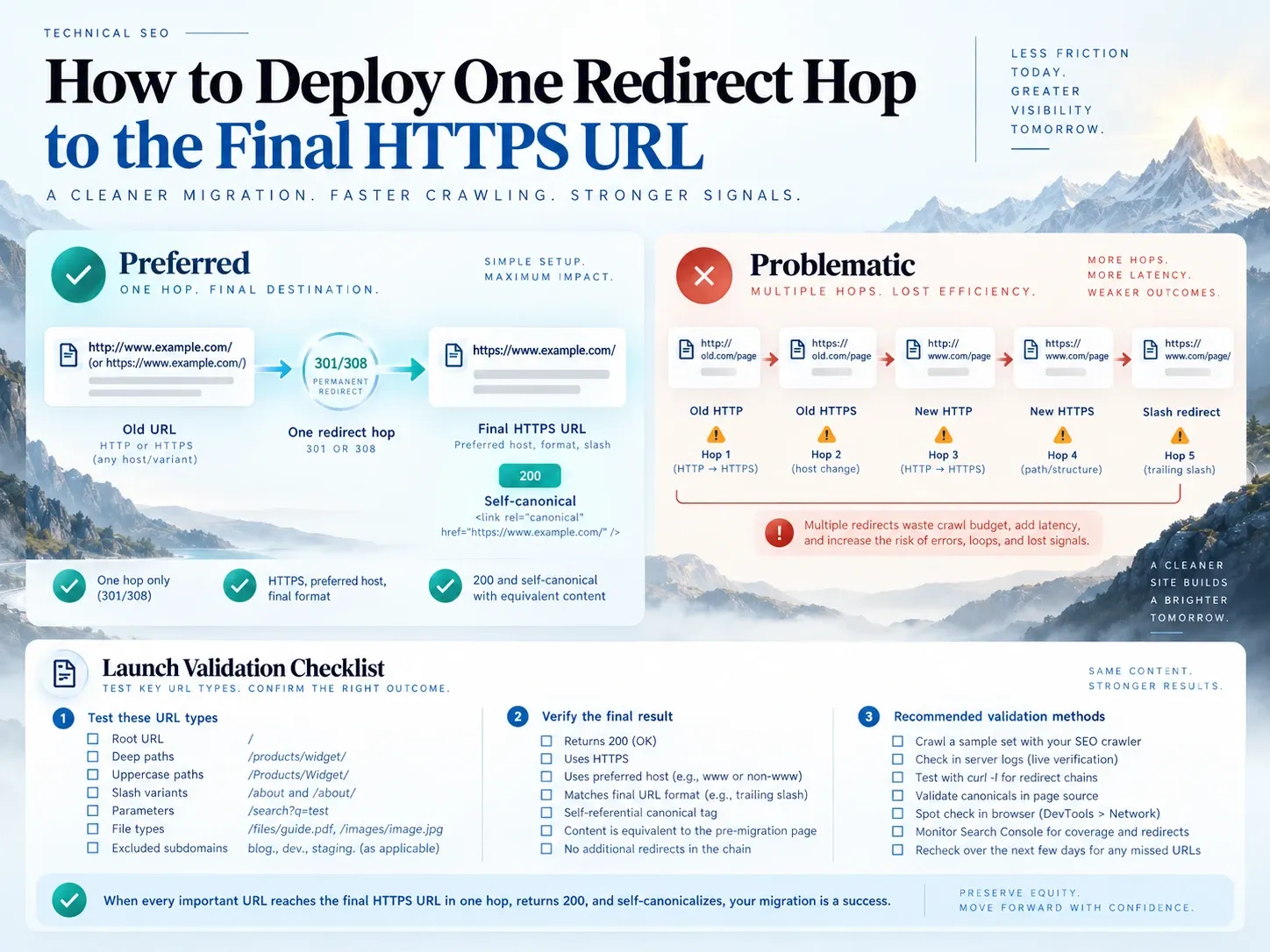
A clean route has this shape:
old HTTP or HTTPS URL
  -> one 301 or 308
new HTTPS preferred-host URL
  -> 200 and self-canonical
A weak route has several independent normalization rules:
old HTTP
  -> old HTTPS
  -> new HTTP
  -> new HTTPS
  -> slash-normalized URL
Google can follow redirect chains, but its site-move guidance recommends a direct destination and says avoid long chains. Users and monitoring systems also benefit from fewer requests. The HTTP redirect code guide separates permanent status from request-method behavior.
NGINX Host Move When Paths Match
server {
    listen 80;
    server_name old.example.com;
    return 301 https://www.example.com$request_uri;
}
The HTTPS old host also needs a valid certificate and an equivalent redirecting server block. Otherwise users can fail TLS before receiving the redirect.
Apache Host Move When Paths Match
Redirect permanent "/" "https://www.example.com/"A prefix redirect can carry path information, but verify the exact deployed result. For changed paths, use reviewed explicit mappings.
Edge Redirect Rules
An edge rule can answer before the origin application. That reduces origin dependency, but it also means application code cannot correct a bad edge destination. Record the rule owner, rule priority, cache behavior and rollback procedure.
Do not deploy all three examples for the same request. Choose one authoritative layer for each redirect policy. The URL redirect implementation guide compares edge, server, application, and CMS ownership.
How to Align Canonicals, Sitemaps, and Internal Links on the New Domain
Update:
- internal links;
- canonicals;
- hreflang;
- XML sitemaps;
- structured-data URLs;
- RSS and product feeds;
- ad and email destinations;
- robots rules;
- analytics configuration;
- consent and payment allowlists;
- profile and high-volume external links.
The new sitemap should contain final 200 URLs, not the redirecting old domain. The new page should canonicalize to itself. Old internal links make every navigation pay for a redirect and keep the retired host in normal crawl paths.
How to Test Domain Redirects Before Launch
Use the 404 bulk checker and a request matrix.
curl -sS -D - -o /dev/null "http://old.example.com/deep-page/"
curl -sS -L -D - -o /dev/null "http://old.example.com/deep-page/"
curl -sS -L "http://old.example.com/deep-page/" | grep -i 'canonical'
Test at least:
old HTTP root
old HTTPS root
top organic landing pages
deep paths
known uppercase paths
slash variants
content parameters
tracking parameters
PDF and image URLs
historical 404s
subdomains excluded from the move
A passing source:
- returns the approved permanent status;
- points directly to the mapped destination;
- finishes at
200; - uses HTTPS and the preferred host;
- lands on equivalent content;
- declares the final canonical;
- does not cross language or market boundaries by accident.
A successful homepage request proves only the homepage rule.
How to Monitor a Domain Move Before and After Launch
Before Launch
Save:
- Search Console performance for both hosts;
- indexed URL counts;
- sitemap state;
- top landing pages and query groups;
- crawl statistics;
- backlink targets;
- redirect-map test results;
- analytics landing-page behavior.
During Launch
Watch:
- server and edge error rates;
- redirect responses by source;
- final page status;
- live analytics;
- authentication, checkout and consent flows;
- unexpected traffic to excluded subdomains;
- cached old rules.
First 24 Hours
Investigate:
- any mapped source ending outside its approved target;
- any final
404,5xx,noindexor login response; - canonical values that still name the old domain;
- new sitemaps containing redirecting URLs;
- loops or multi-hop routes;
- sharp conversion failures on migrated landing pages.
Days 7 and 28
Compare the same query groups and landing pages across both properties. Look for old-host decay, new-host discovery, changed Google-selected canonicals, unmapped URLs and persistent old internal links. Use longer windows when the site is large or crawl demand is low.
Do not create a fixed recovery deadline from one case. Google says migration processing happens per URL and can take weeks or longer depending on site size and server speed.
How to Interpret Indexora’s Domain-Move Case Study
The old root host declining toward zero was expected because it was being retired. The destination remaining stable while crawl requests shifted was consistent with successful consolidation.
The evidence does not establish:
- that every redirect transfers all traffic;
- that a site should recover in 22 days;
- that a domain change and root-to-www consolidation have equal risk;
- that
301beats308for GET pages; - that crawl demand alone proves ranking-signal transfer;
- that a sitemap submission caused a particular recovery time.
The study is an observational case. Its strongest contribution is the measurement design: verify both properties, protect link-bearing URLs, use a one-hop map and compare user-facing performance with crawl behavior.
Common Domain-Forwarding Failures and Their Evidence
Every Old URL Redirects to the Homepage
Evidence: many source paths share one Location, and the final page does not contain their content. Repair the map. Google warns that irrelevant mass redirects can be treated as soft 404s.
Only the Root Path Redirects
Evidence: the old homepage moves, while deep URLs return 404, stay on the old host or reach a registrar error page. Configure path-level behavior.
DNS Changes, but HTTP Does Not
Evidence: the hostname resolves to new infrastructure but both hosts serve 200 copies. Add the intended redirect or canonical architecture. DNS does not communicate a URL move.
Edge and Origin Rules Create a Redirect Chain
Evidence: successive Location headers normalize protocol, host and path separately. Consolidate ownership and calculate the final URL once. Use the redirect-loop troubleshooting workflow when a route repeats instead of reaching the destination.
The Destination Canonical Points Back to the Old Domain
Evidence: final HTML or a Link header names the source domain. Fix the production base URL and purge any cached HTML.
Query Strings Are Copied Without Review
Evidence: tracking noise persists, or application state breaks. Classify parameters before writing a global rule.
Content and Architecture Change During the Move
Evidence: equivalent old and new pages cannot be compared because templates, navigation and content were also replaced. If possible, stage those changes separately. If not, document each change so diagnosis does not attribute everything to forwarding.
SEO Benefits and Limits of Domain Forwarding
The defensible domain forwarding SEO benefits are operational:
- old links and bookmarks still reach relevant content;
- duplicate hosts stop competing as live versions;
- one preferred URL accumulates current internal links;
- monitoring can distinguish retired and final states;
- migrations avoid unnecessary dead ends.
Forwarding is not a ranking boost. The redirect SEO impact depends on content equivalence, implementation and the rest of the migration.
Queries such as do redirects affect SEO, does domain forwarding affect SEO, and domain redirect SEO all need the same qualified answer: a correct permanent redirect supports a genuine move, while a bad map, conflicting signals or changed content can still reduce visibility.
A Domain-Forwarding Runbook
A safe move starts with an inventory, a page-level destination decision and one authoritative redirect layer. Prepare the new site, deploy one permanent hop to each final URL, update every signal you control and monitor both domains.
Indexora’s 22-day case supplies real observations for one root-to-www consolidation. Its value is the evidence trail, not a promise of identical results elsewhere. Build the same trail for your migration before drawing a conclusion about domain forwarding SEO.
Frequently Asked Questions About Domain Forwarding
Should Every Old Page Redirect?
No. Redirect pages with a relevant successor. Return 404 or 410 when nothing equivalent exists. Keep independent resources live.
Should Parameters Always Be Preserved?
Preserve parameters that change content or required state. Remove tracking noise only after confirming that analytics, ecommerce and application behavior will still work.
Can Several Domains Forward to One Site?
They can, but each valuable source page still needs a relevant target. Keyword domains forwarded to one homepage do not create useful content or automatic authority.
How Long Should Redirects Remain?
Google recommends keeping site-move redirects for at least one year. Users may follow old links for much longer, so stable redirects can remain indefinitely when maintenance cost is low.
Is Registrar Forwarding Enough?
Only if the public behavior passes the complete URL matrix. Many control panels hide status, path, HTTPS and query details. Test them.