

Use 301 or 308 when the old URI has moved permanently. Use 302 or 307 when the original URI remains the long-term address. Use 303 when the client should retrieve a separate result with GET after another operation, usually a POST.
Two questions determine the code:
- Is the move permanent or temporary?
- Must the redirected request preserve its method and body?
SEO primarily cares about the first question for public pages. Application correctness and security often depend on the second.
HTTP Redirect Codes Compared by Duration and Request Method
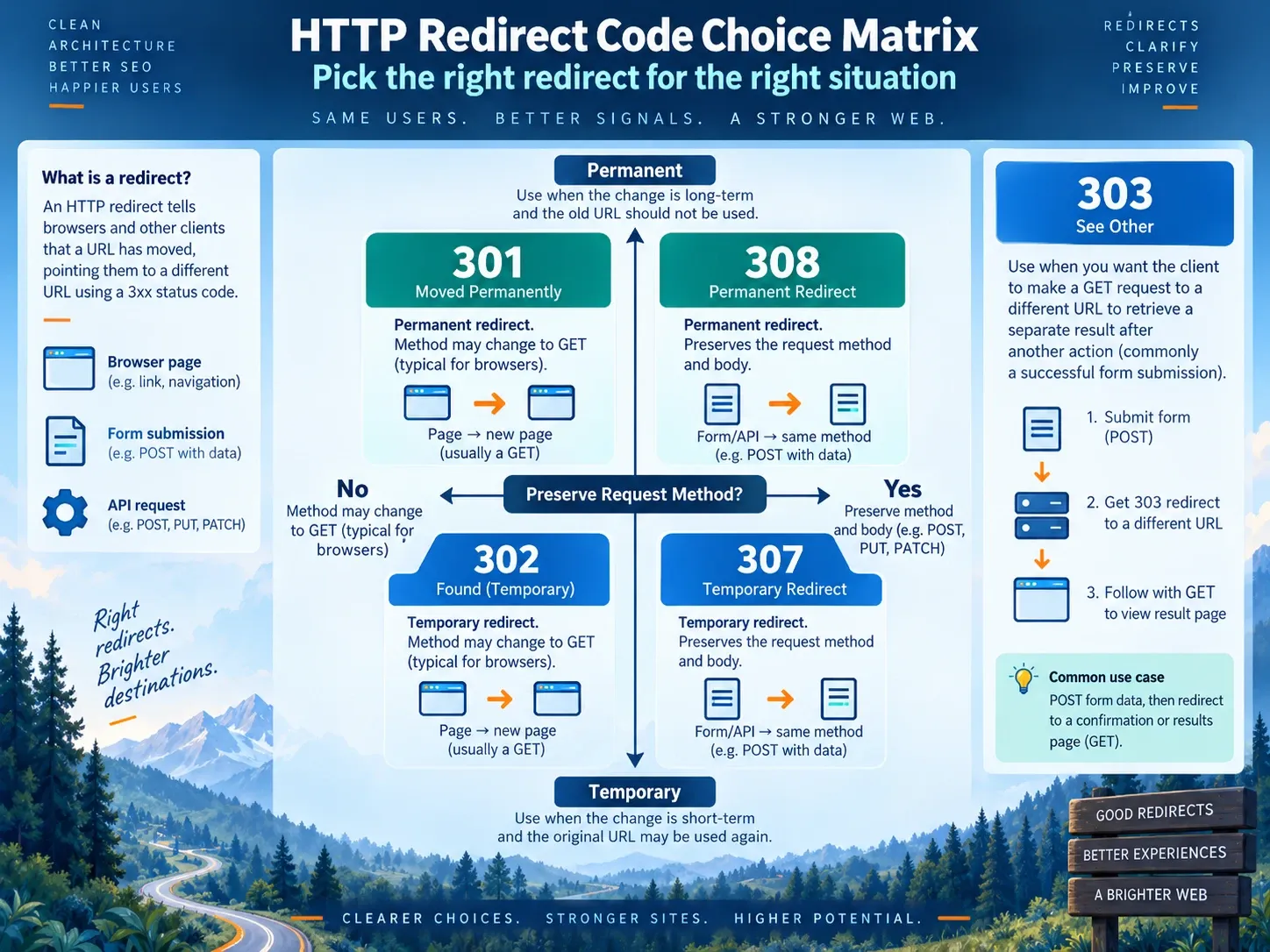
| Code | HTTP meaning | Duration | Redirected method | Typical use | Common mistake |
|---|---|---|---|---|---|
301 |
Moved Permanently | Permanent | POST may become GET | Page, path, host or domain move | Used for a route that will return |
302 |
Found | Temporary | POST may become GET | Maintenance, temporary campaign, test route | Left in place for a permanent migration |
303 |
See Other | Indirect result | Follow-up uses GET or HEAD | Post/Redirect/Get confirmation | Used as a page-migration code |
307 |
Temporary Redirect | Temporary | Method and body preserved | Temporary API or form route | Sends sensitive POST data to an unsafe target |
308 |
Permanent Redirect | Permanent | Method and body preserved | Permanent non-GET endpoint move | Selected because it seems newer |
RFC 9110 explains the historical method behavior. Clients may change POST to GET after 301 or 302. 307 and 308 preserve the method. 303 explicitly directs the client to retrieve another resource with GET or HEAD.
A status code does not prove that the target is relevant, available or indexable. It describes the response from one step.
Why 301 and 302 Differ: The Source URL’s Future
The 301 and 302 redirect difference is easier to decide by asking what happens when the routing condition ends.
Use 301 when:
- the old page will not return;
- a permanent URL structure changed;
- HTTP or an alternate host consolidates into one version;
- a domain moved;
- content merged into a stable successor;
- future internal links should use the target.
Use 302 when:
- maintenance will end and the source will return;
- an experiment temporarily routes users;
- stock, capacity or service conditions can change;
- a campaign handoff has a removal date;
- the target is not the new permanent identity of the source.
For SEO 302 vs 301, write one sentence in the implementation record:
When this condition ends, the durable URL should be __________.If the answer is the target, use a permanent code. If the answer is the source, use a temporary code.
Google’s redirect guidance says permanent redirects signal that the target should become canonical. Temporary redirects do not provide the same replacement signal. Other canonicalization evidence can still affect the URL Google selects.
How to Configure One Direct 301 for a Permanent SEO Move

A public content move should look like this:
GET /old-page/ HTTP/1.1
Host: example.comHTTP/1.1 301 Moved Permanently
Location: https://example.com/new-page/The target should answer:
HTTP/1.1 200 OK
Content-Type: text/html; charset=utf-8
Its HTML should name itself as canonical:
<link rel="canonical" href="https://example.com/new-page/">Before launch, verify:
- the source should disappear;
- the target completes the same user task;
Locationis the final HTTPS URL;- the source reaches it in one hop;
- the target returns
200; - the target is indexable;
- internal links and sitemaps use the target directly;
- canonical, hreflang and structured data use the final URL;
- rollback and cache behavior are documented.
The supposed 301 redirect SEO penalty is not a separate punishment attached to the status. Visibility can still fall when the new content is weaker, mappings are irrelevant, chains or loops exist, final pages are blocked, or internal signals continue to support the old URL. Use the redirect-loop troubleshooting workflow when a route repeats or exceeds its approved hop count.
Google’s site-move documentation states that permanent redirects do not cause a loss in PageRank. That does not make two non-equivalent pages interchangeable. For host-wide moves, use the domain-forwarding migration guide to build page-level mappings.
When a 302 Redirect Is Correct for SEO
Valid 302 redirect SEO cases need a clear end condition.
| Scenario | Source after condition ends | Target role | Required record |
|---|---|---|---|
| Scheduled maintenance | Returns | Temporary explanation | Start and end time |
| A/B test | Remains canonical | Variation | Experiment owner and stop rule |
| Capacity route | Returns | Temporary service location | Health condition |
| Seasonal handoff | Returns | Current campaign | Expiry date |
| Temporary regional outage | Returns | Status or alternate service | Region and incident owner |
Google recommends temporary redirects when an A/B test must route users to a variation. The source remains the intended long-term URL.
Do not use a 302 indefinitely because a CMS defaulted to it. Do not change it to 301 merely because the route has existed for several weeks. Decide the underlying product state, then make the response honest.
The inverse search, SEO 301 vs 302, has the same answer. Permanence is about intent, not elapsed time alone.
When to Use 307 for Temporary Method-Preserving Redirects
A 307 Temporary Redirect requires the redirected request to retain its method and body.
POST /checkout-step
  -> 307 Location: /checkout-maintenance
  -> POST /checkout-maintenance with the original body
That makes 307 redirect SEO mostly a protocol question. Public GET pages can often use 302 for a temporary route. Forms, uploads, APIs and checkout operations need a decision about what the target may safely receive.
Use 307 only when:
- the move is temporary;
- the request can be non-GET;
- the target is designed for the same method;
- the body can be sent to that target;
- authentication and authorization still apply;
- retries will not duplicate an unsafe operation.
Never redirect a credential-bearing or payment POST to an unrelated origin. RFC 9110 says clients should consider removing sensitive fields such as Authorization and Cookie when redirects cross origins. Applications must not rely on inconsistent client behavior for security.
When to Use 308 for Permanent Method-Preserving Redirects
308 Permanent Redirect combines permanence with required method preservation.
PUT /api/v1/resource/42
  -> 308 Location: /api/v2/resources/42
  -> PUT /api/v2/resources/42 with the original body
Use it for a permanently moved API, upload or non-GET endpoint whose target accepts the same request. For ordinary public pages requested with GET, 301 is familiar and sufficient.
Do not choose 308 because it sounds stronger for SEO. The choice exists to protect request semantics.
RFC 7538 originally defined 308 as the permanent counterpart to 307; RFC 9110 now includes it in the main HTTP semantics specification.
When to Use 303 After a Form or API Operation
303 See Other fits Post/Redirect/Get:
POST /orders
  -> server creates or processes the order
  -> 303 Location: /orders/confirmation/123
  -> GET /orders/confirmation/123
The follow-up retrieves a separate representation. Refreshing the confirmation page does not resubmit the original form.
The 303 redirect SEO question is secondary. Confirmation pages may require authentication, noindex or user-specific access. 303 does not replace 301 for a moved article, product or category.
Use 201 Created with a Location header when the API semantics call for returning the created resource directly. Use 303 when the client should see another resource through GET. These are application decisions, not attempts to transfer page rankings.
How to Test Redirect Method Handling on a Safe Staging Endpoint
Do not test POST, PUT or DELETE redirects against a live checkout, account or destructive API. Build a staging echo endpoint that records:
request_id
timestamp
source_url
source_method
source_content_type
source_body_hash
redirect_status
location
target_url
target_method
target_content_type
target_body_hash
authorization_present
cookie_present
The protocol:
- Send GET, HEAD and a harmless POST to each status.
- Record the source response and exact
Location. - Follow the redirect with a normal client configuration.
- Record the method and body received by the target.
- Repeat across supported clients when compatibility matters.
- Test same-origin and authorized cross-origin behavior separately.
- Remove the endpoint and test data after the review.
A curl POST probe can use --data, which selects POST:
curl -sS -L \
  --data 'probe=redirect-test' \
  "https://staging.example.com/test/307"
Do not add -X POST when the purpose is to observe the client’s normal redirect method handling. Forcing a method can invalidate the test. Do not use curl flags such as --post301 or --post302 unless you are deliberately testing that override.
The echo endpoint must not log secrets or raw personal data. A body hash is often enough to confirm preservation.
How to Verify GET Redirects Without Trusting the UI
CMS and CDN labels such as “permanent,” “forward” or “temporary” are not the response.
# First GET response
curl -sS -D - -o /dev/null "https://example.com/old-page/"

# Full chain
curl -sS -L -D - -o /dev/null "https://example.com/old-page/"

# Final page metadata
curl -sS -L "https://example.com/old-page/" | grep -i 'canonical'
curl -I sends HEAD. A framework can handle HEAD and GET differently, so a HEAD result is not a substitute for the GET route users and crawlers normally request.
Record:
requested URL
initial method
initial status
Location
hop count
final URL
final status
final canonical
Cache-Control
Age
rule owner
Use the bulk redirect checker for a visual trace and keep bulk evidence in a machine-readable file.
How Redirect Status Codes and Canonical Signals Differ
The redirect answers a request. The canonical identifies the preferred URL for duplicate or similar content. The canonical-versus-redirect guide covers cases where the source remains accessible.
A clean permanent page move:
old URL -> 301 -> final URL
final URL -> 200 and self-canonical
sitemap -> final URL
internal links -> final URL
A clean temporary route:
source URL -> 302 or 307 -> temporary target
source remains the long-term URL
supporting search signals continue to identify the source
A conflict:
old URL -> 301 -> new URL
new URL canonical -> old URL
Fix the system rather than adding another redirect. The final page should not nominate the retired source. Use the URL redirect implementation guide to assign one authoritative response layer.
How to Plan Redirect Caching and Rollback
Permanent redirects can be cached by browsers and intermediaries. A corrected server rule may appear broken to a client that still holds the old response.
Before a broad launch:
- test on nonproduction paths;
- record existing cache headers;
- document CDN purge controls;
- know which layer owns the response;
- keep a reviewed rollback mapping;
- avoid prematurely long cache lifetimes while the rule is being verified;
- test a clean client after rollback;
- confirm that service workers do not serve stale routing code.
A rollback is not always a matter of deleting one rule. The old page, internal links, sitemap and canonical may also need restoration.
Four Redirect Failures That Look Like an SEO Penalty
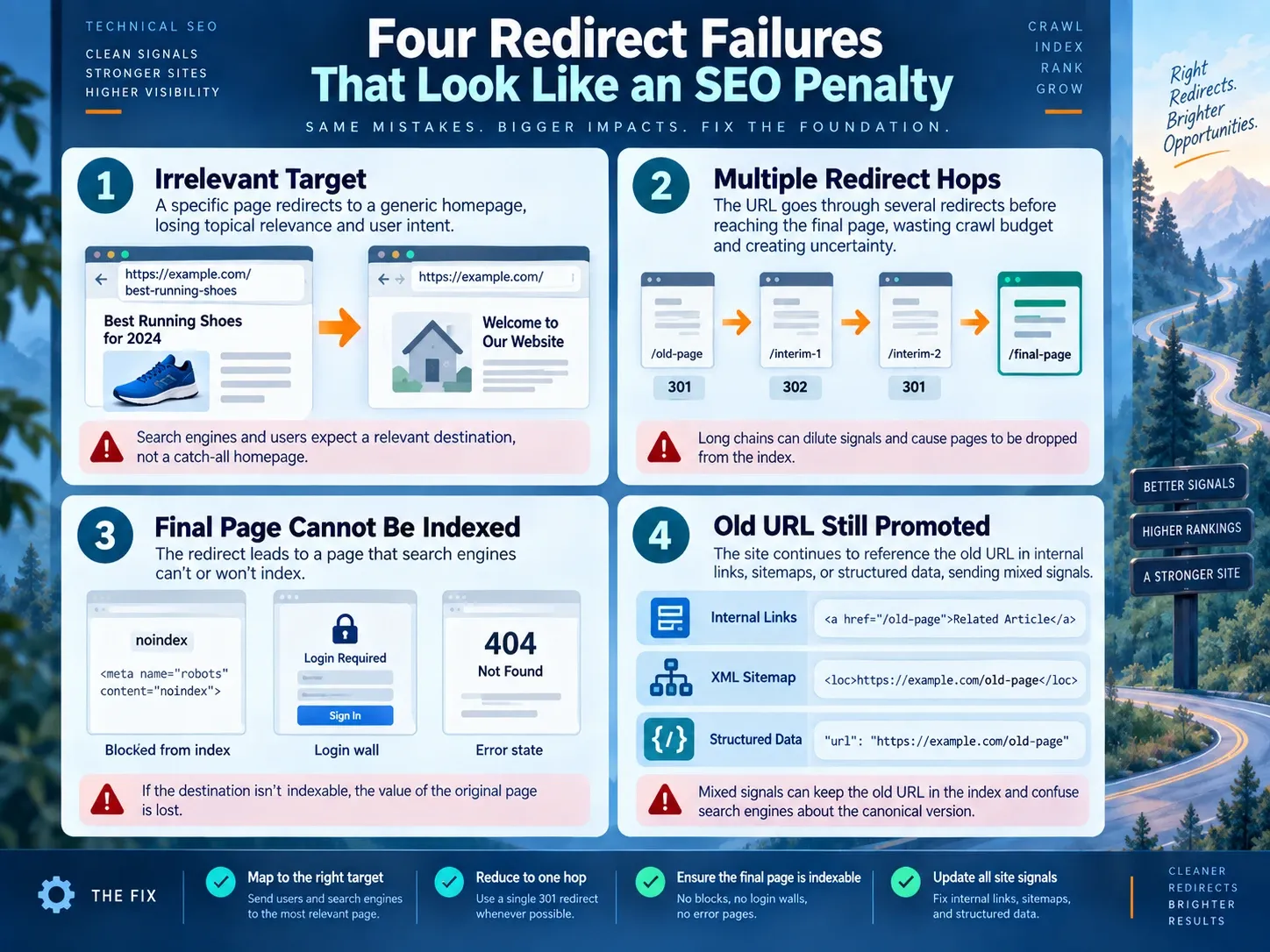
The Target Is Not Equivalent
An old technical guide lands on a generic homepage. The status is permanent, but the content relationship is weak. Map to a close successor or return a missing-resource status.
The Route Contains Several Hops
Protocol, host, path and slash normalization happen separately. Point the source directly to the final URL.
The Final Page Cannot Be Indexed
The destination returns noindex, is blocked behind login, errors or canonicalizes elsewhere. Fix the destination state.
The Site Still Promotes the Source
Internal links, sitemaps, hreflang or structured data name the old URL. Update them in the same release.
These defects answer are redirects bad for SEO more usefully than a yes or no. A necessary direct redirect describes a real move. A bad implementation creates avoidable loss and ambiguity.
What Indexora’s 301 Study Proves and Does Not Prove
Indexora’s 22-day root-to-www study observed one permanent host consolidation. It used two Search Console properties, crawl statistics and about 5,200 referring links. The destination’s rolling 28-day view showed 8.23K clicks and 70.2K impressions while the old host declined toward zero.
The pattern was consistent with a clean permanent move. The study did not compare 301, 302, 303, 307 and 308. It did not test non-GET method handling. Use it as evidence for the monitoring design, not as a status-code experiment.
How to Choose a Redirect Status With a Release Record
Use this form:
Source:
Target:
Why redirect:
Permanent or temporary:
Date temporary condition ends:
Possible request methods:
Must body be preserved:
Target accepts those methods:
Cross-origin:
Sensitive headers:
Cache policy:
Rule owner:
Rollback owner:
Expected final status:
SEO signals updated:
Evidence URL:
Then choose:
Permanent + GET page                -> 301
Temporary + GET page                -> 302
Temporary + preserve method/body    -> 307
Permanent + preserve method/body    -> 308
Operation complete + retrieve result -> 303
No relevant replacement             -> 404 or 410
How to Choose the HTTP Status That Matches the Change
Pick the status from two facts: duration and request semantics. Use 301 or 308 for permanent moves, 302 or 307 for temporary routes, and 303 for a separate GET result after an operation.
Then test the public response, final target, method behavior, cache and rollback. Correct status semantics do not rescue an irrelevant destination, and an SEO label does not override HTTP. When no relevant target exists, follow the 404, 410, or redirect decision policy.
Frequently Asked Questions About HTTP Redirect Codes
Can Google Treat a Long-Running 302 as Permanent?
Search systems consider more than the redirect. Do not depend on reinterpretation. If the move is permanent, return a permanent code and update the site’s signals.
Is 307 Better Than 302 for SEO?
No. Both describe temporary routing. 307 exists to preserve method and body.
Is 308 Better Than 301?
No for ordinary GET pages. 308 is the correct choice when a permanent non-GET move must preserve the request.
Can a 301 and 302 Be Cached?
Caching depends on status semantics and response headers. Inspect the real Cache-Control, shared-cache behavior and client. Treat a broad permanent redirect as a change that may persist.
Can HEAD and GET Return Different Redirect Codes?
They can when framework routes or middleware differ. That is usually a defect for a page migration. Test the GET response and use HEAD only as an additional check.
Should Authorization Cross to Another Host?
Do not design a redirect that depends on clients forwarding credentials to a different origin. Review HTTP client behavior and implement authentication explicitly at the target.