
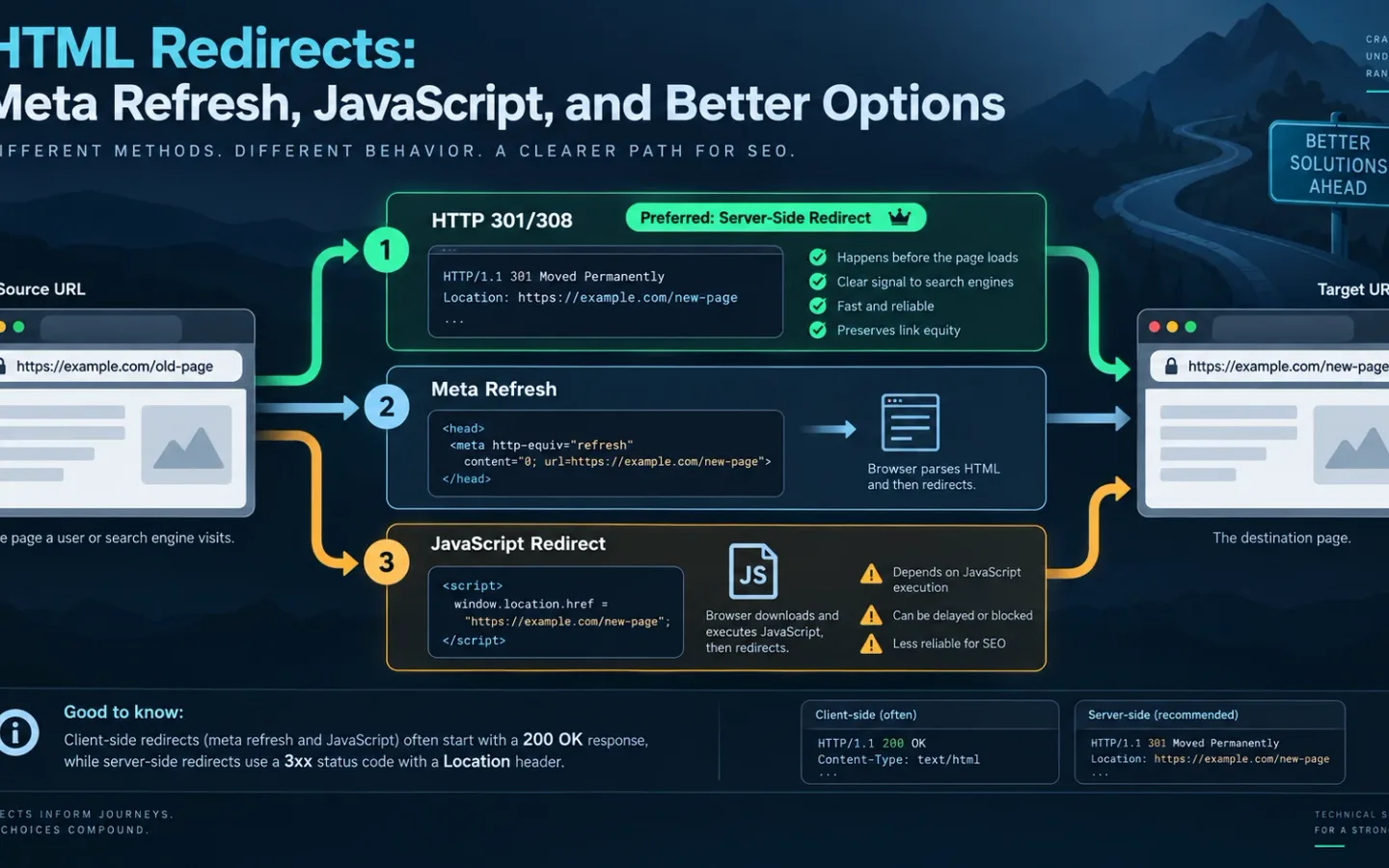
An HTML redirect moves the browser after it receives an HTML document, usually through a meta refresh element. The source commonly returns 200 OK, so the redirect is invisible in a header-only status report. Use it only when the host cannot issue an HTTP redirect. For a permanent move, a server-side 301 or 308 gives users, crawlers, caches and monitoring tools the move instruction in the first response.
JavaScript can also change the current location, but it adds an execution dependency. A blocked script, rendering failure, consent gate or syntax error can leave the visitor and crawler on the source page.
How HTTP, Meta Refresh, and JavaScript Redirects Differ
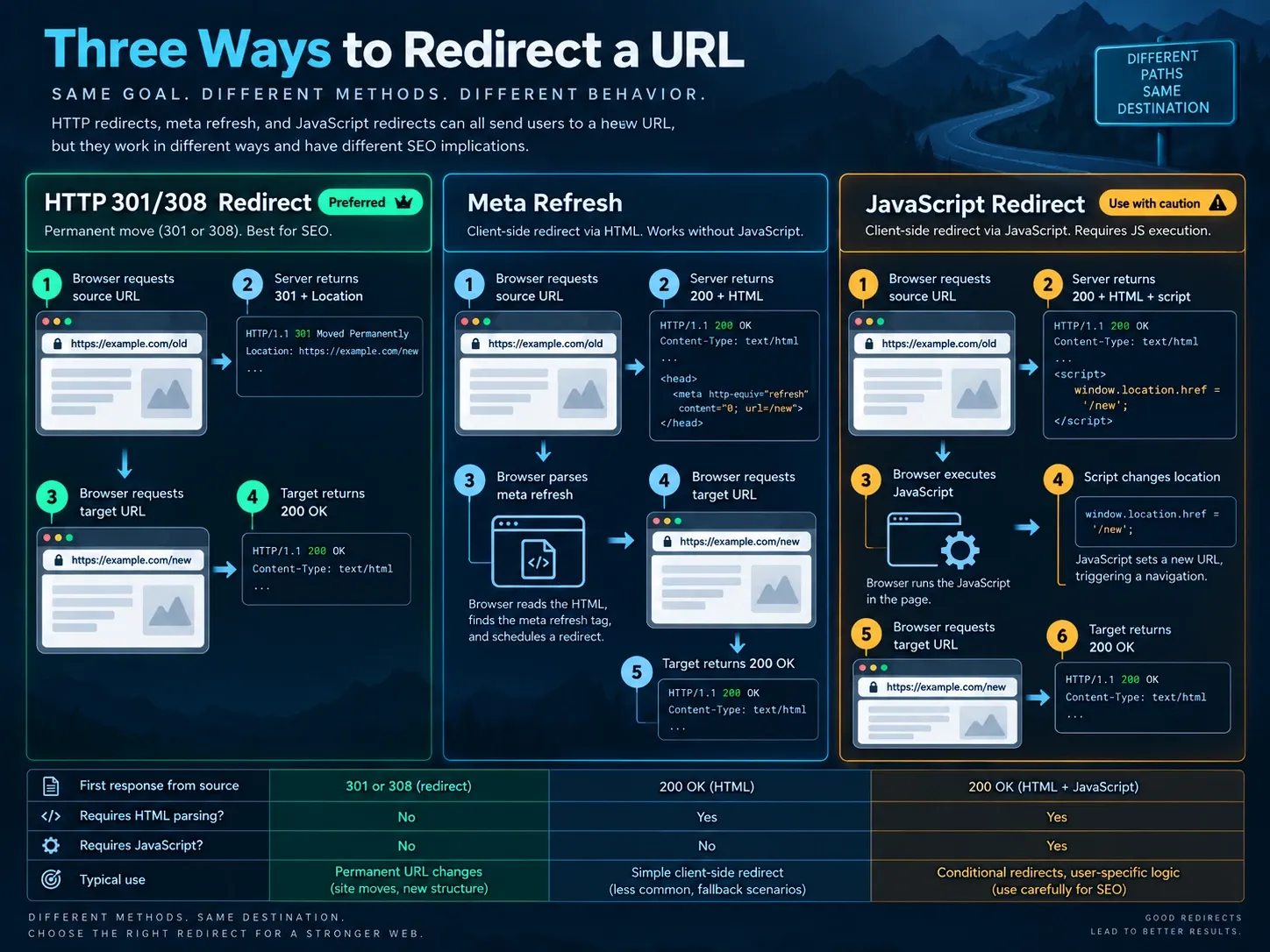
A browser can appear to perform the same movement through different systems.
HTTP redirect
request source
  -> source returns 301 + Location
  -> browser requests target
  -> target returns 200

Meta refresh
request source
  -> source returns 200 + HTML
  -> browser parses <meta http-equiv="refresh">
  -> browser requests target
  -> target returns 200

JavaScript redirect
request source
  -> source returns 200 + HTML + script
  -> browser executes script
  -> script changes location
  -> browser requests target
  -> target returns 200
The initial status answers which layer issued the move. It does not describe everything a browser may do after receiving content.
| Method | First response | Requires HTML parsing | Requires JavaScript | Normal permanent use |
|---|---|---|---|---|
HTTP 301 or 308 |
3xx plus Location |
No | No | Preferred |
| Instant meta refresh | Usually 200 |
Yes | No | Fallback |
| Delayed meta refresh | Usually 200 |
Yes | No | Temporary or interstitial behavior |
| JavaScript location | Usually 200 |
Yes | Yes | Last fallback |
| Manual anchor | Usually 200 |
Yes | No | Navigation, not automatic redirect |
Searches for redirection HTML, HTML redirection, URL redirect in HTML and redirect URL in HTML usually refer to meta refresh. They do not refer to a Location response header, even when application code produces HTML pages.
How to Choose Between Server-Side, Meta Refresh, JavaScript, and Links
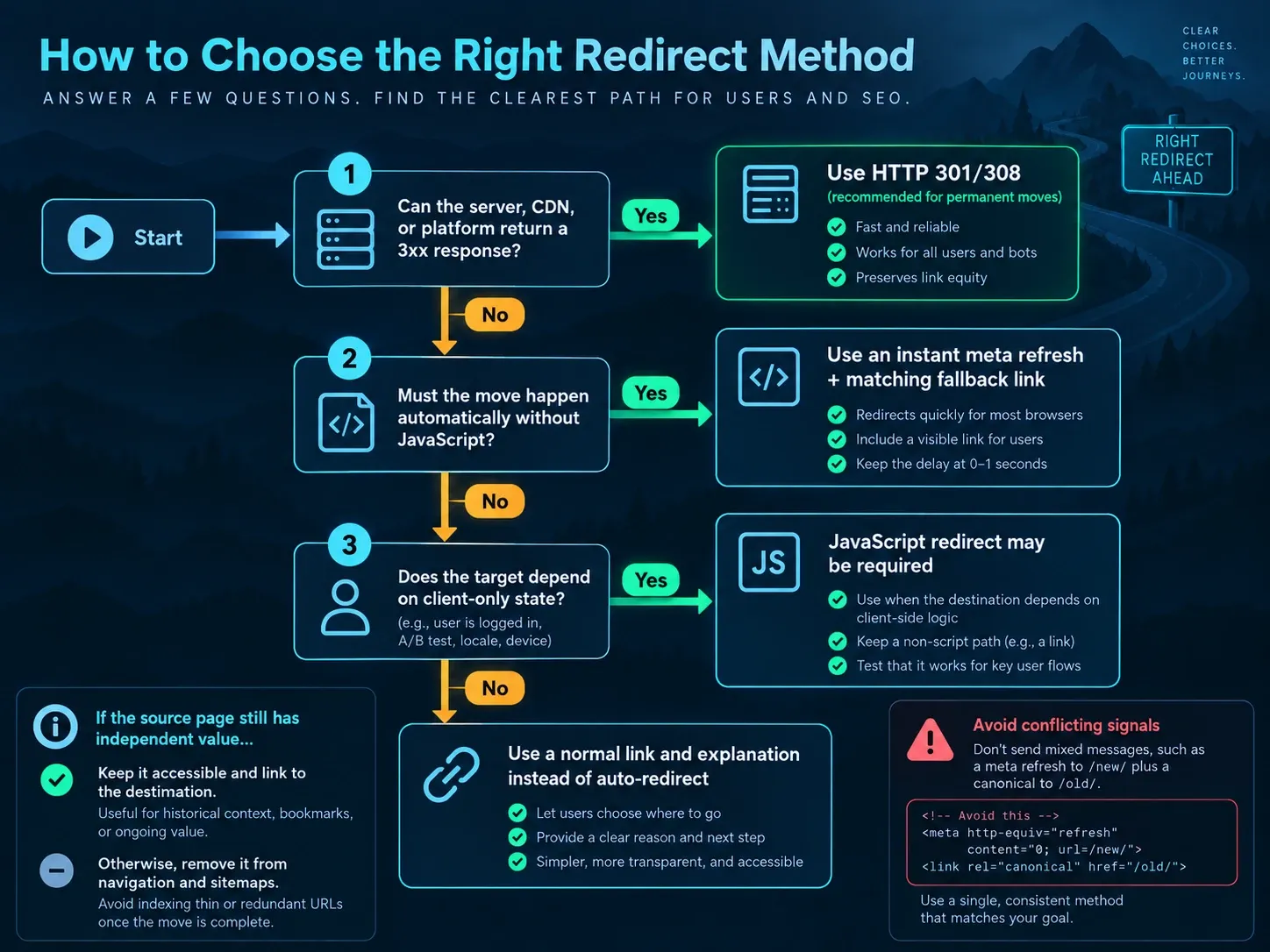
Use this decision sequence:
- Can the server, CDN, platform or application return a
3xxresponse?- Yes: use the appropriate HTTP status.
- No: continue.
- Must the move happen automatically without script execution?
- Yes: use an instant meta refresh plus a normal fallback link.
- No: continue.
- Does the target depend on client-only state that cannot be handled safely on the server?
- Yes: JavaScript may be required. Keep a non-script path.
- No: use a link and explanation instead of automatic navigation.
- Does the source still have independent value?
- Yes: keep it accessible and link to the other page.
- No: remove it from navigation and sitemaps.
Do not use a client-side redirect because it is faster to paste. Use it when infrastructure access is genuinely unavailable. If you control the response layer, follow the URL redirect implementation guide and choose the status with the HTTP redirect code guide.
How to Implement an Instant Meta Refresh With a Fallback Link
A complete HTML redirect page can be small:
<!doctype html>
<html lang="en">
  <head>
    <meta charset="utf-8">
    <meta
      http-equiv="refresh"
      content="0; url=https://example.com/new-page/"
    >
    <title>This page has moved</title>
  </head>
  <body>
    <p>
      This page moved to
      <a href="https://example.com/new-page/">the new address</a>.
    </p>
  </body>
</html>
The value before url= is the delay in seconds. 0 starts navigation as soon as the browser processes the tag.
Google’s redirect documentation says it interprets an instant meta refresh as permanent and a delayed refresh as temporary. Google still recommends server-side redirects where possible.
Put the element in <head>. Use an absolute destination when host or protocol could be ambiguous. Keep the visible anchor’s href identical to the refresh target.
Avoid Adding a Conflicting Canonical
A canonical tag does not move users. If you add one to an HTML transition page, it must name the same preferred target. The destination should self-canonicalize. The canonical-versus-redirect guide covers conflicting URL signals in detail.
Avoid this contradiction:
<meta http-equiv="refresh" content="0; url=https://example.com/new/">
<link rel="canonical" href="https://example.com/old/">
The refresh sends the visitor to /new/, while the canonical nominates /old/. If the source permanently moved, an HTTP redirect remains the cleaner solution.
How the HTTP Refresh Header Works
A server can return:
HTTP/1.1 200 OK
Refresh: 0; url=https://example.com/new-page/
Content-Type: text/html; charset=utf-8
This is not a 3xx redirect. It is the HTTP-header equivalent of meta refresh. It can be useful when a restricted application can set arbitrary headers but not the status.
Do not confuse Refresh with Location. A client processes them under different semantics. Monitoring must record the initial 200 and the refresh instruction separately.
When a Meta Refresh Is an Acceptable Fallback
Meta refresh is reasonable when all of these are true:
- the platform cannot issue a server or edge redirect;
- the destination is final and available;
- the delay is zero for a permanent move;
- a crawlable fallback link reaches the same target;
- the source is removed from internal links and sitemaps;
- the final page has the correct canonical;
- the transition page contains no form state that can be lost;
- the page works for users who do not complete automatic navigation.
Examples include a static file host with no redirect configuration, a locked legacy publishing system or an old document package that can only replace its HTML file.
A countdown page is different. If users need time to read a warning, choose a manual link or an application flow designed for that task. Do not make people race a timer.
Accessibility Risks of Timed Redirects
MDN’s http-equiv reference warns that refresh intervals can be too short for users to consume the page.
A timed change can:
- move focus without warning;
- interrupt screen-reader output;
- remove content before it is understood;
- make keyboard navigation unpredictable;
- lose form input;
- create a repeated navigation loop.
For a moved page, use an immediate transition with a clear link rather than a delay. For a warning or consent task, let the user initiate the next step.
Do not claim accessibility because a fallback link exists. Test focus, keyboard navigation, zoom, reduced motion expectations and screen-reader behavior on the actual page.
JavaScript Redirects and Their Failure Modes
The simplest form is:
<script>
  window.location.replace("https://example.com/new-page/");
</script>
replace() removes the source document from the current session history. Assigning to window.location.href usually leaves it in history. Neither creates an HTTP 301; the source can still return 200.
Google processes JavaScript after crawling and says a JavaScript redirect may be missed if rendering fails. Its JavaScript redirect guidance treats this method as a fallback.
A script can fail because:
| Failure | Evidence |
|---|---|
| Content Security Policy blocks inline script | Browser console CSP error |
| Consent manager delays execution | Network and event timeline |
| Syntax or dependency error stops the bundle | Console stack trace |
| Script runs only after a click | No automatic navigation in a fresh load |
| Hydration replaces route state | Source and rendered DOM disagree |
| Service worker serves stale HTML | Cache and service-worker inspection |
| Browser extension changes behavior | Clean-profile comparison |
| Crawler does not complete rendering | Rendered HTML inspection |
| Target depends on missing client state | Application error or fallback route |
Put redirect logic as early and independently as possible if JavaScript is unavoidable. Do not make it wait for analytics, advertising, a UI framework or a third-party bundle.
How SEO-Friendly JavaScript Links Differ From Redirects
A crawlable link uses an anchor with a real href:
<a href="/new-page/">New page</a>A click handler on a div is not an equivalent link:
<div onclick="location.href='/new-page/'">New page</div>An SEO JavaScript links audit asks whether destinations are discoverable through crawlable anchors. A JavaScript redirect asks whether the current document automatically sends a client elsewhere. Keep those tests separate.
If both pages remain useful, use a normal link. If the source was replaced, issue an HTTP redirect. Do not turn site navigation into automatic routing.
Why Conditional JavaScript Redirects Are Hard to Audit
Client code can send users elsewhere based on device, language, referrer, geolocation or user agent. That creates inconsistent destinations and difficult debugging.
For locale routing:
- publish a visible language selector;
- use localized URLs;
- add correct hreflang annotations;
- remember the user’s explicit choice;
- avoid trapping users in a guessed market;
- keep each regional URL directly accessible.
For mobile layouts, use responsive design or a documented mobile URL architecture rather than a user-agent script that hides the destination.
For authentication, route on trusted server-side session state. A client script should not decide access control.
A redirect that sends crawlers and users to materially different content can resemble cloaking. The practical problem appears earlier: nobody can reproduce one stable source-to-target relationship.
How to Compare the Raw HTML, Rendered DOM, and Browser Navigation
An HTML or JavaScript redirect requires three inspections.
Inspect the Raw Response
curl -sS -D headers.txt -o source.html \
  "https://example.com/old-page/"
Review:
HTTP status
Location header
Refresh header
Content-Type
Cache-Control
X-Robots-Tag
If the response is 200, no HTTP redirect occurred at that step.
Inspect the Original HTML
grep -i 'http-equiv' source.html
grep -i 'canonical' source.html
grep -i 'window.location' source.html
The original document can differ from the browser’s live DOM.
Inspect the Rendered Page
In a clean browser session:
- Open the Network panel and preserve the log.
- Request the source directly.
- Identify the document response.
- Record when the next navigation starts.
- Inspect console errors.
- Compare the initial source with the rendered
<head>. - Repeat with JavaScript disabled.
- Test keyboard and assistive behavior.
- Open the destination directly and verify its final state.
A server-side redirect appears as a document request with a 3xx response. A meta refresh or script creates the next navigation after a 200 document.
How to Test Redirect Caches and Stale Client Code
A transition page can stay in a browser, CDN, service worker or offline cache after the target changes.
Record:
Cache-Control,Age,ETagandLast-Modified;- CDN cache status;
- service-worker registrations;
- HTML build version;
- target URL embedded in the source;
- purge and rollback steps.
A cached JavaScript bundle can contain an old destination even when the HTML is current. A cached HTML page can keep refreshing to a removed URL. Purge the correct layer instead of adding another redirect to counteract stale content.
Permanent HTTP redirects can also be cached. The difference is observability: their status and Location appear in the first response.
Common HTML Redirect Failure Modes
The Delay Is Greater Than Zero
Google can treat it as temporary. Users must wait and accessibility suffers. Use zero for a fallback permanent move or replace the behavior with an HTTP redirect.
The Target Has Another Redirect
The client first loads the transition page and then enters a server chain. Point the instruction directly to the final 200 URL.
The Fallback Link Differs From the Automatic Target
Script-disabled users reach another page, and audits report two destinations. Generate both values from one trusted configuration.
The Old Page Remains in Navigation
Every ordinary visit reloads the transition document. Replace internal links and remove the source from the sitemap.
JavaScript Runs After Consent
Users who reject or delay consent may never move. Redirect logic should not depend on marketing consent.
The Page Enters a Loop
The target or another script sends the browser back to the source. Capture the complete Network sequence and find the first repeated URL. Then use the redirect-loop troubleshooting workflow to assign each navigation to its owning layer.
The Source Contains Indexable Content
The 200 page may remain a viable search result. If it has independent value, keep it and link out. If it was permanently replaced, use an HTTP redirect where possible. If no relevant replacement exists, follow the 404, 410, or redirect decision policy.
Release Criteria for an HTML Redirect
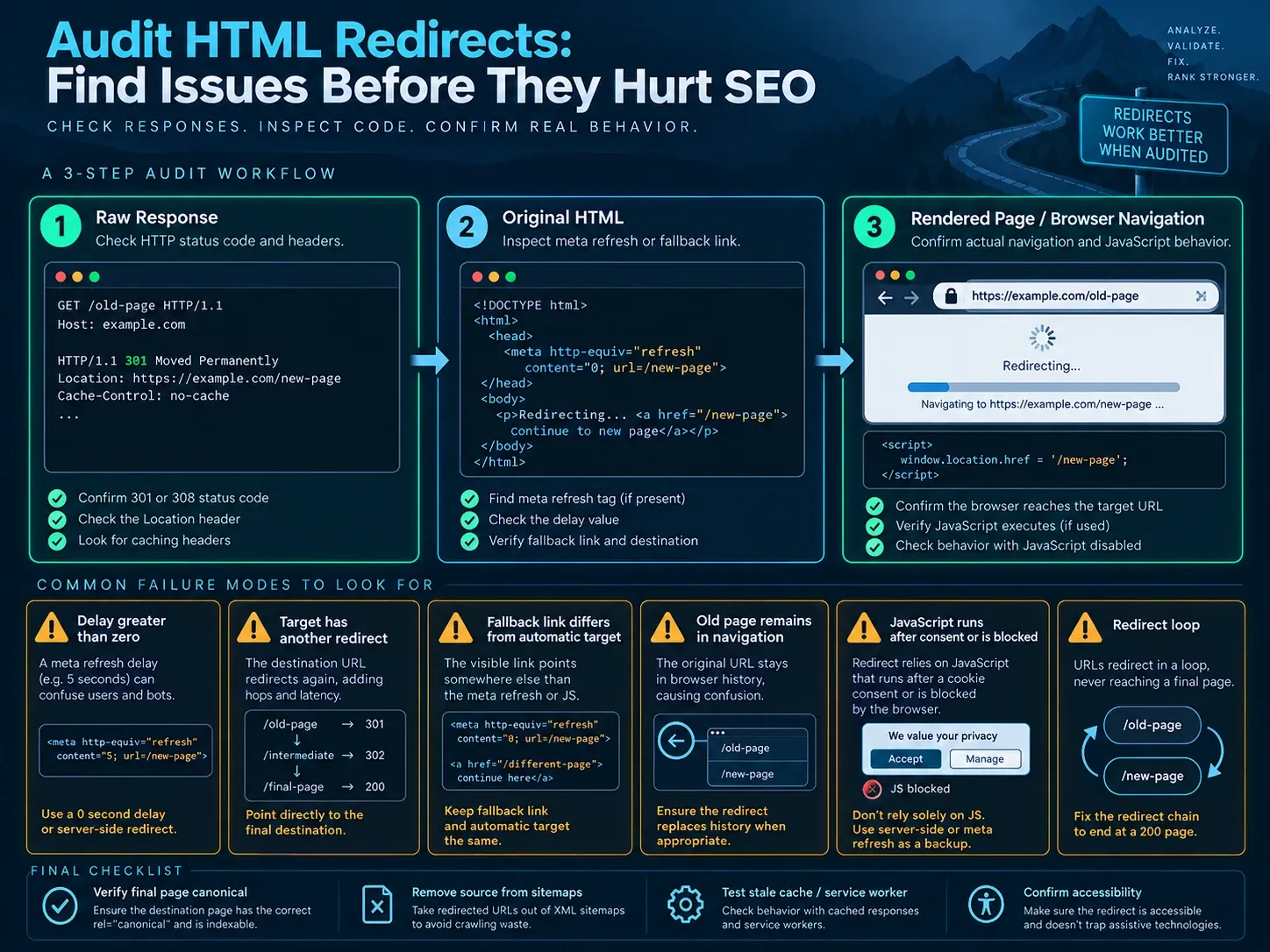
Do not publish until each condition has an answer:
| Gate | Passing evidence |
|---|---|
| Server redirect unavailable | Platform limitation documented |
| Initial response | Recorded status and headers |
| Refresh method | Instant meta or isolated script |
| Target | Final 200 URL |
| Fallback | Crawlable anchor with same destination |
| Canonical | No conflict; final page self-canonical |
| Internal discovery | Source removed from links and sitemap |
| No-JS behavior | User can reach target |
| CSP and console | No blocking error |
| Cache | Purge and rollback documented |
| Accessibility | Focus and reading behavior reviewed |
| Monitoring | Source requests and failures observable |
What Indexora’s Redirect Study Does Not Prove About HTML Redirects
Indexora’s 22-day root-to-www study measured a server-side permanent redirect. The destination’s rolling 28-day Search Console view showed 8.23K clicks and 70.2K impressions during the observation period, while crawl demand on the retiring host declined.
That case supports one-hop server-side monitoring. It is not a meta refresh, JavaScript, CSP, cache or accessibility experiment. No result from that study should be used to claim a signal-transfer rate for HTML redirects.
How to Choose the Simplest Reliable Redirect Method
Use an HTTP 301 or 308 when a permanent source URL has moved. Use an instant meta refresh with a visible link when the platform cannot issue a server response. Use JavaScript only when client state makes it unavoidable and a non-script path still works.
Inspect the raw response, original HTML, rendered DOM, navigation sequence, final page and cache. That evidence shows what the system does. The source code snippet alone does not.
Frequently Asked Questions About HTML Redirects
Can I Redirect a URL in HTML Without JavaScript?
Yes. Use an instant meta refresh in <head> and include a normal destination link. Prefer an HTTP permanent redirect whenever the host supports it.
Does Meta Refresh Pass SEO Signals?
Google says it interprets an instant refresh as permanent and a delayed refresh as temporary. A server-side status is still easier to observe and less dependent on document processing.
Should an HTML Transition Page Return 404?
No. A useful HTML document and a missing-resource response communicate different states. Use a 3xx response if the source moved. Use 404 or 410 if there is no replacement. Use transition HTML only as the documented fallback.
Should I Add noindex to the Source?
Do not stack signals without a plan. A refresh already asks the client to move, and the destination should be final. If the page must stay accessible but should not appear in search, that is a different requirement from a permanent replacement.
Is window.location.replace() an SEO 301?
No. It changes browser history after JavaScript executes. The initial HTTP response remains whatever the server returned.