

Redirect a missing URL only when a close replacement satisfies the same intent. Return 410 Gone when you deliberately removed a known URL and your system can maintain that decision. Return 404 Not Found for unknown, malformed, or removed URLs when a separate tombstone state adds no operational value. Restore the URL with 200 OK if the content should still exist, and use 503 Service Unavailable for a temporary outage.
That is the policy. The difficult work is proving which condition applies to each URL. A 404 count alone cannot answer that question.
The 30-Second Decision Table
| URL state | Response | Required follow-up |
|---|---|---|
| The same content still belongs at the URL | 200 |
Restore the page and fix the failure that hid it |
| The content moved to a true equivalent | 301 or 308 |
Point directly to the final 200 URL and update internal links |
| A known URL was permanently retired with no replacement | 410 or 404 |
Remove it from links, sitemaps, canonicals, and hreflang sets |
| The URL was never valid or came from a bot probe | 404 |
Ignore it unless an internal source or capacity problem exists |
| The page is temporarily unavailable | 503 |
Keep the URL, add appropriate retry handling, and restore service |
An error message returns 200 |
Correct to 404, 410, or restore content |
Test the rendered page and response together |
| A generic page replaces an unrelated missing page | Usually 404 or 410 |
Remove the irrelevant redirect before it becomes a soft 404 |
Google’s guidance is similarly direct: return 404 or 410 when removed content has no similar replacement, and use a permanent redirect when the content moved to a clear replacement. Its soft 404 troubleshooting documentation also warns that an error-looking page returning 200 can be excluded from Search.
Are 404 Errors Bad for SEO?
A valid 404 is the correct response for a resource that does not exist. The loss is attached to the missing page: it can no longer rank, receive search visits, satisfy old backlinks, or complete an internal journey. The status does not automatically describe the quality of every other page on the site.
The problem becomes site-wide when templates, product feeds, sitemaps, canonicals, or hreflang annotations keep generating broken URLs. That pattern wastes user journeys and sends crawlers through an inventory the site does not maintain. At scale, soft 404s are worse because they say 200 OK while showing an empty or missing result. Google’s crawl budget guidance recommends real 404 or 410 responses for permanently removed pages and calls out soft 404s and long redirect chains as crawl waste.
When evaluating are 404 errors bad for SEO, ask four narrower questions:
- Is a crawlable internal link producing the request?
- Did the URL previously earn clicks, impressions, or external links?
- Is the URL still declared in a sitemap, canonical, or hreflang set?
- Does the HTTP response match what the rendered page tells a visitor?
A “yes” answer creates work. A random /wp-admin.php probe with no internal referrer usually does not.
What Indexora’s Redirect Data Proves and Does Not Prove
Indexora has first-party redirect evidence, but it comes from a domain consolidation rather than a 404-versus-410 experiment. That distinction matters.
In our 22-day redirect case study, we compared two Search Console properties, approximately 5,200 referring links, and crawl activity on an old root host and its canonical www destination. The old host recorded 19,200 crawl requests at a 313 ms average response time. The destination recorded 20,600 requests at 259 ms while search demand moved to the canonical host.
The study supports three practices used in this guide:
- preserve URL-level relevance instead of sending deep URLs to a generic home page;
- measure both the source and destination after changing responses;
- use crawl evidence alongside Search Console rather than treating one report as complete.
It does not prove that 410 leaves Google’s index faster than 404. We have not run that controlled comparison, so this article does not claim a speed advantage. Google accepts either status for permanently unavailable content without a similar replacement.
The Four-Part Test for Choosing a Redirect Target
A redirect asserts that the destination replaces the source. Link metrics do not make that assertion true. Before mapping a missing URL, test the proposed destination against four conditions.
- Intent: Does the destination solve the same user task?
- Scope: Does it cover the specific subject, product, or document represented by the old URL?
- Locale: Does it serve the same language and regional market?
- Final state: Is the destination indexable, canonical, stable, and returning
200in one hop?
Use a permanent redirect only when all four conditions pass. If intent, scope, or locale fails, keep a real missing response. If only the final-state check fails, repair the destination before pointing traffic at it. For status selection after that decision, use the HTTP redirect code guide. If the source must stay accessible as a duplicate, use the canonical-versus-redirect framework instead.
A discontinued laptop should not redirect to the electronics home page. It may redirect to a direct successor with comparable specifications. An expired event page may stay live as a useful archive. A deleted research report with strong backlinks may be worth restoring at the same URL. None of those choices can be made from status codes alone.
How 404, 410, 301, 308, and 503 Responses Differ
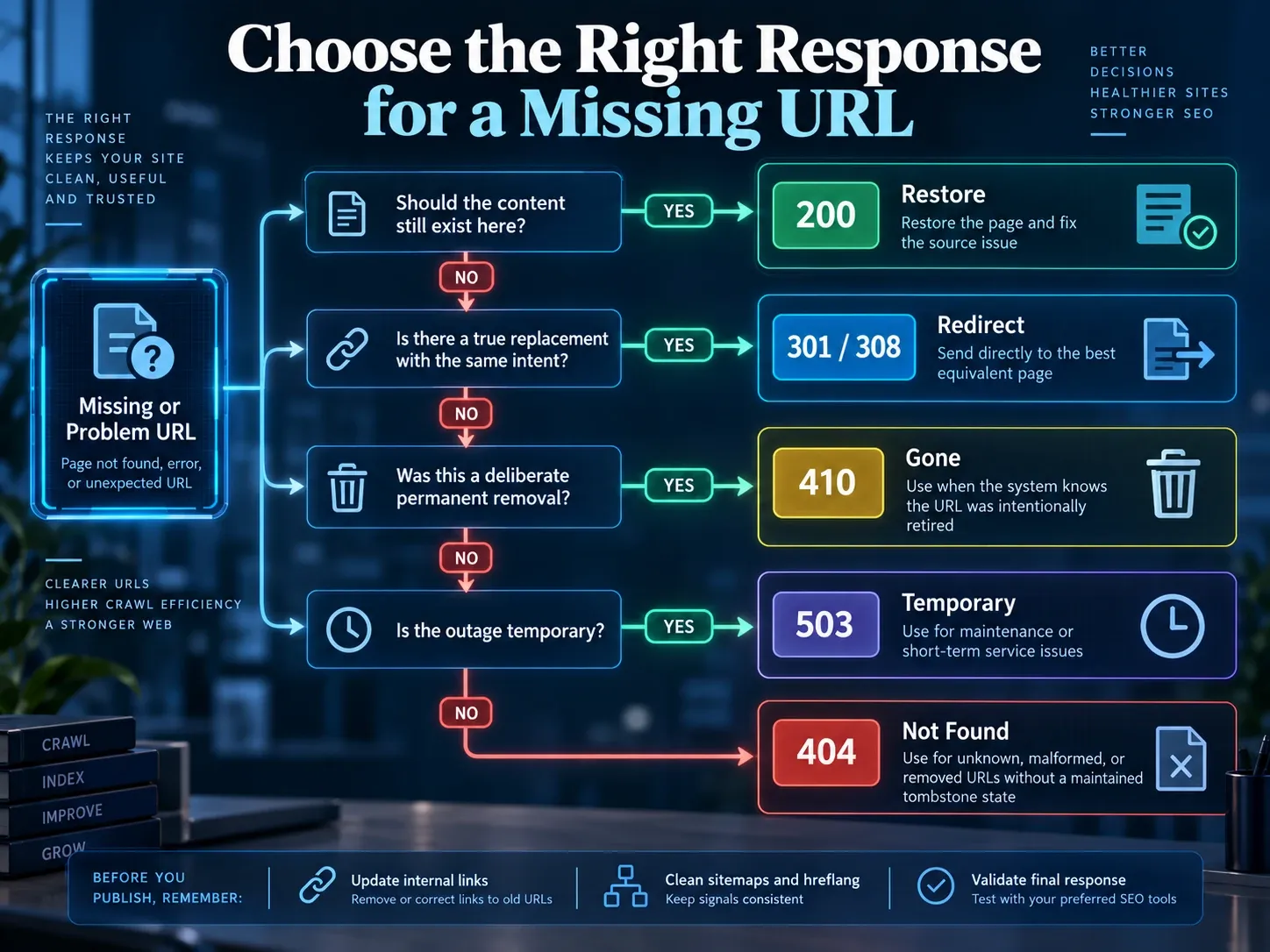
The HTTP semantics standard defines 404 as a resource the origin server did not find or is unwilling to disclose. It defines 410 as a resource that is intentionally and probably permanently unavailable. A 301 or 308 identifies a new permanent location.
| Code | What it communicates | Best operational use | Common misuse |
|---|---|---|---|
404 |
The resource is not available at this URL | Unknown paths, malformed URLs, accidental requests, and removals without a maintained tombstone state | Treating every logged 404 as a redirect task |
410 |
A known resource was deliberately removed | A controlled list of expired jobs, withdrawn documents, or permanently retired SKUs | Returning 410 for all unmatched routes |
301 |
The resource has a permanent replacement | A page move, slug change, or exact successor | Redirecting unrelated pages to a category or home page |
308 |
Permanent move with request method preserved | Permanent API or form endpoint changes where method preservation matters | Using it without checking how clients handle the endpoint |
503 |
The service is temporarily unavailable | Maintenance or a short origin failure | Replacing a temporary outage with a permanent redirect |
Our editorial default is simple: use 410 only when the publishing system knows the URL once existed and records its permanent removal. Let the general not-found handler return 404 for everything else. This keeps the status meaningful and prevents a broad 410 rule from labeling typos and bot probes as editorial decisions.
Why Redirecting Every 404 to the Homepage Fails
A blanket 404 redirect to homepage SEO rule solves the appearance of an error report, not the missing content. Someone following a link to an installation manual receives a generic brand page. A crawler receives a permanent replacement signal even though the destination contains none of the expected information.
Google’s site migration guidance says that redirecting many old URLs to an irrelevant destination such as the new home page can be treated as a soft 404. Replace the catch-all with an explicit map:
Old URL has an equivalent page         -> 301 or 308 to that page
Several pages became one full resource -> 301 each source to that resource
Known page is permanently removed      -> 410, or 404 if no tombstone state exists
Unknown or malformed URL               -> 404
Temporary service failure              -> 503
A category is a valid target only when it continues the source task. A retired product may map to a tightly matched family if the family page explains the relevant options. “It is in the same department” is not enough. When several pages genuinely become one complete resource, follow the SEO page-consolidation workflow before creating the mappings.
How to Audit 404 Errors by Cause and Priority
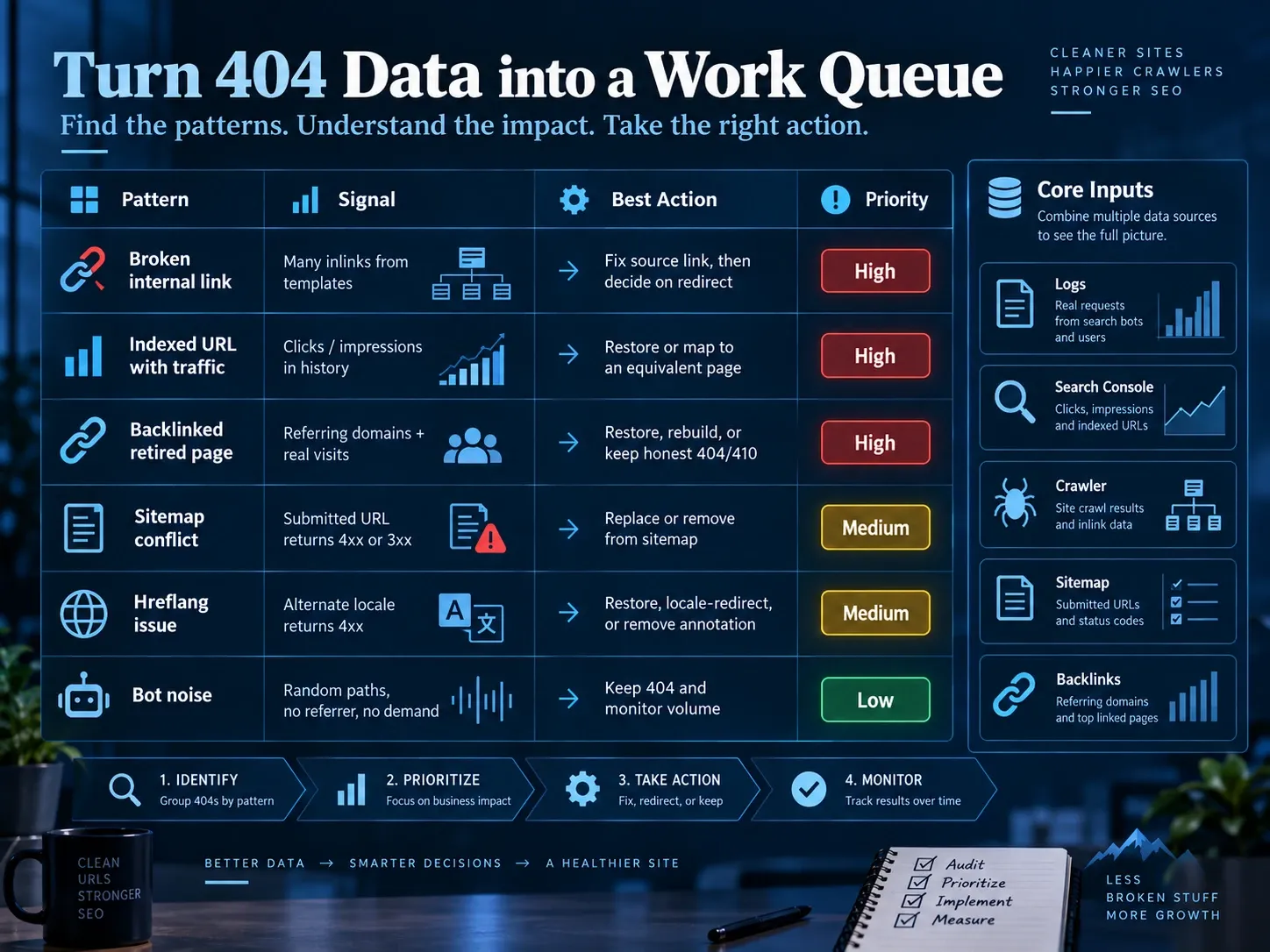
A useful audit groups missing requests by how they were created. The source determines the fix and the priority.
| Pattern | Fingerprint | How to locate it | Corrective action | Verification |
|---|---|---|---|---|
| Broken template link | The same path has many internal referrers | Crawl the site and export 4xx inlinks; search templates for the path | Fix the template first; redirect only if the old path also has external demand | Recrawl the affected template set |
| Indexed URL with search demand | URL appears in historical page-level clicks or impressions | Join a known 404 list with Search Analytics page data | Restore or map to an equivalent page | Inspect the old URL and monitor the destination |
| Missing URL with backlinks | Referring domains point to a retired resource | Join the 404 list with backlink exports and server hits | Restore useful content, build a true successor, or keep 404/410 | Check destination relevance and one-hop response |
| Sitemap conflict | Submitted URL returns 4xx or 3xx | Extract sitemap URLs and crawl them in list mode | Replace with the canonical 200 URL or remove it |
Re-extract and recrawl the sitemap |
| Hreflang cascade | One locale in an alternate cluster returns 4xx | Crawl hreflang targets and compare reciprocal sets | Restore, redirect locale-to-locale, or remove the retired alternate everywhere | Validate every surviving alternate |
| Tracking or case variant | Many paths differ only by query, case, or slash | Normalize log paths before counting | Fix routing or canonicalization; do not create a rule for every tracking value | Test representative variants |
| SPA soft 404 | Browser shows “not found” while the document request returns 200 |
Compare rendered content with the first HTML response | Return 404 from the server or route to a server endpoint that does | Test with JavaScript on and off |
| Bot-generated noise | No internal referrer, no search demand, random path shapes | Group logs by path pattern, referrer, and user agent | Keep 404; address rate or capacity only if it affects service | Monitor request volume and response time |
This matrix turns 5,000 rows into a short work queue. One template bug can produce more user-facing damage than thousands of isolated bot requests.
How to Turn Access Logs Into a 404 Work Queue
The commands below assume an NGINX or Apache combined access log, where field 7 is the requested path and field 9 is the response status. Confirm your log format before using them.
List the 100 most requested 404 paths while removing query strings:
awk '$9 == 404 { split($7, url, "?"); print url[1] }' access.log \
  | sort \
  | uniq -c \
  | sort -nr \
  | head -100
Find 404 requests that have an internal referrer:
awk '$9 == 404 && $11 ~ /^"https?:\/\/(www\.)?example\.com\// {
  print $7 "\t" $11
}' access.log
Compare 404 and 410 volume after deploying a controlled removal list:
awk '$9 == 404 || $9 == 410 { print $9 "\t" $7 }' access.log \
  | sort \
  | uniq -c \
  | sort -nr
Run the same aggregation across rotated logs with zcat or zgrep when your retention policy compresses older files. Keep the date, path, status, referrer, user agent, and response time in the working dataset. Counts without referrers or dates are difficult to prioritize.
Use a real GET request when validating a URL. Some applications handle HEAD differently and can produce a misleading result.
curl -sS -o /dev/null -D - https://example.com/retired-page
curl -sS -o /dev/null -L --max-redirs 10 \
  -w '%{http_code} %{url_effective} %{num_redirects}\n' \
  https://example.com/old-page
On Windows PowerShell, call curl.exe and replace /dev/null with NUL. The first command shows the original status and Location header. The second follows the chain and reports its final status, URL, and redirect count.
How to Fix 404 Errors in Google Search Console
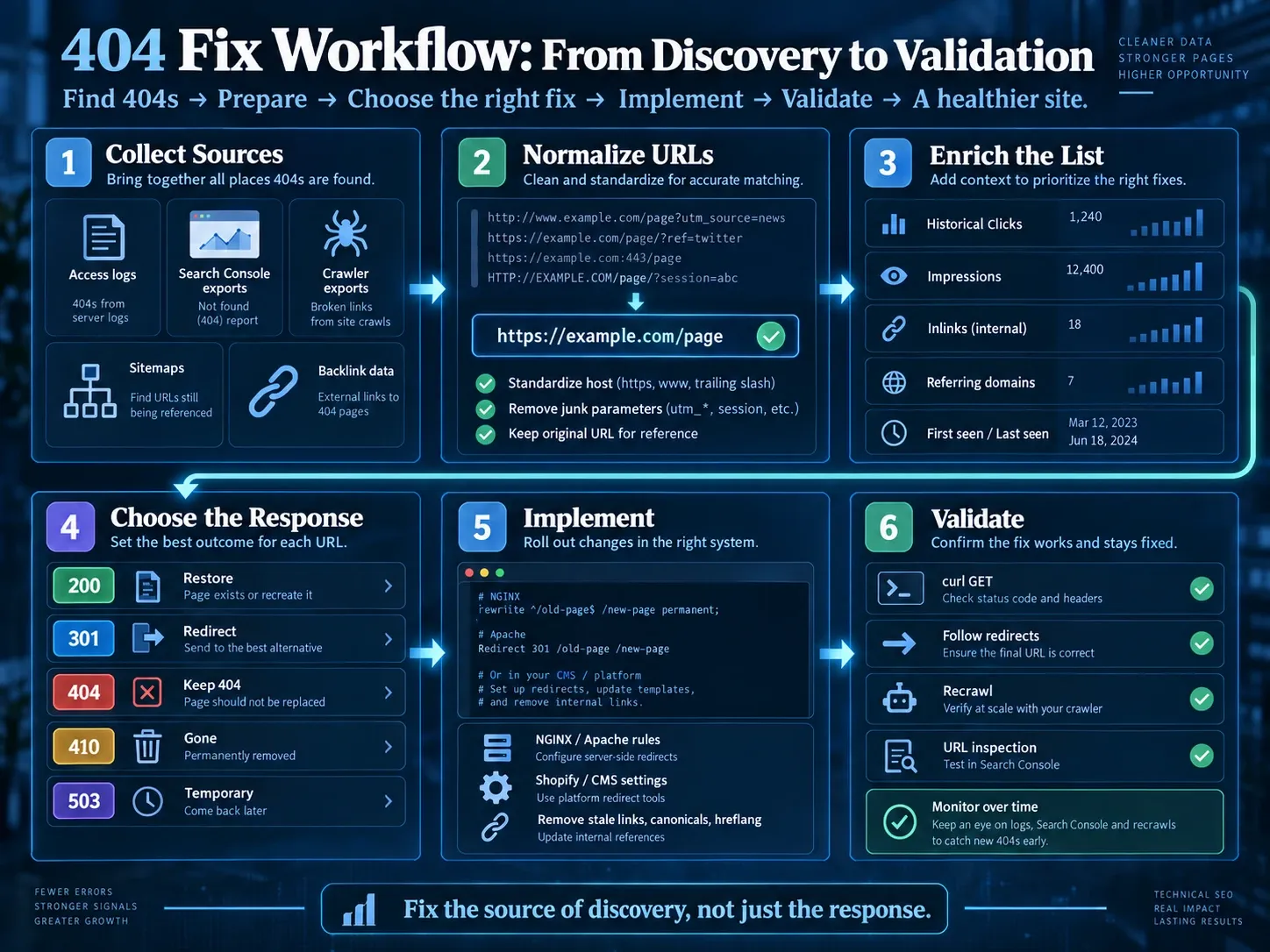
Search Console reports what Google observed. It does not repair the URL, and its APIs do not expose a bulk Page Indexing 404 inventory.
The official Search Console API reference lists Search Analytics, Sitemaps, Sites, and URL Inspection services. There is no Page Indexing examples endpoint. Build the candidate list from the Page Indexing export, server logs, crawler exports, sitemaps, and deployment records. Then use the APIs to enrich known URLs.
1. Export and Normalize Candidates
Export the “Not found (404)” and “Soft 404” examples available in the Page Indexing report. Add URLs from logs and your crawler. Normalize the hostname, strip tracking parameters that do not change content, and keep the original URL in a separate column for verification.
Recommended columns are:
url_original
url_normalized
observed_status
source_report
first_seen
last_seen
internal_referrer_count
sitemap
historical_clicks
historical_impressions
referring_domains
proposed_action
proposed_target
owner
verification_status
2. Add Historical Search Demand
Query Search Analytics with the page dimension over a period that includes the URL’s active life. Google’s Search Analytics guidance notes that detailed page or query requests may omit some data and that the API exposes up to 50,000 rows per day per search type. Treat zero rows as “no returned data,” not proof that the URL never had demand.
Example request body:
{
  "startDate": "2026-06-01",
  "endDate": "2026-08-31",
  "dimensions": ["page"],
  "rowLimit": 25000,
  "startRow": 0,
  "type": "web"
}
Paginate by increasing startRow, then join the returned page keys to the normalized candidate list.
3. Inspect Selected URLs, Not Every Bot Path
Use URL Inspection for URLs that were indexed, submitted, internally linked, or commercially important. The API works on one known URL at a time and has usage quotas. Spend those requests on decisions that need Google’s last crawl, selected canonical, referring sitemap, or page-fetch evidence.
4. Fix the Source and the Response
For each URL, choose restore, redirect, 404, or 410. Then remove stale references from internal links, XML sitemaps, canonical tags, hreflang clusters, and structured data. Fixing only the response leaves the source of discovery active.
5. Verify Live Behavior Before Requesting Validation
Run candidate URLs through the bulk 404 checker to see every hop, status, final destination, and timing. Use the Sitemap Checker to extract submitted URLs, then test any URL that should have been removed or replaced. Request Search Console validation only after live checks pass. The report changes after Google recrawls the affected URLs, not when the server configuration is saved.
A Repeatable Screaming Frog Workflow for 404 Errors
Screaming Frog’s official broken-link workflow provides the fastest route from a 404 to the page that links to it.
- Crawl the site in Spider mode.
- Open the Response Codes tab and filter for Client Error (4xx).
- Select a missing URL and inspect its Inlinks tab.
- Export “Client Error (4xx) Inlinks” to give developers the source URL, anchor, and destination.
- Switch to Mode > List and upload the combined GSC, log, sitemap, and backlink candidate list.
- After implementing redirects, enable “Always Follow Redirects” and export the All Redirects report to catch chains. If a trace repeats instead of reaching a final page, use the redirect-loop diagnosis procedure.
The tool’s List mode documentation also supports API connections. Connect Search Console or a backlink provider to add metrics to known URLs. The connection enriches your list; it does not turn the Search Console API into a complete Page Indexing export.
How to Configure 404, 410, and Redirect Responses in NGINX and Apache
Put exact rules above broad rewrites, test the configuration, and deploy through your normal review process. A typo in a server rule can remove an entire directory.
NGINX
Return 410 for one deliberately retired path:
location = /products/retired-sku {
    return 410;
}
Keep a custom error document while preserving the 404 status:
error_page 404 /404.html;

location = /404.html {
    internal;
}
Create a single-hop permanent move:
location = /guides/old-installation-manual {
    return 301 https://example.com/guides/new-installation-manual;
}
The official NGINX rewrite module reference documents return code, including 410, and permanent redirect responses. Run nginx -t before reloading, then verify both the original response and final destination with curl.
Apache HTTP Server
For a controlled path in .htaccess or the relevant directory context:
RewriteEngine On
RewriteRule ^products/retired-sku/?$ - [G,L]
The Apache [G] flag returns 410 Gone, as described in the official RewriteRule flags reference. Keep the custom 404 page separate:
ErrorDocument 404 /404.htmlFor a simple permanent move, prefer Redirect when no conditional rewrite is needed:
Redirect permanent "/guides/old-installation-manual" \
  "https://example.com/guides/new-installation-manual"
Do not add a second CMS redirect for the same source. Server, CDN, application, and plugin rules can combine into a chain or loop even when each rule looks correct in isolation.
How to Handle 404 Errors in Ecommerce Platforms and CMSs
Temporarily Out-of-Stock Products
Keep the product URL at 200 when the same item will return. Show availability, expected restock information when known, compatible alternatives, and a notification option. Removing a seasonal or replenishable product creates an avoidable ranking and customer-history reset.
If the product is permanently discontinued and has a true successor, use one permanent redirect. If no successor exists, choose among a useful archived product page, a 404, or a controlled 410. Backlinks justify reviewing the page; they do not justify an unrelated redirect. The URL redirect implementation guide covers server, CDN, and Shopify deployment after the destination decision is complete.
Shopify
Shopify redirects work only when the source is already broken. Its URL redirect documentation explains that a product set to Draft or removed from sales channels can become eligible for a redirect. It also documents reserved paths, query-string limitations, and market subfolder behavior.
Use this sequence:
- Decide whether the product is returning. If yes, keep it published and do not redirect.
- For permanent retirement, identify a close product or collection replacement.
- Make the old path unavailable, then create the redirect under Content > Menus > URL Redirects.
- Test the base path and every active market subfolder.
- Create locale-specific redirects when markets need different destinations.
A single Shopify redirect can apply across language or market subfolders. Do not assume every localized target is equally relevant.
Adobe Commerce and Magento Stores
Adobe Commerce can keep out-of-stock products visible, and its URL rewrite system can create redirects per store view. For a multilingual catalog, verify the request path and destination in each store view instead of testing only the default store.
Adobe’s web configuration includes an “Auto-redirect to Base URL” option and explicitly warns against using it for multi-store setups. That setting is especially risky for SEO because a bad path can become a generic home-page redirect instead of an honest 404. The Adobe Commerce web configuration reference documents the behavior and warning.
WordPress
Check the theme, redirect plugin, caching layer, and web server separately. A plugin that records 404s is useful for discovery, but automatic “closest match” redirects can produce irrelevant destinations. Fix broken menu or template links at their source. Keep one owner for each redirect rule so the plugin and server do not compete.
JavaScript Applications
A client-side router often renders a “Not found” component inside a successful HTML shell. Crawlers first receive 200, which can create a soft 404. Return the missing status from SSR, the edge, or the origin. If the platform cannot change the shell response, Google’s JavaScript SEO guidance recommends routing to a server URL that returns an actual 404 rather than leaving the error on a 200 document.
How to Prevent Hreflang 404 Cascades
A removed locale can break an entire alternate cluster. Google’s hreflang documentation requires each version to list every alternate, including itself, with matching sets across pages.
Use this branch:
- If
/de/product-amoved to a German equivalent, redirect it to that German page and update every hreflang set. - If the German version was permanently removed, delete its annotation from all surviving variants and from the XML sitemap.
- If no German equivalent exists, do not redirect it to the English home page.
- If a market moved from a locale subfolder to another locale structure, map each page within the same language and intent.
After deployment, crawl every URL in the cluster. One surviving page with an old alternate can keep sending crawlers back to the missing URL.
How to Improve SEO With a Custom 404 Page
You improve SEO with a custom 404 page by helping visitors recover while preserving an accurate status. The custom design must not convert the response to 200.
Include:
- a clear statement that the requested page was not found;
- normal navigation and a working site search;
- a small set of useful section links based on actual site architecture;
- a way to report a broken internal link;
- lightweight analytics for the requested path and referrer;
- no automatic timer or forced home-page redirect.
Omit a canonical to the home page. A real 404 does not need a canonical or noindex directive to explain that it should not be indexed. More tags cannot repair a 200 response.
Keep the template cheap to render. Error routes receive malformed paths and automated probes, so a slow recommendation service should not sit on the critical path. If recommendations fail, the server must still return the correct status.
How to Measure 404 and 410 Outcomes
Do not publish a claim that 410 is “faster” until you measure comparable URLs. Use this protocol for a defensible site-specific result.
Define Cohorts by Meaning
Create three cohorts:
- known, permanently removed URLs assigned to
410; - removed URLs without a maintained tombstone state assigned to
404; - moved URLs with equivalent destinations assigned to a permanent redirect.
Do not randomly assign a page with a replacement to 404 merely to balance a test. Match 404 and 410 cohorts by URL age, directory, prior crawl frequency, internal-link state, sitemap state, and historical search demand.
Record the Baseline
For at least one complete pre-change reporting window, record:
| Metric | Source | Why it matters |
|---|---|---|
| Requests by status and path | Server or CDN logs | Shows crawler and user demand |
| Googlebot requests per 1,000 cohort URLs | Validated bot logs | Normalizes unequal cohort sizes |
| Historical clicks and impressions | Search Analytics | Separates valuable URLs from noise |
| Internal inlinks | Site crawler | Detects discovery you control |
| Sitemap and hreflang references | Sitemap and crawl exports | Identifies contradictory signals |
| Referring domains | Backlink export | Finds URLs worth restoring or replacing |
| Soft 404 examples | Page Indexing report | Detects response-content mismatch |
Change One Layer and Verify It
Deploy the response change without also restructuring navigation, changing canonical rules, and replacing the sitemap generator in the same release. Remove stale references that directly contradict the new state, but record those removals. Test a sample from every route pattern with the same GET-based checks.
Compare Daily Cohorts
Track recrawl requests, observed statuses, soft 404 classifications, and any residual search traffic. Report the cohort sizes, dates, medians, ranges, and excluded URLs. Search Console examples are not a full census, and recrawl timing differs by URL history, so use logs as the primary request record.
The publishable result is not “410 won.” It is a table showing what happened to matched cohorts under documented conditions. If the difference is small or inconsistent, say so.
A Defensible SEO Policy for 404s, 410s, and Redirects
A defensible 404 redirect SEO policy starts with page meaning, not report cleanup. Restore content that should exist. Redirect only to a destination that passes the intent, scope, locale, and final-state tests. Use 410 for known permanent removals, 404 for general missing paths, and 503 for temporary service failures.
Then prove the result. Trace redirects, crawl internal inlinks, clean sitemaps and hreflang sets, aggregate access logs, and use Search Console to enrich known URLs. A smaller report is useful only when it reflects a more accurate site.
Frequently Asked Questions About 404 Redirects
Should I Redirect a Deleted Product?
Keep a temporarily unavailable or seasonal product live at 200 if it will return. Permanently redirect a discontinued product only to a close successor or a category that genuinely continues the same shopping task. If neither exists, retain a useful archive or return 404 or 410.
What Should I Do With Backlinks to a Deleted Page When No Replacement Exists?
First decide whether the old content can be restored as an archive or rebuilt into a useful current resource at the same URL. If not, keep the honest 404 or 410. Redirecting solely because a URL has backlinks can send people to an irrelevant page and may be treated as a soft 404.
Should a 404 Page Have a Canonical Tag?
The HTTP status is the primary signal. Omit a canonical from the error template if possible, and never canonicalize all missing URLs to the home page. A canonical does not turn an error into a valid replacement.
Is 410 Better or Faster Than 404?
410 is more explicit about intentional permanent removal, but Google recommends either 404 or 410 when no similar replacement exists. Use the code your content system can apply accurately. Do not promise faster removal without a controlled, site-specific test.
Why Does Search Console Still Show a 404 After I Fixed It?
Search Console reflects Google’s last observed crawl and keeps historical examples. Verify the live response, remove internal discovery sources, and wait for recrawling. Use validation only after the fix is live across the full affected pattern.
Can a Custom 404 Page Return 200 If It Has Useful Links?
No. Useful navigation helps visitors, but the response still needs to be 404. Returning 200 for an error page creates conflicting machine and human signals.