
Readers should be able to tell where a URL leads. Write a path that names the page’s task, choose one preferred version, and keep it stable. Shaving a word off a published slug is rarely worth a hurried migration.
The checks below use GIndexa’s article and tool paths. For title, answer, and link checks on the same page, use the on-page SEO checklist.
What Makes a URL SEO-Friendly
A URL has a scheme, host, and path such as /insights/keyword-research/seo-keywords-examples/. The slug is the last named segment, seo-keywords-examples. A query string after ? is separate.
Google’s URL guidance favors understandable paths, descriptive words, hyphens, and proper percent encoding for non-ASCII characters. It gives no magic slug length.
| URL form | Reader’s likely interpretation | Editorial decision |
|---|---|---|
/insights/seo/on-page-seo-checklist/ |
A checklist inside SEO insights | Clear task and section. |
/insights/seo/seo-seo-best-seo-page/ |
Repeated search terms | Rewrite for meaning before publication. |
The first path belongs to this cluster’s planned pillar. The second is illustrative. Neither a neat slug nor a tidy category can make up for a page that misses the reader’s task.
Choose a Slug That Names the Page’s Task
Write the page’s job first. “Compare SEO keyword examples by intent and page type” leads to GIndexa’s real slug, seo-keywords-examples. It needs neither best, a year, nor every query variant.
Use lowercase and hyphens for new English slugs. Keep small words when they preserve meaning: how-to-use-keywords reads better than how-use-keywords. GIndexa’s seven-word cap is house style, not a Google threshold.
Name the lasting topic rather than this year’s campaign. When a guide needs new facts, revise the guide. Adding a year to its URL creates an address you’ll have to keep or redirect later.
Check for an existing owner before publishing. seo-title and what-is-an-seo-title could serve the same task. The keyword-to-URL workflow helps decide when variants need one page.
Design Paths for Categories, Parameters, and Languages
Make hierarchy reflect real navigation. GIndexa uses /insights/keyword-research/ for its examples page. Keep crawlable links and breadcrumbs. The URL tree does not replace them.
A tracking parameter usually adds attribution, not a new page for search. Product filters need closer judgment: one may serve a useful, distinct task while another produces thousands of near-identical views. Make that call before setting canonical or crawl rules. Google’s faceted-navigation guidance covers the crawl cost.
If /en/ and /de/ hold distinct localized content, connect them with appropriate alternate signals. Translating only the slug creates a duplicate. See Google’s localized-version guidance.
For non-ASCII slugs, test the CMS address and shared link with their encoded bytes. An encoded address alone is no reason to migrate a published URL.
Check Canonical Signals and Duplicate URL Variants
Align internal links, sitemap, and canonical markup. GIndexa’s examples page declares its exact trailing-slash URL as canonical and has an indexable robots directive. URL Inspection is still needed to see Google’s selected canonical.
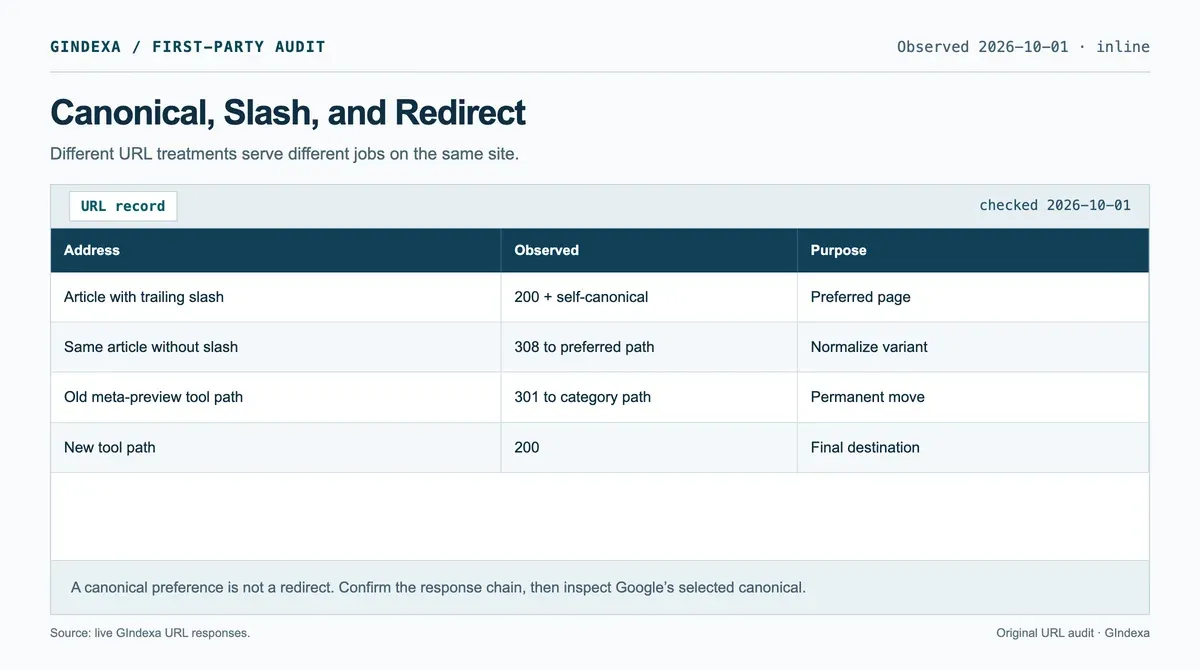
Source: GIndexa’s live URL responses and article HTML, checked October 1, 2026. The paths document different URL decisions.
Test /page and /page/ separately. Redirect an unnecessary variant. Use a canonical when duplicate views must stay accessible. Google treats canonical as a signal. Its canonical guidance asks for consistent internal-link and sitemap preferences.
Pick the control that matches the job. A robots block can keep Google from seeing a noindex or canonical tag on the page. If you need removal, let Google crawl the noindex. For accessible duplicates, work through canonical versus redirect.
Change a Published URL Without Breaking the Old One
A keyword tool may suggest a cleaner phrase. That’s a reason to inspect the page, not automatically rename it. If the current path is readable, indexable, and linked, a title or answer edit may solve the problem. Move the URL when the site structure changes, the path makes a misleading promise, or duplicate pages need consolidation.
Decide Whether the Published URL Must Change
Use the following URL change decision matrix before editing the route. Traffic tiers use settled 90-day organic clicks: high means a page in the site’s top 20%, medium means some clicks below that band, and low means none. Link tiers count distinct referring domains: high is 10 or more, medium is 1 to 9, and low is zero. These are editorial review triggers, not Google thresholds.
| Decision | Traffic and link context | Business case and release rule |
|---|---|---|
| Must change | Any tier | A legal or security requirement, broken route, or genuine consolidation needs a new address. Map the old URL to the closest equivalent and test the redirect before release. |
| Usually keep | High traffic or high link tier | The path still names the task, even if a shorter keyword variant exists. Improve the page and internal links without renaming it. |
| Review carefully | Medium tier | A category move or misleading slug may justify change. Record the owner, destination, backlinks, and baseline first. |
| Low-cost candidate | Low traffic and low link tier | Rename only if the new path materially improves a real navigation or content problem. Published URLs still need a redirect. |
| Never ship | Any tier | A bulk rename with no old-to-new map, a redirect to an unrelated page, or a chain that ends in a 404. Block the release until fixed. |
For a permanent move, map the old URL to the closest useful new destination and use a server-side 301 or 308. Google’s redirect guidance says permanent redirects signal that the target should be shown in search results. Avoid sending unrelated old pages to a generic home page. The destination must satisfy the task the old page served.
Map and Test the Move
For a move you can test, follow this sequence:
- Save the old path, current canonical, top query group, and internal links.
- Publish the new page with its own canonical and content that keeps the old page’s useful answer.
- Redirect the old path directly to the new path, including common slash variants.
- Update navigation, body links, hreflang where relevant, structured data, and sitemap entries to the final address.
- Request the old URL and inspect the response chain. It should reach the intended 200 page without a loop or an unrelated hop.
- Monitor both old and new URLs in Search Console after the move. A temporary split in reporting is possible. Do not infer success from one day’s position.
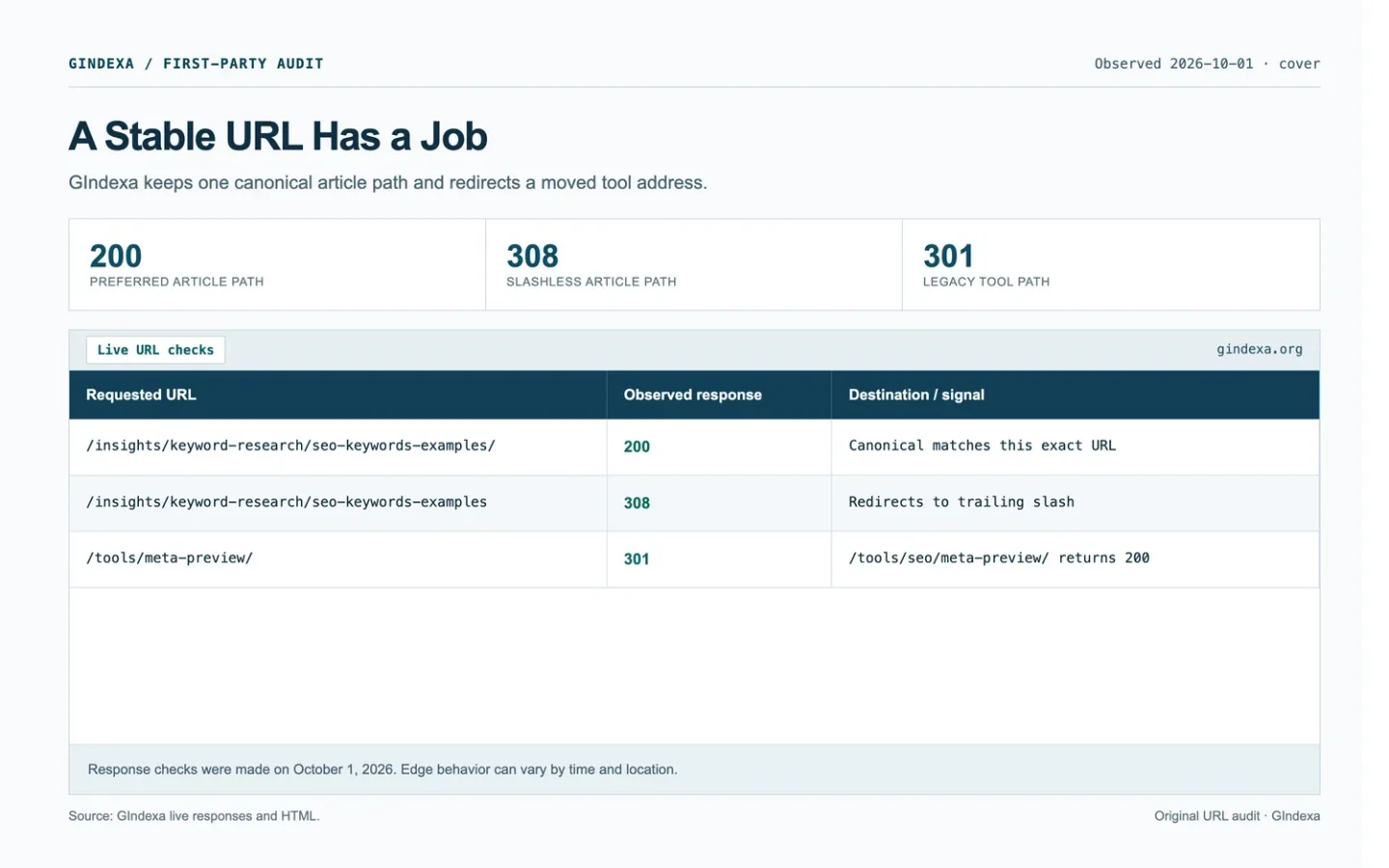
GIndexa keeps a real legacy tool rule in public/_redirects: /tools/meta-preview/ points to /tools/seo/meta-preview/. In a live check on October 1, 2026, both the slash and slashless old paths returned 301, and the new path returned 200. This is a site architecture move, not a claim that the redirect increased traffic. The redirect implementation guide covers server configuration and response testing in more depth.
Deploy the Redirect Rules
On Cloudflare Pages, these are the actual GIndexa rules in public/_redirects. Pages expects one source, destination, and status per line. Place specific routes before any broad wildcard. The file does not apply to a request handled by a Pages Function, so test the deployed route rather than assuming the file ran. See Cloudflare Pages redirect syntax.
/tools/meta-preview/ /tools/seo/meta-preview/ 301
/tools/meta-preview  /tools/seo/meta-preview/ 301
For a site whose origin runs Nginx instead of Pages redirects, put these exact-match locations inside the existing HTTPS server block. $is_args$args keeps any query string. Use one platform as the owner of the redirect to avoid an extra hop. Nginx documents return and exact locations in its rewrite and core module references.
location = /tools/meta-preview {
    return 301 https://gindexa.org/tools/seo/meta-preview/$is_args$args;
}
location = /tools/meta-preview/ {
    return 301 https://gindexa.org/tools/seo/meta-preview/$is_args$args;
}
Run nginx -t before reloading an Nginx origin. With either platform, test a normal GET to both old paths and confirm that the final destination returns 200. Keep the new page’s canonical and internal links on the destination URL.
Audit a GIndexa URL and Redirect Map
Open the SEO keyword examples page and record the address, <title>, H1, canonical, and first answer. Its path names the section and the page’s topic. Its canonical points at the same path. That is enough to mark path and declared-canonical consistency in a page audit. It is not enough to mark Google indexing as verified.
Our live check found that /insights/keyword-research/seo-keywords-examples/ returned 200 while the same address without the trailing slash returned 308 to the preferred path. The legacy /tools/meta-preview/ and /tools/meta-preview paths each returned 301 to /tools/seo/meta-preview/, which returned 200. These are dated response observations. Repeat the check from your own edge location after deployment, because the response chain can change. Use curl -I for a quick header check, then a normal GET because some servers treat HEAD differently.
Use this GET-based probe. It prints the status and Location header without downloading the body. The sample output beneath it is from GIndexa on October 1, 2026, with unrelated response headers omitted.
curl -sS -D - -o /dev/null https://gindexa.org/tools/meta-preview/ \
  | grep -Ei '^(HTTP/|location:|cf-cache-status:)'
curl -sS -D - -o /dev/null https://gindexa.org/insights/keyword-research/seo-keywords-examples \
  | grep -Ei '^(HTTP/|location:|cf-cache-status:)'
HTTP/2 301
location: /tools/seo/meta-preview/
cf-cache-status: DYNAMIC
HTTP/2 308
location: /insights/keyword-research/seo-keywords-examples/
cf-cache-status: DYNAMICFollow each Location with a second request. For the two examples above, the destination returned 200 in the same check. A 301 or 308 alone does not prove the redirect chain ends on a working page.
| Field | Article URL check | Tool move check |
|---|---|---|
| Preferred destination | 200 with a matching self-canonical | New tool path returned 200. |
| Alternate address | Slashless path returned 308 to the preferred URL | Both legacy slash variants returned 301. |
| Action | Keep the stable article slug | Maintain the permanent old-to-new redirect. |
| Evidence still needed | Google’s selected canonical | A later check from another edge location. |
The responses show two different jobs. The article’s slashless address sends visitors to its preferred version. The old tool path sends them to a new section. The canonical states a preference in page markup. Keep the response evidence in the audit record because a tag alone will not show where the browser went.
Keep the URL Stable After Publication
New examples, screenshots, or a clearer title can live at the current address if the page still serves the same task. Keep internal links pointed there and retest canonical markup after template edits. If a category rename forces a new path, prepare the redirect map and verify each final destination before launch.
The on-page audit worksheet has fields for the preferred URL and the evidence behind it. Save the response and canonical you checked. When someone proposes the next rename, that record will show what already works and what a move would affect.
Frequently Asked Questions About SEO-Friendly URLs
Should You Change a Published Slug to Add a Higher-Volume Keyword?
Usually, no. Compare the current slug with the page’s actual task and search queries. If the address is accurate and already linked, revise the title and content first. A rename creates a migration and a redirect obligation. Change the slug only when it materially mislabels the page or a necessary site move justifies the cost.
What if Slash and Slashless URLs Both Return 200?
Choose the preferred form, then align canonical tags, internal links, and sitemap entries to it. Test both versions with curl -D - -o /dev/null at the public edge and, if you control it, the origin. A CDN cache can serve an older 200 even after the origin redirects. Check Age and CF-Cache-Status, then purge the exact cached source URL and retest. Cloudflare notes that purging a redirect source does not purge its destination.
HSTS affects a different part of the chain: a browser may upgrade http:// to HTTPS before making a network request, hiding the HTTP response you expected to inspect. It does not choose between /page and /page/. Test the HTTPS slash variants directly, and use curl to inspect HTTP separately. Cloudflare’s HSTS guide explains the browser upgrade. After the cache and protocol checks, inspect Google’s selected canonical rather than assuming the declared tag settled it.
Do Uppercase and Lowercase Paths Need Separate Redirects?
Test them first. Paths can be case-sensitive, and a server may treat /Guide/ and /guide/ as different resources. If both are reachable, choose the intended lowercase path and map the alternate to it where the platform allows. Preserve intentional case in file or asset paths until you know how the server handles them.
What if a Redirect and Canonical Point to Different Destinations?
Follow the redirect to its final 200 page, then inspect that page’s canonical and the sitemap entry. If the redirect leads to page B but B canonicals to page C, decide which page actually owns the task before changing either signal. Align internal links and the redirect with that decision. Do not assume Google will interpret contradictory signals in the order you intended.
What Should You Do With Tracking Parameters in Shared Links?
Check whether the parameter changes the page’s content. If it only identifies a campaign, link internally to the clean URL and keep the canonical consistent. Do not block the parameter pattern before confirming whether Google must crawl it to see canonical markup. Keep analytics attribution needs separate from indexation decisions.
When Does a Filtered URL Deserve Its Own Indexable Page?
Only when it serves a distinct, stable search task and a useful product or result set. Inspect demand and the live result mix, then assess inventory stability and duplicate variants. If the filter exists solely for sorting or a temporary view, keep it out of the search page map. Avoid a blanket rule that also hides valuable collections.
How Do You Handle Old URLs After a Category Rename?
Make a complete old-to-new map, including pages that have backlinks or internal links. Send each old URL to its closest equivalent in one hop, update links and sitemap entries, and test representative templates with a normal GET. Keep the redirect while people and crawlers still use the old address. Watch Search Console for unexpected 404s or the wrong destination.