
Local SEO keyword research should start with what a business offers and where it can take jobs. Compare customer wording with local search results, then map each distinct task to a useful page. Let verified service coverage set the geographic limits; a city name in a spreadsheet is not enough to justify another URL.
The planning matrix uses a fictional plumbing business serving Austin. Its services, coverage, and scores are teaching inputs, not client results. We also reviewed three public Austin plumbing pages on October 1, 2026, to compare the proposed page map with examples. We did not inspect the business’s Business Profile, Search Console, bookings, or change history, so the review supports no claim about traffic lift or penalties.
Define the Business Before Collecting Local Keywords
Record what a keyword tool cannot verify: the services offered, operating hours, accepted jobs, actual coverage, and whether customers visit a staffed location. For this example, assume the business clears drains, repairs water heaters, and performs scheduled plumbing inspections in Austin and two nearby areas it can reliably reach. It does not offer sewer replacement or 24-hour emergency service.
That service boundary rules out queries the company cannot fulfill. A tool may suggest 24 hour plumber austin, but a page targeting it would mislead people if the business closes at 6 p.m. A sewer-replacement query needs a provider that performs that work. Build the inventory around current operations, then consider search demand.
Google describes local results in terms of relevance, distance, and prominence (Business Profile help). Keyword wording can help a page match a real task. It cannot change the searcher’s distance or create a local presence.
Build a Service, Place, and Task Matrix
Create one row for each real service. Add the places customers include in their searches and the task or urgency in their wording. Keep the original phrasing, even when a keyword tool assigns it a cleaner label.
| Illustrative query | Search task | First page candidate | Check before publishing |
|---|---|---|---|
drain cleaning austin |
Book drain service in the city | Drain-cleaning service page | Is this service offered across Austin? |
clogged kitchen sink repair austin |
Solve a specific drain problem | Drain page section or focused guide | Is diagnosis different enough to need its own page? |
water heater repair austin |
Find a repair provider | Water-heater repair page | Does the business repair the queried heater types? |
water heater leaking what to do |
Understand immediate next steps | Safety-aware informational guide | Does the query need advice before a booking page? |
plumber near me |
Find an available nearby provider | Homepage or relevant service page | What do the live local results show? |
plumbing inspection [served area] |
Book a defined service in a place | Inspection service page | Does an area-specific page add real local details? |
The brackets in the last row mark a worksheet placeholder, not text to publish as a keyword. Replace it only with an area the business serves. The 100 SEO keyword examples apply the same intent-to-page approach outside local search.
A Public Austin Page Check: Three Tasks, Three Page Types
Roto-Rooter’s public site gives a concrete page-map comparison. This is an observation of visible pages, not a client case study or endorsement.
| Public page inspected | What a visitor can verify on the page | Task it serves |
|---|---|---|
| Austin location overview | Austin contact path, 24/7 hours, and links to multiple plumbing services | Choose a local provider or find the right service. |
| Austin drain-cleaning service | Drain types handled, service process, coverage, and a scheduling path | Decide whether to book drain cleaning. |
| Leaking water-heater guide | Possible causes, initial checks, and when to seek professional help | Understand a leak before deciding on a repair. |
The pages serve different tasks: one helps a visitor book a service, while another explains a problem. Their visible content does not show rankings, conversion rates, or whether a previous URL split improved results.
Validate Local Intent in the Search Results
For each representative query, record the search location, device, date, result types, and pages that appear. Keep Local Services Ads (paid provider cards), a businesses/map module (local profiles), conventional sponsored links, and organic website results distinct. An ad does not establish that the same query showed a local pack. Google’s Local Services Ads help describes the paid provider unit.
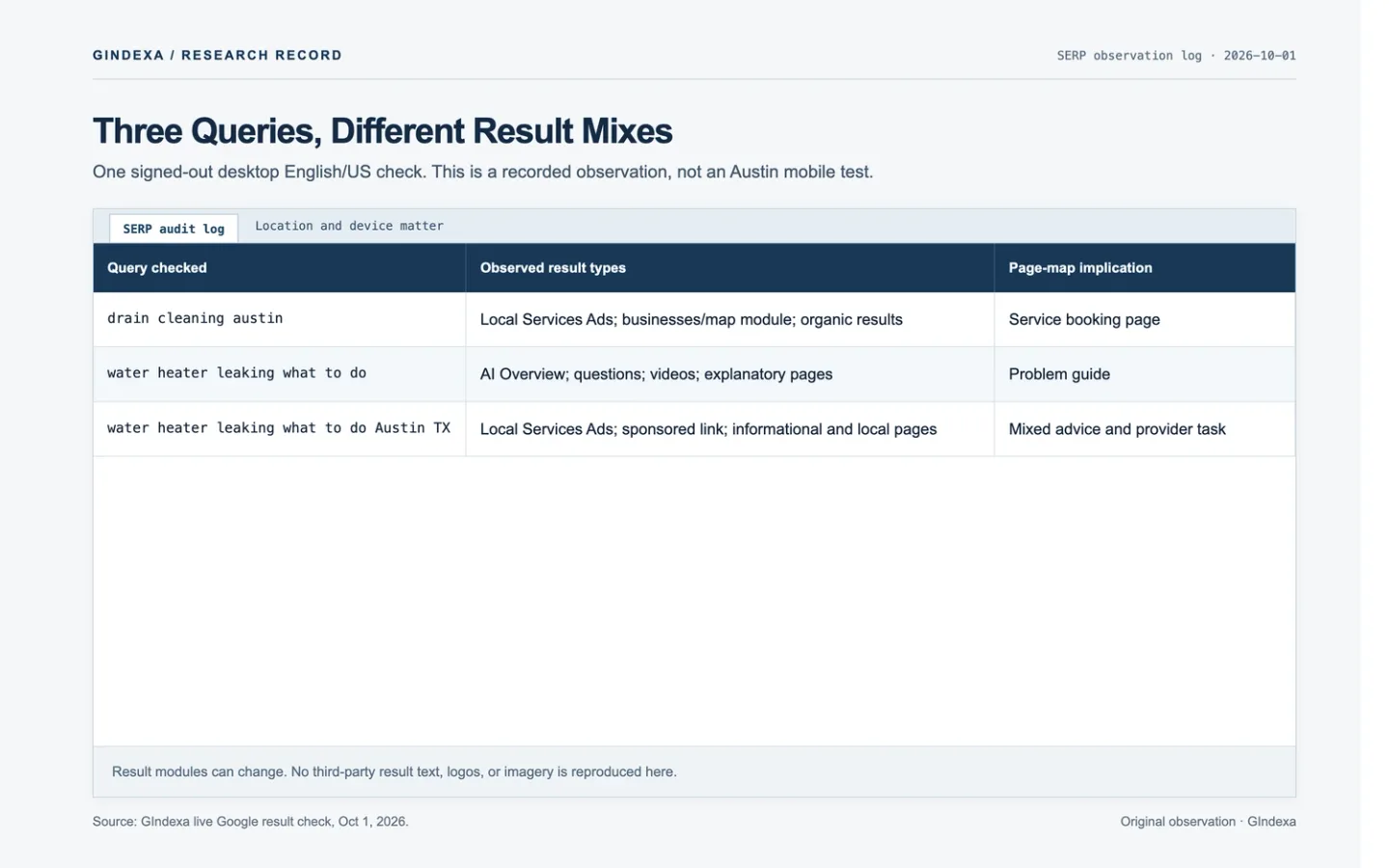
The table records one live Google check from October 1, 2026, in a signed-out, English/US desktop session. It is not a mobile test or a search from within Austin:
| Query checked | Visible result mix in this snapshot | Page-map implication |
|---|---|---|
drain cleaning austin |
Austin-labeled Local Services Ads; a separate businesses/map module; questions and organic results below | A useful Austin drain-service page must let a visitor assess and request that service. |
water heater leaking what to do |
AI Overview, questions, videos, and explanatory organic pages; an ad also appeared, but its location did not establish Austin | Lead with safe, reviewed problem guidance; provide a repair path when appropriate. |
water heater leaking what to do Austin TX |
Austin-labeled Local Services Ads, a separately labeled sponsored link, informational features, and local organic pages; no separate businesses/map module in this check | Adding the city changes the query and may mix immediate advice with provider selection. Check both tasks. |
Google can change these modules by location, device, time, and ad inventory. The links reproduce the query and US/English settings, not a frozen result page. The unqualified water-heater query does not establish what appeared for an Austin search. Check again on a phone from within the business’s service area before making a mobile SERP decision.
Use a device and location that match the service area; a remote results preview is only a proxy. Check three query forms for each service: service alone, service plus city, and problem wording. Group phrases under one page when the results serve the same task and show similar pages. If they diverge, record why before splitting URLs. Save the location, device, timestamp, result types, and paid units in the worksheet so another editor can repeat the check.
Competitor city pages can help identify what visitors need to evaluate. Check availability, service boundaries, equipment handled, proof of work, and the booking path, then build your page around the business’s verified details.
Map Each Query Group to a Useful Landing Page
Assign one primary URL to each task. A service page should explain the work and show the next step. A problem guide can cover symptoms and link to the relevant service. Use the homepage for the overall business and coverage; keep detailed service information on service pages.
| Group | Primary page | What makes the page useful |
|---|---|---|
| Drain cleaning in Austin | /services/drain-cleaning/ |
Problems handled, process, service hours, contact path. |
| Water-heater repair in Austin | /services/water-heater-repair/ |
Heater types, repair scope, service boundary, booking path. |
| Leaking-heater information | /guides/leaking-water-heater/ |
Clear next steps and when to contact a qualified professional. |
| General plumbing near the business | Homepage | Real services, location or service-area information, trust details. |
These paths illustrate page types; they are not GIndexa URLs. A service-plus-city query can fit the main service page when the business has one operating area. Give an area its own page only when verified service details answer a distinct local need.
Avoid Thin City Pages and False Local Signals
A location page should answer a customer’s questions even when they arrive without a specific query in mind. Include the services available there, real travel or scheduling constraints, documented project examples used with permission, or other useful local details. When the only differences are the heading and city name, add coverage information to the main service page instead.
Before publishing a proposed /service-areas/round-rock/drain-cleaning/ page, check that it:
- States whether drain cleaning is available in Round Rock, along with dispatch hours and any travel or job-type limits.
- Shows a completed job or other area-specific proof only when the business can document the work and has permission to publish it. Describe the problem, work, and outcome without inventing a homeowner quote.
- Explains any local constraint the team handles. Verify claims about water, housing stock, or codes with a source; a city-name swap is not evidence.
- Gives visitors a direct booking path and links to the main drain-cleaning service. If the sole local detail is “we serve Round Rock,” add it to the main service page.
Google’s spam policies on doorway abuse cover similar pages aimed at regions or cities that funnel visitors to one destination. For a service-area business, Google’s service-area guidance says one Business Profile covers the whole served area. Keep website pages and Business Profile details tied to the business’s actual operations.
Show Several Served Places on One Service Page
When one team offers the same drain service in nearby places, use one substantive service page with a visible coverage section. List the cities or postal codes served, any dispatch hours or area restrictions, and a way to check an address before booking. A text list is crawlable and accessible; an optional map should match it. Keep city links out of a footer when they lead to interchangeable pages, and do not publish a private home address to create a local signal.
If the site uses structured data, areaServed can describe its actual coverage. The following fictional markup uses Schema.org’s Plumber type and areaServed property. Replace each value with information the business has verified:
{
  "@context": "https://schema.org",
  "@type": "Plumber",
  "name": "Example Plumbing",
  "url": "https://example.com/",
  "areaServed": [
    { "@type": "City", "name": "Austin, Texas" },
    { "@type": "City", "name": "Round Rock, Texas" }
  ]
}
The markup should match visible service coverage. It does not create a second location, guarantee local rankings, or replace Business Profile verification. Google’s LocalBusiness structured-data documentation requires a physical address for local-business rich-result eligibility. A home-based service business should not publish a hidden residential address to qualify for that feature. Google’s Business Profile rules allow separate profiles for genuinely separate staffed locations with their own service areas, not for extra city keywords.
Prioritize Terms by Service Fit and Page Gap
Score four inputs in a working sheet: real service fit (0 or 1), distinct search task (0–3), existing page quality (0 for missing to 3 for strong), and estimated demand (0–3, ranked within one market and source). Exclude high-volume terms that do not match a service. A lower-volume term can still matter when it reflects a distinct, useful task. Keep the keyword database, country, and collection date because volume and difficulty are estimates.
For qualified terms, use priority = 2 × distinct task + (3 − existing page quality) + demand to create a 0–12 review queue. If service fit is 0, mark Exclude regardless of score. Use the score to find possible page gaps; let the SERP and the page’s usefulness determine whether to update, create, or merge a URL. Download the service–place–task matrix (XLSX) to enter queries and use the formula in Excel or Google Sheets. Its three Austin rows are fictional; the SERP and evidence fields are blank for the business’s own checks.
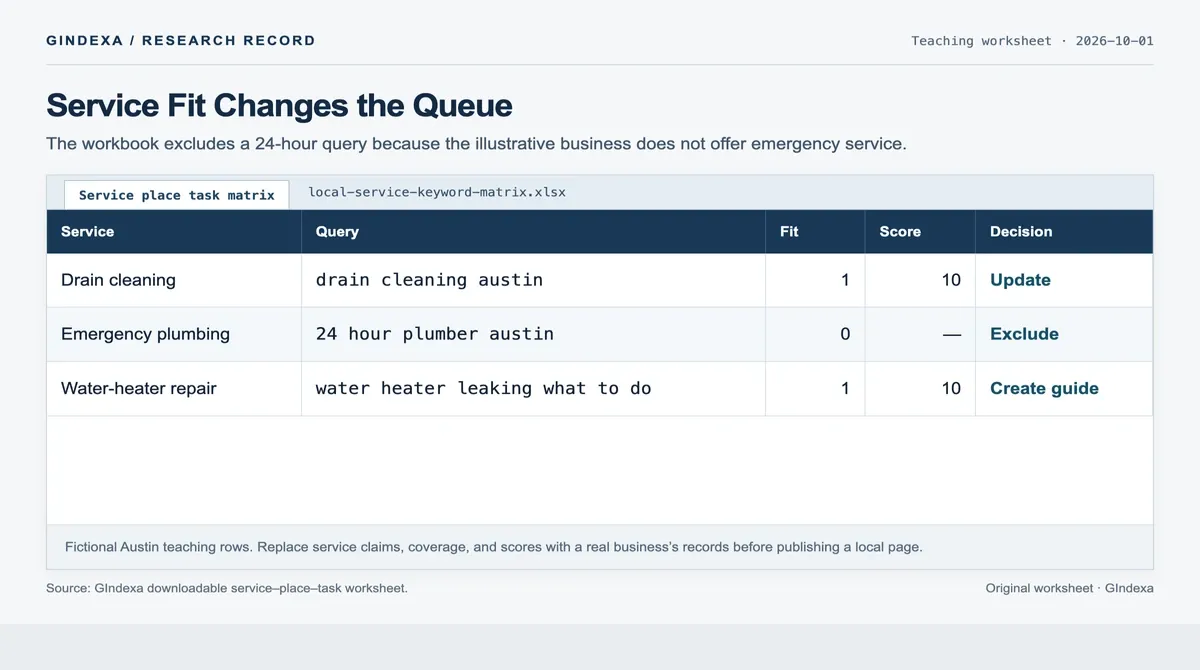
Source: GIndexa’s downloadable service–place–task worksheet. The Austin business and its scores are fictional teaching inputs, not client results.
In the October 2026 US keyword export used to plan this cluster, local seo keyword research is estimated at 1,900 monthly searches with difficulty 36. That estimate applies to this article’s topic, not to any plumbing query in the example. It does not support creating city pages or predict local traffic.
Start with service pages that fill documented gaps. Add a problem guide when it serves a different task, then link the pages in context. For broader seed collection, use the website keyword discovery workflow. Once the pages have enough data, review Search Console by query and landing page; track calls or bookings separately from search clicks.
Turn Local SEO Keyword Research Into a Page Map
Before publishing, replace the worksheet’s Austin teaching inputs with the business’s verified services and coverage, then repeat the result checks from within that area. After launch, use query-by-page data alongside tagged calls or bookings to decide which URLs to update, combine, or expand. The public examples show page purpose; they do not establish rankings or outcomes.
Frequently Asked Questions About Service-Area Pages
What if Actual Coverage Crosses Several Metro Areas?
Map staffed bases, crews, travel time, hours, and job types by metro before changing pages or profiles. One base with one team does not justify a Business Profile for every metro. Google generally expects one service-area profile and says the boundary should usually fall within about two hours’ driving time, with exceptions. Separate staffed locations may have separate profiles. Keep one service page when the offer is the same; add a metro page when dispatch limits or documented work make its answer materially different.
How Can a Home-Based Business Reach Nearby Towns Without a Public Storefront?
When customers do not visit the home address, hide it in Business Profile and enter the actual service areas. Add a visible coverage section to the relevant service page with towns served, scheduling limits, and an address-check or booking step. Check nearby-town searches from a device in that area. A town page still needs the evidence described above; an invented office address or repeated “near me” title cannot replace proximity or a useful answer.
What if a Town Is Listed as Served but Generates No Visible Town Queries?
First confirm that the business accepts jobs there. Then check the service page’s indexing, internal links, and visible coverage. In Search Console, filter queries containing the town name and inspect their landing pages. An empty filtered table does not prove that nobody searched from the town: Search Console has no city-level searcher location dimension and can omit queries. Check live results from a device there and, if available, review Business Profile interactions separately. A town page should answer a local need, not force a query row.
What if Two Staffed Branches Serve Some of the Same Towns?
Before creating profiles, document each branch’s address eligibility, staff, hours, phone routing, and dispatch area. Google’s business representation rules permit profiles for genuinely separate staffed locations; overlapping service areas do not create extra locations. Give each eligible branch page its operational details and contact path. Keep one shared service page when the work is identical, and route bookings to the branch that can fulfill them.
What if the Service Page Ranks Organically but the Business Is Absent From the Local Pack?
Check the two surfaces separately. Confirm that the page is indexed and answers the service query, then review Business Profile eligibility, primary category, services, hours, verification, and whether the search location falls within the true service area. Google’s local ranking explanation names relevance, distance, and prominence. A title change cannot repair a profile or distance problem by itself. Record the query, device, location, and date before comparing a pack result with an organic URL.
What if the Service-Area Map, ZIP List, and areaServed Markup Disagree?
Use the dispatch team’s current acceptance rules as the source of truth. Test boundary addresses and exceptions, then align the visible service-page list, optional map, Business Profile areas, and structured data. Remove postal codes where only some addresses are serviceable, or explain the limit beside them. Revalidate the JSON-LD after editing. A successful validation does not show that Google will display the business in a town, and a map graphic alone should not be the only way customers can check coverage.
What Evidence Would Show That a Separate Town Page Helped?
Before launch, record the intended town-query group, owner URL, dispatch capacity, and parent page baseline. After indexing, compare settled query-by-page impressions and clicks for both URLs across equal periods. Check whether the new page attracted relevant queries or shifted exposure from the parent. Tag calls and bookings by landing page, then confirm the business accepted the jobs. If possible, compare the result with a similar service area that did not change. A few impressions or a movement in average position cannot establish incremental leads.