
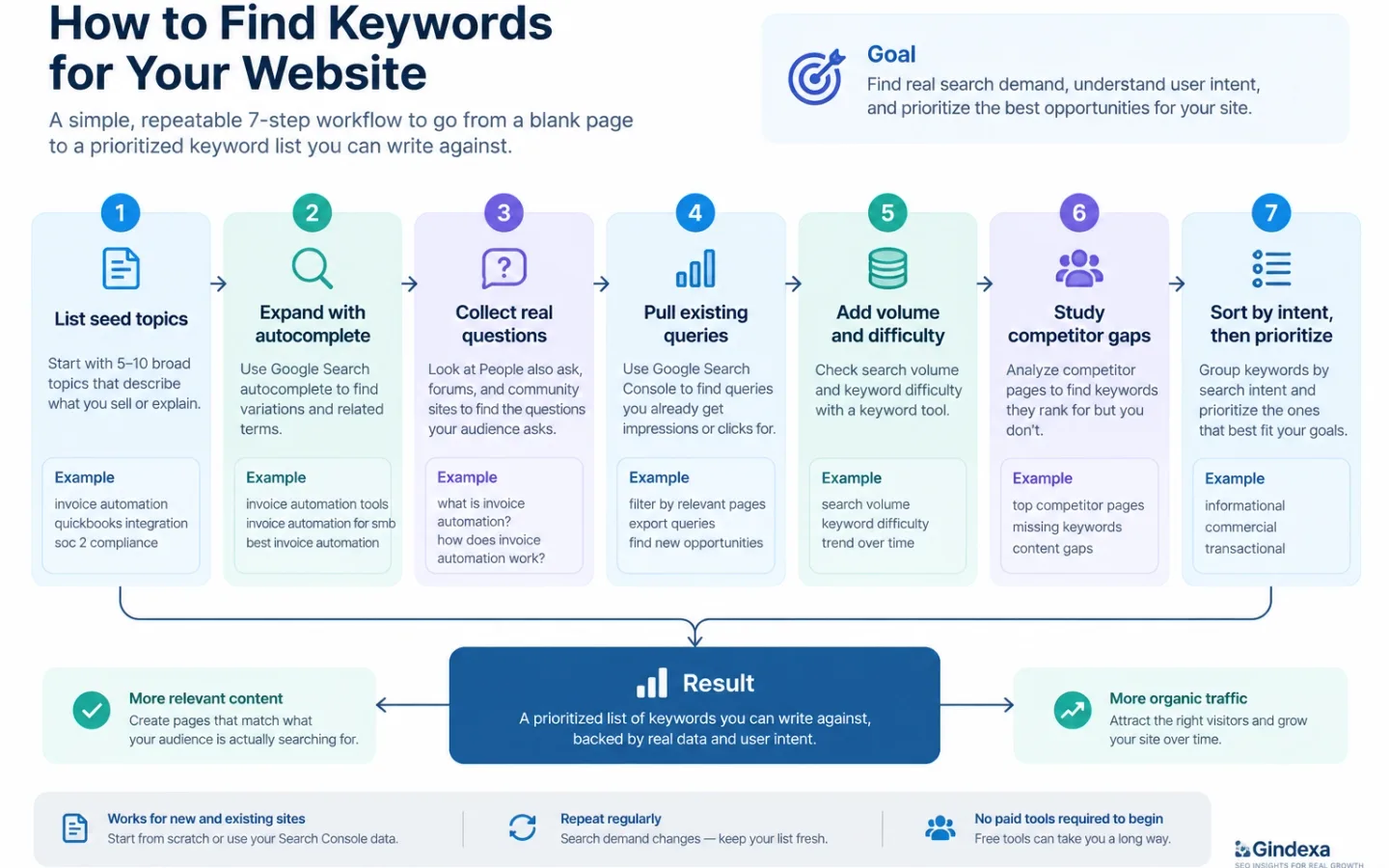
If you want to know how to search for keywords for your website, the process is simpler than most guides make it sound. You start with a handful of topics your business covers, expand them with free tools that show what people actually type, then sort the results by intent and difficulty. Seven steps take you from a blank page to a prioritized list you can write against. None of them require a paid tool to begin. This workflow works for a brand-new site with no data and for an established one sitting on years of Search Console history.
We run this exact process in the GIndexa Lab. On a recent run for an AI workspace and tools client, we screened a collected US keyword universe down to 87 qualified non-brand terms at a difficulty of 30 or lower, and cut 199 that failed on difficulty, brand, demand, or intent. The filters, the Search Console recipes, and the scoring formula below are the ones we used on that run. Every number credited to it is a Semrush US estimate pulled on September 8, 2026.
Why Keyword Research Is Worth Your Time
Keyword research matters because it replaces guessing with evidence. Instead of writing what you assume people want, you write for the phrases they already search. That single shift decides whether a page finds an audience or sits unread. It also protects your effort, since a page aimed at a term with no demand cannot earn traffic no matter how good the writing is.
That is why keyword research is important even when it feels like a detour. An hour of it can save weeks spent drafting pages nobody searches for.
Demand also keeps moving. Google has said for years that 15 percent of daily searches are brand new, so no list stays complete for long. That makes keyword discovery a habit rather than a one-time task, and the workflow below is built to repeat.
The whole process fits in seven steps.
| Step | What you do | Main tool |
|---|---|---|
| 1 | List seed topics | Your own knowledge |
| 2 | Expand with autocomplete | Google Search |
| 3 | Collect real questions | People also ask, forums |
| 4 | Pull existing queries | Search Console |
| 5 | Add volume and difficulty | A keyword tool |
| 6 | Study competitor gaps | Competitor pages |
| 7 | Sort by intent, then prioritize | A spreadsheet |
Step 1: Start With Seed Topics Your Business Covers
Seeds are the broad topics that describe what you sell or explain. Write down five to ten in plain words, pulled from customer emails, sales calls, and your own product labels rather than guesswork. These are the doorways you expand in later steps, and the starting vocabulary shifts with your business model.
| Business type | Seed angle | Example seeds |
|---|---|---|
| B2B SaaS | Jobs to be done plus integrations | invoice automation, quickbooks integration, soc 2 compliance software |
| Ecommerce | Categories, attributes, and use cases | merino wool socks, gifts for runners, waterproof hiking boots |
| Local service | Service plus city plus “near me” | emergency plumber austin, gutter cleaning near me |
| Publisher or blog | Questions and comparisons | how to compost indoors, gas vs induction cooktop |
Step 2: Expand Seeds With Google Autocomplete and Related Searches
Type each seed into Google and read the suggestions. Those predictions reflect real searches, since Google’s autocomplete predictions come from common queries people enter. Add a question word or a letter to branch the list, then mine the “related searches” block at the bottom of the page. This stage costs nothing, and Google Trends is how to find trending keywords before they peak.
Advanced: Reverse-Engineer a Competitor’s Long-Tail Subfolders
A rival’s content subfolder is a ready-made map of long-tail demand. In a keyword tool, pull a competitor’s top pages and filter to one subdirectory, such as /blog/ or /guides/, to see the exact long-tail phrases that folder ranks for. The operator site:competitor.com/blog/ does a rough version for free. Read the folder as a cluster, since the URL slugs reveal the subtopics a competitor already validated, and the terms where their page sits on page two are the ones a sharper article can take.
Step 3: Mine Questions From People Also Ask and Forums
Questions convert well and often trigger AI answers, so they deserve their own pass. Search a seed term and open the “people also ask” box, then note the questions that match your topic. Each expansion reveals more, so a single seed can surface a dozen real questions in minutes.
Go where your audience already talks. Reddit threads, niche forums, and question sites show the exact wording people use and the problems behind it. A phrase like “why is my sourdough gummy” is an article title and a clear signal of intent at the same time. Communities matter for keyword research for content marketing, because they map the questions a buyer asks on the way to a decision.
A few search operators pull these questions faster than scrolling ever will. Drop your own topic into the patterns below and read the results as raw phrasing, not as pages to copy.
| Goal | Operator to try in Google | What it surfaces |
|---|---|---|
| Community pain points | site:reddit.com/r/seo "how do i" |
real questions in one subreddit |
| Q&A phrasing | site:quora.com [your topic] |
questions with natural follow-ups |
| Forum problems | [your topic] forum "problem" OR "issue" |
complaint-shaped long-tail terms |
| Comparisons | [your topic] "vs" OR "alternative" |
commercial comparison queries |
| Competitor questions | intitle:"how to" [your topic] |
question pages already ranking |
Step 4: Pull Real Queries From Search Console
If your site has any history, Search Console is the most honest source you have. Its performance report lists the real queries that already show your pages, along with clicks, impressions, and average position. Sort by impressions with low clicks, and you find terms you rank for but do not serve well yet.
Those near-misses beat most new ideas. A page ranking on page two for a phrase you never targeted tells you demand exists and Google already sees you as relevant. Build a dedicated page or strengthen the existing one, and that near-miss turns into traffic. A new site skips this step for now and returns once data arrives.
To find the fastest wins, isolate striking-distance queries, the ones ranking just below the top of page one. Export the report to a sheet, then apply three filters together so only the reachable terms remain.
| Filter | Value to use | Why it works |
|---|---|---|
| Average position | Between 8 and 20 | One improvement can reach page one |
| Impressions | Above 500 | Demand is already proven |
| Click-through rate | Below 2 percent | Ranking is capping the clicks |
The query box also accepts custom regex, which is the quickest way to pull a shape of demand without exporting. Use ^(how|what|why|when|where|who|which|is|can|does|do)\b to isolate question queries, or \b(vs|versus|or|alternative)\b to surface the comparison terms worth a dedicated page.
Advanced: Pull Every Query With the Search Console API
The Performance report caps the table at 1,000 rows, which hides most of the long tail. The Search Console API returns far more, paging through up to 25,000 rows per request and up to 50,000 rows a day for each search type, and a bulk export to BigQuery removes the cap entirely. Batch-extract every query, then filter and dedupe in a sheet. The hundreds of terms the interface never shows are where most striking-distance wins sit.
Step 5: Add Volume and Difficulty With a Keyword Tool
Now bring in numbers. A keyword tool shows search volume, keyword difficulty, and phrases your seeds miss. Free options like Google Keyword Planner give ranges, while paid tools like Semrush or Ahrefs give sharper estimates and competitor data. Most keyword research best practices assume this step, because a tool catches demand you cannot see by hand.
Read the numbers with judgment. High volume with high difficulty is a poor first target for a young site, while a quieter phrase with clear intent often returns more, sooner. Treat volume as a guide, not a verdict, since many valuable terms report low or zero volume simply because they are new or very specific.
Set the tool’s filters before you read a single row, or the export will bury you. For a young site, a workable screen keeps difficulty low and phrasing specific, then strips out the brand terms that only add noise.
| Filter | Young-site setting | Reason |
|---|---|---|
| Keyword difficulty | Under 30 | Winnable without heavy authority |
| Volume | Above 100 | Enough demand to be worth a page |
| Phrase specificity | Try 3+ words as a discovery filter, then check intent | Word count alone does not establish demand or difficulty |
| Intent | Informational first | Matches early-stage content |
| Exclude terms | Your brand and competitor names | Removes navigational noise |
Turn on the questions view as well, since a query-shaped phrase usually maps straight to a heading. Raise the difficulty ceiling only after your site has earned a few rankings and can compete for harder terms.
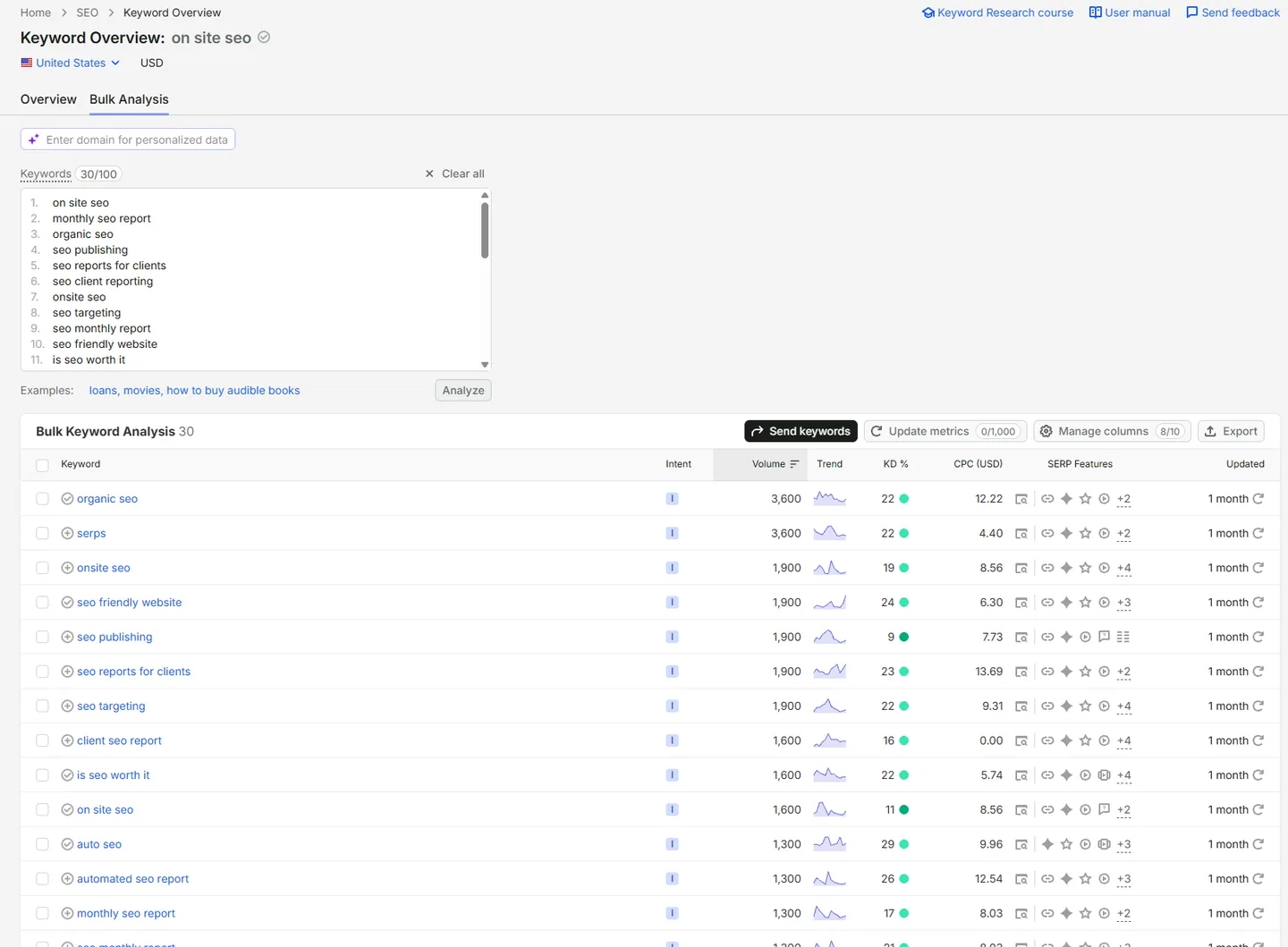
How Far Apart the Tools Are on the Same Keywords
Those numbers need a second look before you trust them. We ran one seed set through two tools on the same day, in the same US market. The table below pairs identical keywords, with the Semrush estimate beside the Google Keyword Planner reading.
| Keyword | Semrush volume | Semrush KD | Keyword Planner volume | Planner difficulty |
|---|---|---|---|---|
| organic seo | 3,600 | 22 | 100 to 1K | Not provided |
| onsite seo | 1,900 | 19 | 100 to 1K | Not provided |
| seo publishing | 1,900 | 9 | 100 to 1K | Not provided |
| seo friendly website | 1,900 | 24 | 100 to 1K | Not provided |
| seo reports for clients | 1,900 | 23 | 100 to 1K | Not provided |
| seo targeting | 1,900 | 22 | 100 to 1K | Not provided |
| on site seo | 1,600 | 11 | 100 to 1K | Not provided |
| is seo worth it | 1,600 | 22 | 100 to 1K | Not provided |
| automated seo report | 1,300 | 26 | 100 to 1K | Not provided |
| monthly seo report | 1,300 | 17 | 100 to 1K | Not provided |
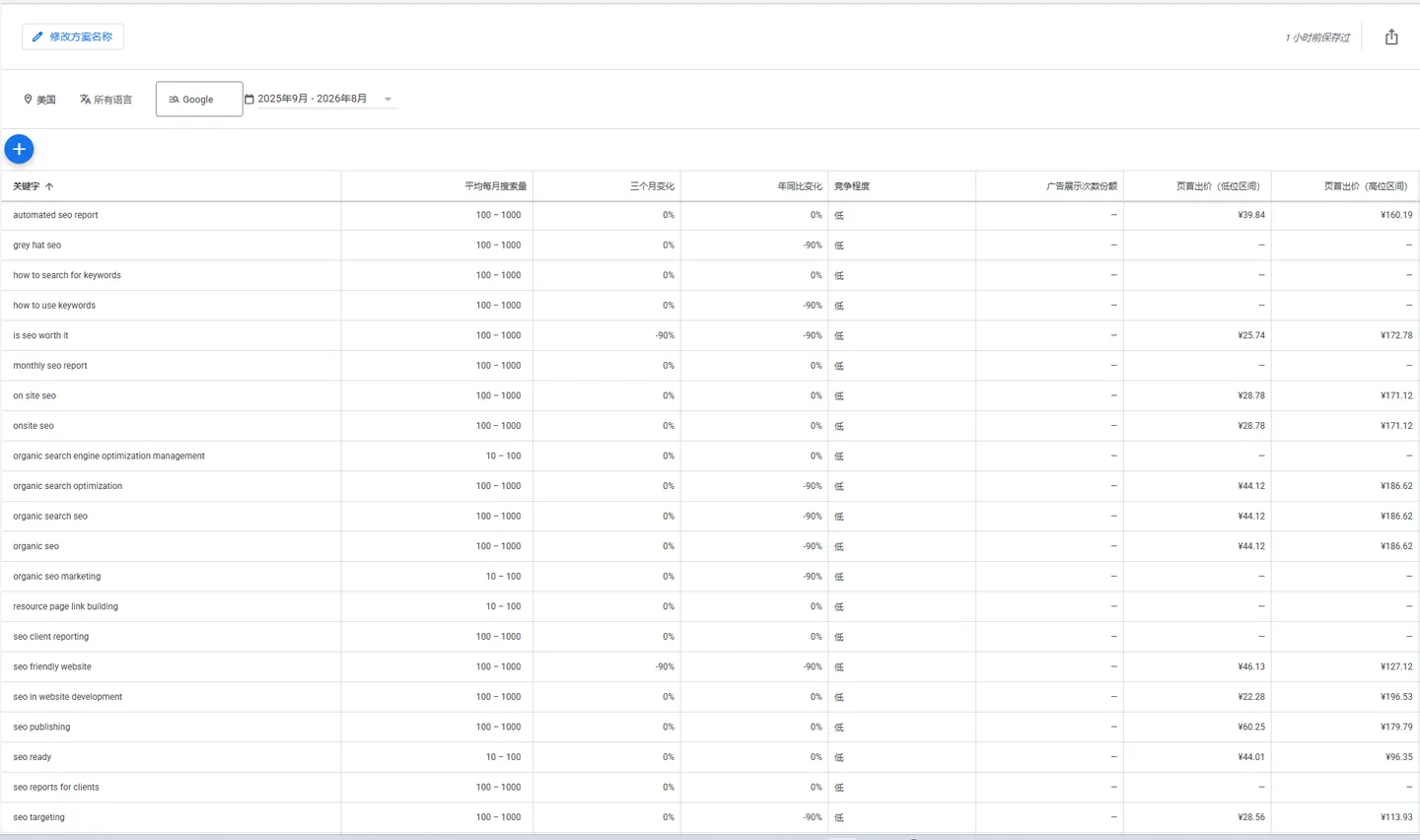
Take “organic seo”. Semrush estimates about 3,600 searches a month, while the Planner files the same term under a wide “100 to 1K” band that does not even reach the Semrush figure. You cannot plug both numbers into one formula. The Planner also gives no organic difficulty at all, only an ad-competition label, so its data cannot fill the SEO Opportunity dimension on its own. Add a third tool such as Ahrefs and you get a third difficulty scale, since Ahrefs KD, Semrush KD, and Moz DA are separate models that do not convert into one another.
A single tool shows the same problem. Semrush difficulty on these similar-volume terms swings from 9 for “seo publishing” to 26 for “automated seo report”, so volume and difficulty do not move together. That is why we convert every metric to a relative 0 to 5 band within one database before scoring. Normalizing stops a single tool’s scale, or one loud number, from deciding the plan, and it lets Demand and SEO Opportunity combine cleanly in the formula below.
Sources: Semrush US database and Google Keyword Planner, pulled September 2026 for the same seed set. Semrush figures are estimates, and Planner figures are broad ranges rather than exact counts.
Step 6: Study Competitor Keywords and Gaps
Your competitors have already done research you can read. Enter a rival domain into a keyword tool and export the terms they rank for, then look for phrases they cover and you do not. That gap is your shortlist. Focus on terms where their page is weak, because those are the ones you can realistically beat.
A keyword gap tool makes this repeatable, but only if you filter it correctly. The rule we apply in the GIndexa Lab keeps a gap only when a competitor ranks in the top ten, your own site does not rank or sits past position twenty, and the term still clears the business-fit and non-brand checks. Anything else is either a term you already hold or a distraction.
| Gap filter | Setting | Why it matters |
|---|---|---|
| Competitor position | 1 to 10 | Proven, winnable demand |
| Your position | Missing or past 20 | A real gap, not a minor tweak |
| Branded terms | Excluded | Their brand is not your opportunity |
| Volume and difficulty | Volume above a floor, difficulty within reach | Keeps the shortlist realistic |
Read their top pages by hand too. Note the format that ranks, the questions they answer, and the depth they reach. The goal is to answer proven demand better than they did, not to rebuild their page. Our note on how to build a keyword demand map shows how to turn these gaps into clusters your site can own.
Step 7: Sort by Intent and Difficulty, Then Prioritize
A raw list is not a plan. Sort every phrase by search intent first, because intent decides the page format that can win. The matrix below maps each intent to the page type that tends to rank for it, so a term lands on the right template from the start.
| Intent | What the searcher wants | Page format that wins |
|---|---|---|
| Informational | To learn or solve a problem | Guide, tutorial, or FAQ |
| Commercial investigation | To compare before buying | Comparison, review, or listicle |
| Transactional | To act or buy now | Product, pricing, or signup page |
| Navigational | A specific brand or page | Homepage or brand page |
| Local | A nearby option | Location or service-area page |
Our guide to keyword examples by intent and page type shows what that sorting looks like across a full list.
With intent set, score each keyword or cluster so the writing order is not a guess. We use the same five-dimension model that drives the GIndexa keyword screen. Rate each dimension from 0 to 5, then weight it by how much it moves a real decision.
| Dimension | What it measures | Weight |
|---|---|---|
| Business Fit | Match to what you sell or explain | 30% |
| Intent Fit | Query intent against the page’s job | 20% |
| Demand | Relative volume and trend in one database | 20% |
| SEO Opportunity | Rankability from difficulty, SERP, and competitor coverage | 20% |
| Commercial Value | Purchase intent and CPC evidence | 10% |
The weights fold into one formula that returns a 0 to 100 score.
Priority Score = Business Fit × 6 + Intent Fit × 4 + Demand × 4 + SEO Opportunity × 4 + Commercial Value × 2Read the score as a queue. From 80 to 100 a term is P1 and leads the schedule. From 60 to 79 it is P2 for the near term, 40 to 59 is P3 supporting work, and anything under 40 waits unless you have a clear reason to override it. Score a keyword below and the band updates as you move each slider.
Rate each dimension from 0 to 5. The score updates live using the same weighting as the GIndexa keyword screen, then lands the keyword in a band from P1 down to Monitor.
Priority Score = Business Fit x 6 + Intent Fit x 4 + Demand x 4 + SEO Opportunity x 4 + Commercial Value x 2
Search Console striking-distance filter
Export the performance report to a sheet, then keep only rows with average position between 8 and 20, impressions above 500, and a click-through rate below 2 percent. Paste either pattern into the query box as a custom regex.
^(how|what|why|when|where|who|which|is|can|does|do)\b\b(vs|versus|or|alternative)\bThe calculator uses the formula above, so you can rebuild it in a spreadsheet when you want a copy to share with your team. The same model, applied to three example terms:
| Keyword | Business Fit | Intent Fit | Demand | SEO Opportunity | Commercial Value | Score | Level |
|---|---|---|---|---|---|---|---|
| how to do keyword research for a new blog | 5 | 5 | 3 | 4 | 1 | 80 | P1 |
| best keyword research tool | 3 | 4 | 4 | 1 | 5 | 64 | P2 |
| keyword | 2 | 2 | 5 | 1 | 2 | 48 | P3 |
Two habits keep the scores honest. Compare demand only within the same country and database, because the same volume means different things across markets. And when a piece of data is missing, such as an absent difficulty score, reweight the dimensions you do have rather than scoring a zero, then lower your confidence instead of the priority. This final sort turns raw keyword discovery into a publishing order your team can act on.
A Worked Example: From One Seed to a Priority Score
This thread comes from the client run described earlier. Every figure is a Semrush US estimate from September 8, 2026.
Start with the seed “youtube transcript”, one of the client’s tool areas. Expansion surfaces “youtube transcript search”, “youtube transcript download”, and “search youtube transcripts”, plus a set of how-to questions like “how to view transcript on youtube” and “how to copy youtube transcript”. One seed becomes a full cluster in minutes.
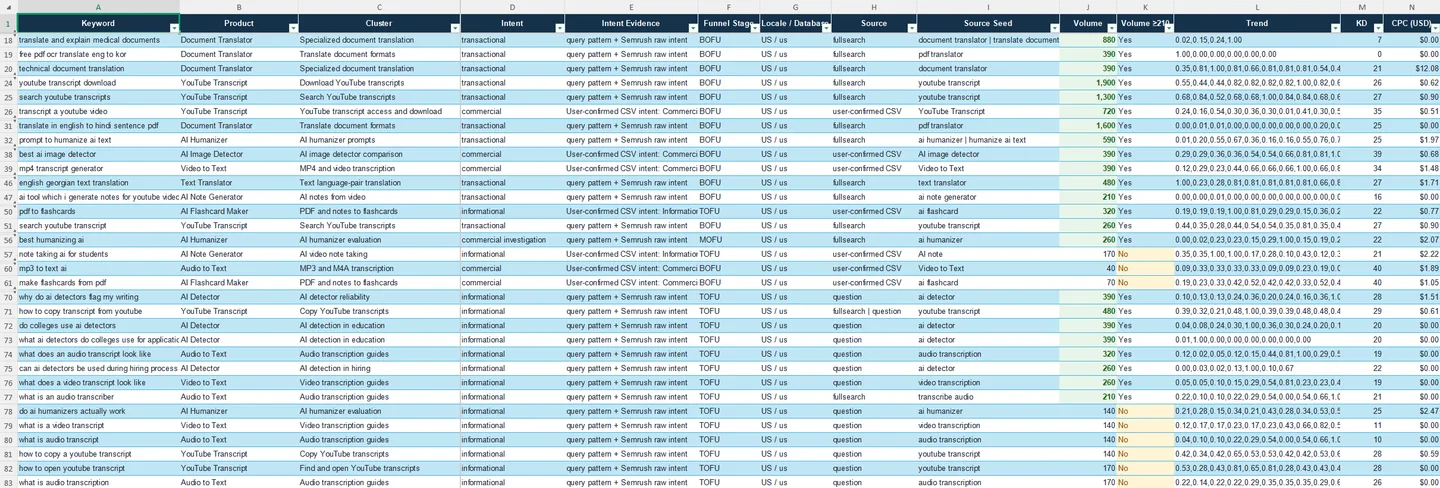
The numbers then force a choice that raw volume would get wrong. “youtube transcript download” carries the higher demand at 1,900 searches, but its difficulty is 26. “youtube transcript search” has less volume at 1,600, yet a difficulty of only 7. Score both on the five dimensions and the quieter term wins.
| Keyword | Volume | KD | Business Fit | Intent Fit | Demand | SEO Opportunity | Commercial Value | Score | Level |
|---|---|---|---|---|---|---|---|---|---|
| youtube transcript search | 1,600 | 7 | 5 | 5 | 5 | 4 | 2 | 90 | P1 |
| youtube transcript download | 1,900 | 26 | 5 | 5 | 5 | 2 | 2 | 82 | P1 |
The higher-volume term scores lower, because its difficulty pulls SEO Opportunity from 4 down to 2. Both map to the client’s existing YouTube transcript tool page, so the plan strengthens one page for the strongest term rather than splitting effort across near-duplicates. The how-to questions, lower in demand and easily closed by a summary, became supporting FAQ entries rather than standalone pages. Repeat that scoring across the seed set and a collected universe collapses into 87 qualified terms and a defensible publishing order.
How to Filter Out Keywords AI Overviews Will Eat
Search results now answer many questions before a reader ever clicks. A 2025 Pew Research Center study found that when an AI summary appeared, users clicked a regular search link on about 8 percent of visits, against 15 percent when no summary showed, and only 1 percent clicked a source inside the summary. So a keyword can carry real volume and still send almost no traffic, because Google answers it in place.
The terms most exposed are simple, self-contained facts that a two-line summary can close. Definitions, dates, unit conversions, and single-answer questions all fit that shape. High volume on those terms overstates what you can actually win, since few readers click once the summary answers them. The terms that survive are the ones a summary cannot finish: comparisons that need a verdict, step-by-step tasks a reader wants to follow along, product and price decisions, local searches, and anything that rewards first-hand testing or opinion.
Screen for this while you sort. When a term is a pure definition with a likely AI answer on top, treat its raw volume with suspicion and lower its Demand score, or route it into a cluster hub rather than a standalone page. Favor formats an AI Overview cannot replace, where original data and real tests still give an independent site an advantage.
| Keyword shape | AI Overview risk | What to do |
|---|---|---|
| “what is [term]” definition | High, answered inline | Skip, or fold into a cluster hub |
| “how many”, date, or conversion | High | Skip unless it feeds a bigger page |
| “how to [task]” step-by-step | Medium, readers still follow along | Keep, add steps, images, and specifics |
| “[X] vs [Y]” comparison | Low, needs a clear verdict | Keep, and state a recommendation |
| Transactional, local, or tool query | Low, a summary cannot transact | Keep, these still earn clicks |
Common Mistakes When You Find Keywords
Most failed keyword research repeats the same handful of mistakes. The first is chasing volume alone, which buries the specific terms that convert under loud ones that rarely do. The second is ignoring intent, so a buying query lands on a definition page and never ranks. The third is aiming several pages at the same phrase, which splits your signals and causes cannibalization.
The fourth is treating the list as finished, when demand and phrasing drift enough that a static list ages within months. The fifth is skipping the free steps and jumping straight to a tool, which hands you volume figures with no sense of the questions behind them. Running the full workflow in order avoids most of this.
How to Keep Finding Keywords for Your Website
Knowing how to search for keywords matters less than repeating the process. Run the seven steps, publish against the priorities, then come back each quarter as demand shifts and new questions appear. Nobody invents keywords for your website. You find the ones people already type and match them to pages that answer well. Keep the process live with our keyword research skills, and a blank page becomes a working list of terms your site can win.
Frequently Asked Questions About Finding Keywords for Your Website
How Do I Find Keywords for a Brand-New Site With No Traffic?
Lean on the free steps. Start from customer questions and seed topics, expand them with autocomplete and related searches, and mine “people also ask” for real phrasing. A keyword tool then adds volume so you can pick low-difficulty terms first. You skip Search Console until your pages collect enough impressions to report data.
How Many Keywords Do I Actually Need?
Fewer than you think. Aim for one primary term per page and a small cluster of related phrases around it, rather than a giant list. A focused site of thirty strong pages beats a scattered one of three hundred thin ones. Quality of match matters far more than the size of the spreadsheet.
Can I Just Use AI to Generate My Keywords?
AI helps you brainstorm seeds and cluster phrases quickly, but it guesses at demand without real data. Pair it with a tool that shows actual search volume and with Search Console for live queries. Use AI to organize and speed up the work, not to replace the evidence that a term has searchers behind it.
How Often Should I Redo Keyword Research?
Review core topics each quarter and watch rankings monthly. Demand shifts, competitors publish, and fresh questions appear, so a once-a-year audit falls behind. A light quarterly pass keeps your map current without turning research into a full-time job, and it catches rising terms while they are still easy to win.
Do Keyword Tools Give the Same Numbers?
No, and that is normal. Each tool models volume and difficulty differently, so figures vary between them. Use one tool consistently to compare terms against each other, and treat the exact number as a rough guide rather than a fact. The relative order between keywords matters more than any single value.
Which Free Tools Are Enough to Start?
Plenty. Google Search itself gives you autocomplete, related searches, and the people also ask box. Google Trends shows direction, Google Keyword Planner gives volume ranges, and Search Console reports your live queries. Together they cover the first six steps at no cost. Reach for a paid tool once you want competitor data and sharper difficulty scores.
What Is a Striking-Distance Keyword?
It is a term your site already ranks for just below the top of page one, usually between positions 8 and 20. These are the fastest wins in keyword research, because Google already sees your page as relevant and one round of improvement can push it onto page one. Find them in Search Console by filtering for that position band alongside high impressions and a low click-through rate.