
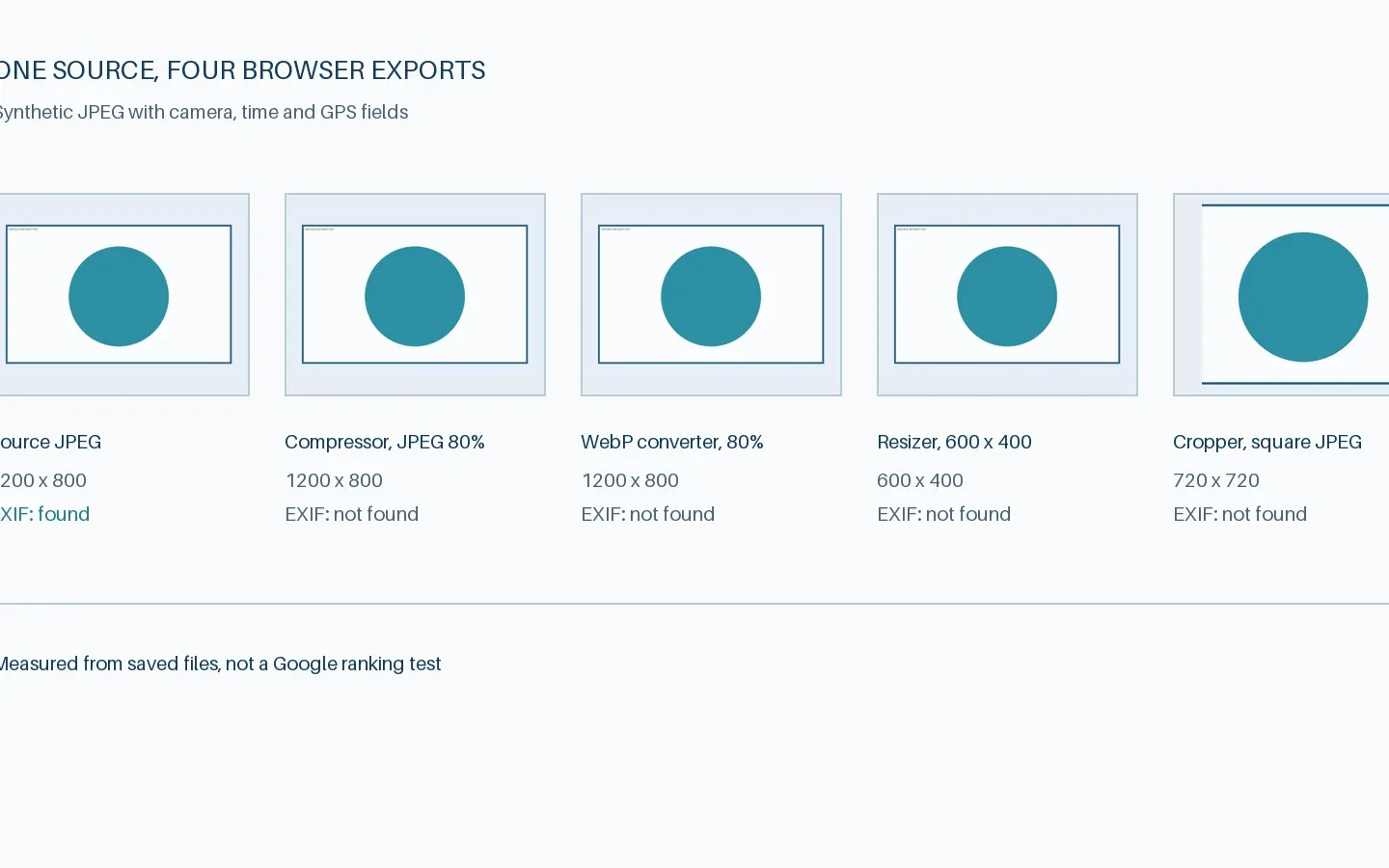
Current finding: In this one-file run, the four saved exports had none of the five tested EXIF field groups. The viewer displayed source camera, time, and GPS data without creating an export.
If you compress or crop a photo in the browser, does the saved copy still contain its GPS coordinates? The answer depends on the tool and the file. We tested the current GIndexa image tools with one synthetic JPEG whose EXIF fields we knew in advance. The result is a narrow observation about those exports, not a privacy guarantee for every photo or a claim about Google rankings.
The full evidence bundle contains the source JPEG, all four downloaded outputs, the field report, SHA-256 hashes, and the sample and inspection scripts. All location and camera values are fictional.
Methodology
We generated a 1200 by 800 JPEG with a blue shape and visible “synthetic metadata test” label. A Python script embedded five field groups: camera make, camera model, capture time, GPS, and image description. The GPS coordinates were the fictional test value 0,0. We checked the source with piexif, then loaded the same file in GIndexa’s EXIF Viewer on the local site. The viewer displayed the synthetic camera, date, and GPS values. It is an inspection tool and did not create a new file.
In the Codex in-app browser on Windows, we uploaded that source through each tool’s visible upload control. We used the default 80% quality and JPEG output in the compressor. The WebP converter used its default WebP output and 80% quality. The resizer used a 600-pixel width with aspect ratio locked, which produced 600 by 400. The cropper used its default square crop and JPEG download, which produced 720 by 720. We saved the files from the browser without further edits.
We then read each saved file independently with Pillow for format and dimensions and piexif for the five selected EXIF field groups. The CSV report inside the evidence bundle records exact bytes and SHA-256 hashes so a reader can verify that the files in the bundle match the report. This was one run per operation on one source file. We did not test all browsers, source formats, or tool options.
Variables
The controlled input was the same synthetic JPEG for every operation. The changed variable was the operation and its output setting. We tracked file format, pixel dimensions, bytes, camera make, camera model, capture time, GPS, and image description. The viewer was checked separately because reading a file does not make an output file.
| Operation | Output setting | Saved format | Dimensions |
|---|---|---|---|
| Source | Synthetic test file | JPEG | 1200 × 800 |
| Compressor | Keep JPEG, 80% quality | JPEG | 1200 × 800 |
| WebP converter | WebP, 80% quality | WebP | 1200 × 800 |
| Resizer | Width 600, aspect ratio locked | JPEG | 600 × 400 |
| Cropper | Default square crop | JPEG | 720 × 720 |
The source was deliberately simple, so its byte changes should not be used as typical compression benchmarks. A photograph with detailed texture, a screenshot, and a transparent graphic will encode differently. The test isolates metadata presence, not visual quality or search performance.
Results
The original file contained all five tracked EXIF field groups. None was found in any of the four saved exports by the independent inspection. The EXIF Viewer displayed the source’s camera, capture time, and GPS data, but it did not change the source file. The source and each export have distinct SHA-256 hashes in the downloadable report.
| Saved file | Bytes | Camera make and model | Capture time | GPS | Image description |
|---|---|---|---|---|---|
| Synthetic source JPEG | 40,861 | Present | Present | Present | Present |
| Compressor JPEG | 22,154 | Absent | Absent | Absent | Absent |
| WebP converter output | 7,846 | Absent | Absent | Absent | Absent |
| Resizer JPEG | 12,927 | Absent | Absent | Absent | Absent |
| Cropper JPEG | 18,984 | Absent | Absent | Absent | Absent |
“Absent” means the named EXIF field was not found in that saved file by our inspector. It does not mean that the file contains no metadata of any kind. It also does not mean a photo becomes anonymous. The visible scene can disclose a location even without GPS. The EXIF explainer separates this privacy check from credit and licensing decisions.
The converter’s output was the smallest in this test because a simple synthetic shape compresses well as WebP. That result must not be generalized to all photos or formats. File weight was recorded to identify the actual exports and to make the test reproducible, not to claim a performance or ranking improvement.
Limitations
The sample had EXIF fields but no IPTC rights record, XMP packet, embedded ICC color profile, or maker notes. We cannot say whether these tools retain or remove those fields from other files. The viewer displayed a subset of the source’s EXIF values. A viewer that does not show a field is not proof that the field is absent.
We tested one JPEG in one in-app browser session on Windows. The browser version was not available through the test interface. Browser encoders and tool code can change, and another source format may follow a different path. We did not test HEIC, RAW, animated files, bulk folders, every crop ratio, or WebP-to-JPEG conversion. The result also does not test uploads through a CMS or CDN, where another processing step may change the delivered file.
The tool pages we tested run locally in the browser and export through Canvas-based paths. That implementation explains why a fresh encoded file might lack source metadata, but the finding above comes from inspecting the actual downloaded files. A future code change could alter retention. For a sensitive image, inspect the exact output you plan to share instead of relying on this report.
This experiment says nothing about whether EXIF affects Google Images rankings. Google’s image SEO documentation addresses image discovery and page context. Its image metadata documentation covers supported credit and licensing fields. Our test did not measure either Search surface.
Conclusion
In this one-file run, GIndexa’s compressor, WebP converter, resizer, and cropper produced saved files without the five tracked EXIF field groups. The EXIF Viewer read the source’s camera, time, and GPS data without exporting a new file. That is enough to guide a next check, but not enough to promise full metadata removal for every image.
Keep an untouched original, inspect it, export a copy with the setting you intend to use, and inspect the downloaded copy. If privacy or attribution is important, also check IPTC, XMP, color, and visible clues with tools suited to those fields. Compare the final public file if a publishing system processes the image again.